

Countdown - Event & Widget
Ajaysinh Jadeja · Utilities
Independent analytics for this App Store listing. AppTracker is not affiliated with Ajaysinh Jadeja.
Chart standing · US
What changed · US
Listing changes AppTracker has observed for this app in this storefront — new versions, price moves, rating shifts, and store copy.
• Template dates: Christmas, New Year, and Diwali templates now pre-fill the correct upcoming holiday date. • Configurable Widgets: Long-press your Home or Lock Screen widget to choose a specific countdown or show the next upcoming event. • Calendar Import: Import trips, holidays, and dates from Calendar with choose-first selection and quota protection. • Event Photos: Add personal photos to your countdown cards and widgets with circular avatars and smart emoji fallback. • Performance & Stability: Enhanced offline resilience, improved deletion handling, and repeat boundary accuracy.
Screenshots




About
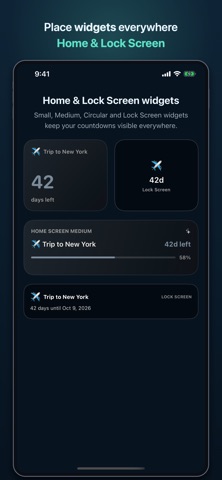
Countdown - Event & Widget is the simplest way to see how long is left until the moments that matter. Add a trip, wedding, exam, payday, deadline, or holiday — and watch it tick down on a beautiful story card with a live progress ring. Put your next event on your Home Screen or Lock Screen, get reminders before it arrives, and share a themed countdown card with anyone. FEATURES • Live countdown cards with progress ring and percent-elapsed readout • Configurable Home & Lock Screen widgets — pick an active countdown or show next upcoming • Milestones along the journey — 100 days to go, halfway there, one week to go • Four theme kits: Minimal, Paper, Neon, and Aurora • 16 templates for vacations, weddings, exams, paydays, holidays, and more • Custom photos on each event — shown on your cards and widgets with emoji fallback • Import dates from Calendar — choose-first selection with quota protection • Repeating events — daily, weekly, monthly, or yearly • Count up from a past date for anniversaries and milestones • Reminders on the day, one day before, one week before, plus custom timing • Share a themed countdown image to Messages or social apps • Notes, tags, and search for long lists • Pin important events; archive others without deleting HOW TO USE 1. Tap + or pick a template with smart defaults. 2. Set the date, icon, theme, and reminders. 3. Add the widget — your next event stays visible on Home or Lock Screen. 4. Open any event for milestones, details, and share. 5. Swipe to pin, archive, or delete. PREMIUM (ONE-TIME PURCHASE) Premium is a single one-time purchase — no subscription, no renewals, unlocked forever on your Apple ID. • Unlimited events (free: 5 active) • All four theme kits (free: Minimal & Paper) • Medium and Lock Screen widgets — circular, rectangular, and inline • Custom formats: weeks + days and working days • Unlimited custom reminders per event The free version is fully usable: five events, two theme kits, live and days-only countdowns, the small widget, and core reminders. Questions or support: iyogeetech@gmail.com Privacy policy: https://iyogeetech.com/privacypolicy/privacy.html
What's new · 1.2.1
• Template dates: Christmas, New Year, and Diwali templates now pre-fill the correct upcoming holiday date. • Configurable Widgets: Long-press your Home or Lock Screen widget to choose a specific countdown or show the next upcoming event. • Calendar Import: Import trips, holidays, and dates from Calendar with choose-first selection and quota protection. • Event Photos: Add personal photos to your countdown cards and widgets with circular avatars and smart emoji fallback. • Performance & Stability: Enhanced offline resilience, improved deletion handling, and repeat boundary accuracy.
Details