

Easy! Voice Recorder
Codama Inc · Utilities
Independent analytics for this App Store listing. AppTracker is not affiliated with Codama Inc.
Chart standing · US
What changed · US
Listing changes AppTracker has observed for this app in this storefront — new versions, price moves, rating shifts, and store copy.
Importing, right-to-left layouts, and a handful of playback fixes. • Importing an audio file now works on Android. It never had — every attempt failed the instant a file was picked. • Hebrew, Arabic, Russian, Spanish, French, Italian and Portuguese now use the right word form for a count. Selecting two recordings in Hebrew, or moving three in Arabic, used to fall back to English or show a raw placeholder. • The trim screen runs right-to-left in Hebrew and Arabic, matching the player. The start and end handles were on opposite sides between the two screens, which made it easy to trim the wrong end. • A recording made mostly in the background is saved with its true length, not the length it had when the app was last on screen. A short take started just before switching apps could even be reported as empty. • Merging recordings keeps the waveform lined up with the audio, and no longer makes the library file bigger with every merge. • Leaving the trim screen no longer leaves playback stuck inside the selection you were auditioning. • The skip buttons no longer undo a scrub you just made, and scrubbing a recording whose file is missing no longer carries into the next one you play. • A save that fails now says so, instead of looking like a dead button. • Imported files get a readable name, and the weekday shown on a recording uses your language's own punctuation.
Screenshots



About
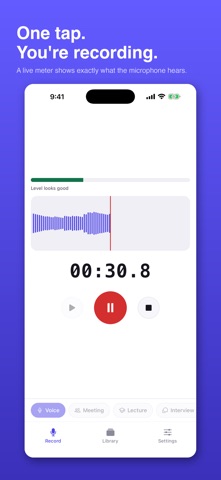
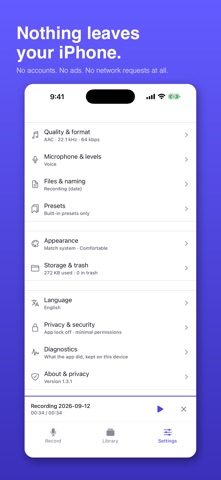
The voice recorder you can hand an hour-long lecture to and not think about again. Most recorders make you trust them. This one lets you check. It asks for the microphone and nothing else, it makes no network requests at all, and every screen tells you exactly what it is doing while it does it. ONE TAP TO RECORD The record button is the first thing you see and the biggest thing on screen. No tabs to hunt for, no filename to invent before you have captured anything. Lectures, meetings, song ideas, a thought in the car — start in under a second, and name it afterwards, or never. YOU CAN SEE IT WORKING A live level meter and waveform show exactly what the microphone is hearing, with a warning the moment the input runs too hot or too quiet. Elapsed time, remaining storage and the file format stay on screen while you record, so "is this actually recording?" is never a question you have to ask. RECORDINGS THAT CAME OUT TOO LOUD CAN BE FIXED Choose a quieter microphone source and see the difference on the meter before you commit. Anything already recorded can be turned down permanently with a per-recording playback level. FIND IT AGAIN Search by name, sort by date, length or size, and group recordings into folders. Smart folders collect recent and unsorted takes for you. The recording that is playing looks different from the one that is selected, and tapping a row never makes the list jump under your thumb. TRIM WITHOUT FEAR Set the start and end with full-width sliders — no hunting for a twelve-pixel handle. Trimming is non-destructive by default, so the original is always intact and one tap of Undo brings it back. AAC recordings can also be cut exactly, frame by frame, with no re-encoding and no loss of quality. NOTHING IS LOST BY ACCIDENT Deleting moves a recording to a trash that holds it for up to 90 days, and every destructive action offers an immediate Undo. If the app is ever interrupted mid-recording, the take is recovered the next time you open it. EVERYTHING STAYS ON THIS IPHONE Easy! Voice Recorder makes no network requests at all. No accounts. No ads. No analytics. No crash reporting. No prompts asking you to rate the app. The microphone is opened only while you are actually recording, and a recording leaves the app only if you deliberately share it. IN YOUR LANGUAGE Thirteen languages, fully translated — including Arabic and Hebrew with a properly mirrored right-to-left layout, not just translated strings. ALSO INCLUDED • AAC and M4A, with sample rate, bitrate and mono/stereo control • Presets for voice notes, meetings, lectures and music • Skip quiet sections, with a live threshold meter so you can see where the line sits • Variable playback speed from 0.5x to 2x, loop, and configurable skip intervals • Import existing audio files • Light and dark themes, comfortable and compact list density • Full VoiceOver support, large touch targets, and respect for your system font size One purchase, yours for good. No subscription, no in-app purchases, no ads, and no upsell screens. Not a call recorder: recording telephone calls is not permitted.
What's new · 1.4.3
Importing, right-to-left layouts, and a handful of playback fixes. • Importing an audio file now works on Android. It never had — every attempt failed the instant a file was picked. • Hebrew, Arabic, Russian, Spanish, French, Italian and Portuguese now use the right word form for a count. Selecting two recordings in Hebrew, or moving three in Arabic, used to fall back to English or show a raw placeholder. • The trim screen runs right-to-left in Hebrew and Arabic, matching the player. The start and end handles were on opposite sides between the two screens, which made it easy to trim the wrong end. • A recording made mostly in the background is saved with its true length, not the length it had when the app was last on screen. A short take started just before switching apps could even be reported as empty. • Merging recordings keeps the waveform lined up with the audio, and no longer makes the library file bigger with every merge. • Leaving the trim screen no longer leaves playback stuck inside the selection you were auditioning. • The skip buttons no longer undo a scrub you just made, and scrubbing a recording whose file is missing no longer carries into the next one you play. • A save that fails now says so, instead of looking like a dead button. • Imported files get a readable name, and the weekday shown on a recording uses your language's own punctuation.
Details