

Pocket 3D: STL Viewer
Jay Movaliya · Graphics & Design
Independent analytics for this App Store listing. AppTracker is not affiliated with Jay Movaliya.
Chart standing · US
What changed · US
Listing changes AppTracker has observed for this app in this storefront — new versions, price moves, rating shifts, and store copy.
Pocket 3D is now free and supported by ads. WHAT HASN'T CHANGED Your models are read on your device and never uploaded. The advertising has no access to your files, their contents or their names. Opening, rendering and measuring a model still needs no internet connection — with no connection the app works exactly as before, simply without ads. PRIVACY CONTROLS On iOS you're asked before the advertising identifier may be used to track you across other companies' apps. Decline and every feature still works. Where consent rules apply, a Privacy options entry appears in the Info panel so you can change your choice at any time. ALSO IN THIS RELEASE - Back now closes an open sheet, then the current model, and asks before leaving the app - A Rate Pocket 3D link in the Info panel - The file list scrolls, fixing crowding on smaller screens with a full recents list - Fixed a glitch where a closed model could flash back on screen for a moment
In-app purchases · US
No in-app purchases.
Screenshots



About
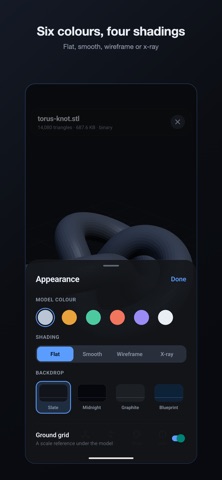
Pocket 3D turns your iPhone into a proper STL viewer. Open a model, turn it over in your hand, and find out the things you actually need to know before you print it. MEASURE YOUR MODEL Bounding size on every axis, plus volume, surface area and triangle count. Everything is measured in the file's own coordinate frame, so the axes match your CAD software or slicer. Sizes are shown in millimetres, the standard convention for 3D printing. CHECK IF IT WILL PRINT In a closed mesh, every edge is shared by exactly two faces. Pocket 3D verifies that and reports the result. When a mesh is not watertight, the app withholds the volume figure rather than showing one, because on an open surface that number has no meaning. VIEW FROM ANY ANGLE One finger orbits, pinch zooms, two fingers pan. Snap to isometric, top, bottom, front, back, left or right, and re-frame at any time. MAKE IT READABLE Six model colours, four backdrops, and four shading modes: flat, smooth, wireframe and x-ray. X-ray fades the near surfaces so interior structure becomes visible. OPEN FILES FROM ANYWHERE Binary and ASCII STL with automatic format detection. Open from the file picker, your recents, or share a file straight into Pocket 3D from another app. A sample model is bundled so you can try it immediately. PRIVATE BY DEFAULT No servers, no account, no sign-up. Files are read on your device and never leave it. No analytics, no advertising, no tracking. Works with no internet connection.
What's new · 1.1
Pocket 3D is now free and supported by ads. WHAT HASN'T CHANGED Your models are read on your device and never uploaded. The advertising has no access to your files, their contents or their names. Opening, rendering and measuring a model still needs no internet connection — with no connection the app works exactly as before, simply without ads. PRIVACY CONTROLS On iOS you're asked before the advertising identifier may be used to track you across other companies' apps. Decline and every feature still works. Where consent rules apply, a Privacy options entry appears in the Info panel so you can change your choice at any time. ALSO IN THIS RELEASE - Back now closes an open sheet, then the current model, and asks before leaving the app - A Rate Pocket 3D link in the Info panel - The file list scrolls, fixing crowding on smaller screens with a full recents list - Fixed a glitch where a closed model could flash back on screen for a moment
Details