

PictoBlox Studio
Agilo Research Private Limited · Education
Independent analytics for this App Store listing. AppTracker is not affiliated with Agilo Research Private Limited.
Chart standing · US
What changed · US
Listing changes AppTracker has observed for this app in this storefront — new versions, price moves, rating shifts, and store copy.
What’s New in PictoBlox • Improved Intellio connection experience and fixed IP connection issues • Fixed Backpack crashes related to sounds and costumes • Added Rename and Delete options for Make A Block • Added new memory optimization modes: Always, Auto, and Never • Reduced RAM usage during startup • Improved Human Body, Object, and Card Detection performance • Improved camera and microphone device handling • Improved touch interactions and scrolling on iPad • Improved file import and mobile file handling • Improved loading and onboarding experience • Improved overall UI responsiveness and stability • Redesigned the High RAM Usage alert • Faster installation and setup experience • General bug fixes and performance improvements
Screenshots




About
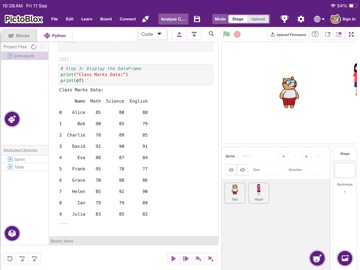
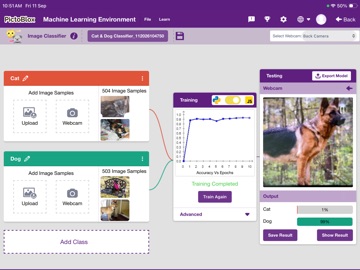
PictoBlox AI is a block-based coding and STEM learning app for iPad. It helps students create interactive projects, control robotics hardware, work with AI features, and learn programming through hands-on activities. Designed for classrooms, labs, and makers, PictoBlox AI combines visual programming with real-world hardware control so learners can move from simple coding concepts to advanced projects. Key features: • Block-based coding interface for beginners • AI and machine learning project support • Robotics and Quarky hardware connectivity • Camera, microphone, Bluetooth, and local network support for interactive projects • Project creation, testing, and classroom use on iPad • Suitable for STEM, coding, robotics, and AI learning programs PictoBlox AI is built for students, teachers, and schools that want to make coding practical, visual, and project-based.
What's new · 1.0.1
What’s New in PictoBlox • Improved Intellio connection experience and fixed IP connection issues • Fixed Backpack crashes related to sounds and costumes • Added Rename and Delete options for Make A Block • Added new memory optimization modes: Always, Auto, and Never • Reduced RAM usage during startup • Improved Human Body, Object, and Card Detection performance • Improved camera and microphone device handling • Improved touch interactions and scrolling on iPad • Improved file import and mobile file handling • Improved loading and onboarding experience • Improved overall UI responsiveness and stability • Redesigned the High RAM Usage alert • Faster installation and setup experience • General bug fixes and performance improvements
Details