

ID Photo Studio - Passport
INPHIL CHOI · Photo & Video
Independent analytics for this App Store listing. AppTracker is not affiliated with INPHIL CHOI.
Chart standing · US
What changed · US
Listing changes AppTracker has observed for this app in this storefront — new versions, price moves, rating shifts, and store copy.
Making an ID photo is now faster and more natural. • Bright, plain backgrounds like a white wall are kept as they are instead of being replaced • The camera opens straight from the home screen, and you can import a photo from the camera screen • Added the Korean alien registration card size (3.5×4.5cm) — 40 sizes in total • Adjustment tools are now tucked into "Adjust manually" for a simpler screen • Settings now show the real app version
Screenshots



About
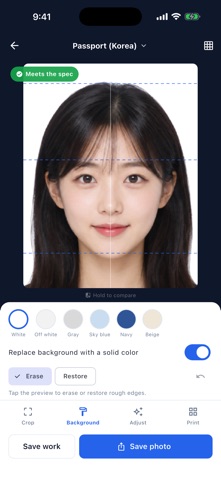
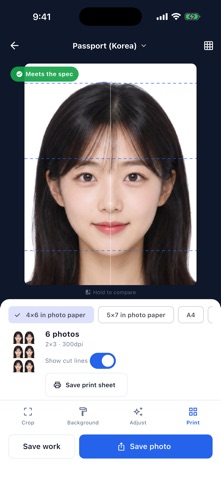
Turn one phone photo into an ID photo sized to your spec — without a photo studio. ID Photo Studio detects the face, crops to the exact ratio required by the spec you choose, and replaces the background with a clean solid color. It then checks the result against the spec, item by item, and lays out a 4×6 in print sheet for you. ■ 40 built-in sizes + custom · Korea: passport (standard and online), ID card, driver’s license, alien registration card, 3×4cm, 3.5×4.5cm, 5×7cm, résumé, student ID, certificates · Worldwide: USA (2×2 in), Japan, China, Schengen, Canada, UK, Germany, France, Russia, Türkiye, Australia, New Zealand, India, Singapore, Malaysia, Thailand, Vietnam, Philippines, Indonesia, Taiwan, Hong Kong, Brazil, Saudi Arabia, UAE, Egypt, South Africa · Search by name, country or size (35x45) · Custom sizes in millimetres ■ Shooting guide The camera screen overlays the guide for the size you picked. When your face fits, it turns green; when it doesn't, you get one hint at a time — "move a little closer", "raise the camera a little". ■ Face-aware auto crop Head height (crown to chin) and the gap above the head are solved for the spec automatically. Tilted photos are straightened to the eye line. Fine-tune with move and zoom whenever you want. ■ Background replacement Swap a busy background for white, off-white, gray, sky blue, navy or beige. Tap the preview to erase or restore rough edges around hair. ■ Compliance check Head height, space above head, eye level, background evenness, resolution (dpi), exposure, face angle, even lighting and glare near the eyes are each reported as pass, review or not met — with a short note on how to fix what failed. Where the device supports it, closed eyes and expression are checked too. Other apps make the photo; this one tells you whether it fits. ■ No ads, no purchases No subscription, no ad-removal fee, no per-save charge, no watermark, no account. ■ Print sheet Lay out as many copies as fit on 4×6 in, 5×7 in, A4 or Letter, with optional cut lines, at 300dpi or better. ■ Your photos never leave the device Face detection, background removal and adjustments all run on the device. No upload, no account, works in airplane mode. ※ The specs in this app are provided for reference. Requirements change, so confirm the issuing authority’s current rules before submitting. This app does not guarantee acceptance.
What's new · 1.0.2
Making an ID photo is now faster and more natural. • Bright, plain backgrounds like a white wall are kept as they are instead of being replaced • The camera opens straight from the home screen, and you can import a photo from the camera screen • Added the Korean alien registration card size (3.5×4.5cm) — 40 sizes in total • Adjustment tools are now tucked into "Adjust manually" for a simpler screen • Settings now show the real app version
Details