

Sermon Cam: Auto-Track Video
Ian Tomlinson · Photo & Video
Independent analytics for this App Store listing. AppTracker is not affiliated with Ian Tomlinson.
Chart standing · US
What changed · US
Listing changes AppTracker has observed for this app in this storefront — new versions, price moves, rating shifts, and store copy.
FIND WHAT YOU NEED FASTER • Sermon sections: Your transcript is split into named chapters, so you can jump straight to the story, point or passage you want. On iPhones with Apple Intelligence, sections are found and named on your phone. • Search by meaning: Describe what was said, like "the seed that dies in the ground", and find it even if the preacher used different words. MAKE BETTER CLIPS • Scrub through clips: A new bar under the preview works like YouTube. Tap to jump, drag to scrub. • Move, resize and rotate captions: Drag, pinch and twist captions right on the preview. • Batch export: Select several clips and export them in one go. • Clipped sentences are marked in the transcript, and each new clip starts with your last clip's framing. • Fix everywhere: Correct a misheard word once and fix it everywhere it appears. Corrected names also help future transcripts. IMPROVEMENTS • We fixed a timing problem with videos trimmed on iPhone before upload. • Tracking is now faster on most phone and stream footage. • The punch-in slider now uses its full range for tall and square shapes. • Press a volume button to hear previews while the silent switch is on.
In-app purchases · US
What this app sells inside itself, grouped by kind and priced for this storefront.
Screenshots


About
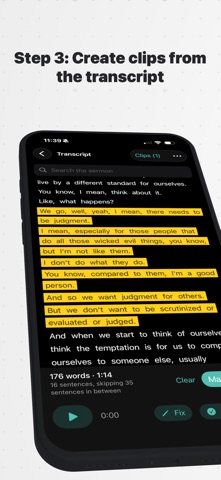
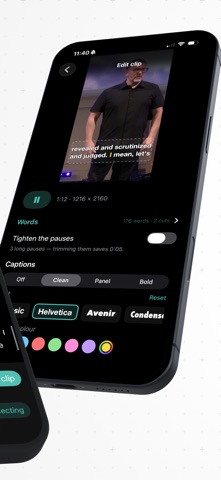
Sermon Cam turns a wide sermon recording into vertical clips ready for Instagram Reels, TikTok, and YouTube Shorts. Point it at your Sunday video, press and hold on the speaker, and the app follows them for the whole message. No keyframing, no manual cropping, and nobody walks out of frame. Then read the transcript, tap the passage you want, and export. Everything runs on your phone. Your sermon is never uploaded anywhere. WHAT IT DOES • Auto-follow tracking. Touch the speaker once and the app finds them, then keeps them framed for the entire sermon. • Reframe to any shape. 9:16 for Reels, Shorts, and TikTok, plus 4:5, 1:1, 16:9, or your original ratio. • Camera controls that behave like a camera operator. Punch in, follow speed, lead the move, headroom, and off-center framing that leaves room for a lower third or the lyrics screen. • On-device transcript. Every word timed, searchable, and correctable. • Clip straight from the transcript. Tap the sentences you want and the clip cuts itself. • Tighten pauses. Trim dead air between sentences automatically. • Burned-in captions. Three styles, ten typefaces, your own highlight color, dragged and sized wherever you want it. • Save your framing as a preset and reuse it every week. • Export the transcript as .txt, .srt, or .vtt for YouTube and your website. • 4K in, 4K out. Full resolution, no watermark. FOR CHURCH MEDIA TEAMS Built for the volunteer who has one wide camera at the back of the sanctuary and forty minutes to get clips posted before small group. No desktop editor, no account, no plugins. Import the video, find the speaker, pick the moments worth sharing. Importing, tracking, transcribing, framing, captions, and cutting clips are free. Exporting the finished video requires a subscription: $9.99/month or $99.99/year, with a 7-day free trial for new subscribers. Payment is charged to your Apple ID at confirmation of purchase and renews automatically unless cancelled at least 24 hours before the period ends. Manage or cancel in your Apple ID settings. If a subscription ends, nothing you have made is deleted — only exporting stops. Terms of use: https://sites.google.com/view/sermoncam/terms
What's new · 1.2
FIND WHAT YOU NEED FASTER • Sermon sections: Your transcript is split into named chapters, so you can jump straight to the story, point or passage you want. On iPhones with Apple Intelligence, sections are found and named on your phone. • Search by meaning: Describe what was said, like "the seed that dies in the ground", and find it even if the preacher used different words. MAKE BETTER CLIPS • Scrub through clips: A new bar under the preview works like YouTube. Tap to jump, drag to scrub. • Move, resize and rotate captions: Drag, pinch and twist captions right on the preview. • Batch export: Select several clips and export them in one go. • Clipped sentences are marked in the transcript, and each new clip starts with your last clip's framing. • Fix everywhere: Correct a misheard word once and fix it everywhere it appears. Corrected names also help future transcripts. IMPROVEMENTS • We fixed a timing problem with videos trimmed on iPhone before upload. • Tracking is now faster on most phone and stream footage. • The punch-in slider now uses its full range for tall and square shapes. • Press a volume button to hear previews while the silent switch is on.
Details