

Surya Time — Sun Clock
Max Schleining · Utilities
Independent analytics for this App Store listing. AppTracker is not affiliated with Max Schleining.
Chart standing · US
What changed · US
Listing changes AppTracker has observed for this app in this storefront — new versions, price moves, rating shifts, and store copy.
• A Sense of Touch: Hold the phone up to the sky and feel what you find. Surya now uses bespoke Core Haptics designed not for button taps, but for discovery — a tactile swell when the crosshair locks onto the sun or the moon, a crisp tap as a summit comes into focus, and a gentle pulse at the exact moment first or last light touches a mountain ridge. • Focused Summit Sights: Mountain ranges can put dozens of peaks into a single window. A new "In Focus" mode identifies only the summit you are currently aiming at, with distance added directly to the nameplate (e.g., Mont Blanc · 4,808m · 12km). Prefer the full panoramic skyline? Switch between "In focus" and "All" anytime in Settings. • Open Sight-Line Cross-Sections: When exploring vantage points on the map, the terrain cross-section now opens directly by default. Watch the sun and moon trace the actual topography, with physical contact haptics as the light meets the crest. • Silky Horizon Motion: Peak detection and silhouette sampling now share a unified pass, eliminating micro-stutters when flying between viewpoints or sweeping across complex alpine terrain. • Sound & Touch Settings: Dedicated controls for ambient soundscapes and haptic feedback, grouped neatly in the redesigned settings sheet.
Price & rating history · US
Reconstructed from the listing changes AppTracker has observed in this storefront. A field is charted once it has changed more than once, and each line starts at the value it moved from.
Price · 0.99 USD now · 2 changes on record
In-app purchases · US
No in-app purchases.
Screenshots


Keywords this app targets
Search terms AppTracker associates with this app — estimates, not search volume. ❝ = in the app's title; a highlighted number is its current position for that term.
Similar apps
Competitors and close alternatives, as estimated by AppTracker.
 Lightphase
Onyx Mueller
Lightphase
Onyx Mueller
 Sloww: Sun & Moon Phase Clock
SOREN MIKKEL LAULAINEN
Sloww: Sun & Moon Phase Clock
SOREN MIKKEL LAULAINEN
 Sundial Solar & Lunar Time
Tier 9 Digital LLC
Sundial Solar & Lunar Time
Tier 9 Digital LLC
 Plein Soleil
Cedric Floury
Plein Soleil
Cedric Floury
 Sunrise Sunset Times
Fascinating Projects
Sunrise Sunset Times
Fascinating Projects
 Sundowner – Sun & Moon
Henning Hock
Sundowner – Sun & Moon
Henning Hock
 Sun & Moon 3D Planetarium Pro
Henning Poulsen
Sun & Moon 3D Planetarium Pro
Henning Poulsen
 Solis - Sun Tracker
Ben Davin
Solis - Sun Tracker
Ben Davin
About
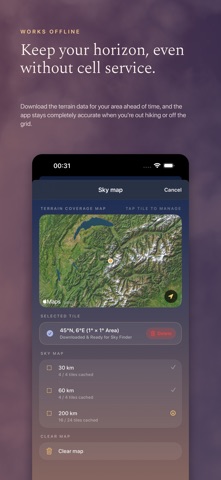
How much daylight have you got left? Surya Time answers the way people did before anyone thought of time zones. It takes the light you are actually given today, from sunrise to sunset, and divides it into twelve hours; then it does the same with the night. An hour here is as long as the light allows. In June yours will run past sixty-six minutes, and by December they will have shrunk towards forty, and neither figure is a rounding error. It is simply what the sky did. All of it is worked out on the phone from your own coordinates, which means that noon arrives when the sun is over you, and not when it is over the city your time zone happens to be named after. The dial shows you what the day has spent and what it still owes you: seven hours and fifty-five minutes of light, say, and the hour you are presently standing in. Sunrise and sunset are given on the clock the place itself keeps, so a city you have pinned reads as a local would read it. And the day does not end at a flat horizon. Download the ground around you and the app draws the skyline you actually stand in front of, with the summits on it named and measured: Mont Blanc de Courmayeur at 4,748 m, and the nearer, lower hills that take more of your evening precisely because they are close. A ridge to the west can be worth a quarter of an hour, and now you can see which one is taking it. Which raises a practical question, so there is an answer for that as well. The Vantage Map ranks the ridges and lookouts around you by how much more sunset each would give back — a hundred and nine minutes for a summit fifteen kilometres off, if that is a walk you fancy — and it shows you the gain before you set out. Choose an area of thirty, sixty or two hundred kilometres, download its elevation once, and the horizon keeps working with no signal at all. There are five widget sizes for the home screen and the lock screen, and each one asks for its own fix, so a phone that has flown overnight has already caught up before you open the app. If you want to know how far your watch has drifted from the sun, the app will tell you, and it will tell you where the minutes went: some are the price of your longitude inside a time zone drawn for somebody else, and the rest belong to the Earth, whose orbit is an ellipse and whose axis is tilted. Some days twelve hours of sixty is exactly what you want. On other days you would rather simply hear that two fifths of the daylight has gone, and the app will say it that way instead. The hours can be named in Greek, in Latin, or in plain English, whichever sounds least like an instrument panel to you. When you lose the moon, hold the phone up and the app will point at it. Sun or moon, the bearing is worked out for the ground you are standing on rather than for the centre of the Earth, which matters more than it sounds: close to the horizon the difference between the two is wider than the moon itself. There is a map as well, showing where the daylight is falling this second, with the line between day and night drawn true and your own place marked upon it. The moon is drawn as a real terminator rather than an emoji, and the colours follow the sun's true altitude, so the screen tends to look like the hour it is describing. You can pin a city if you would sooner read somebody else's sky. There is no account, no sign-in and nothing that tracks you.
What's new · 1.5
• A Sense of Touch: Hold the phone up to the sky and feel what you find. Surya now uses bespoke Core Haptics designed not for button taps, but for discovery — a tactile swell when the crosshair locks onto the sun or the moon, a crisp tap as a summit comes into focus, and a gentle pulse at the exact moment first or last light touches a mountain ridge. • Focused Summit Sights: Mountain ranges can put dozens of peaks into a single window. A new "In Focus" mode identifies only the summit you are currently aiming at, with distance added directly to the nameplate (e.g., Mont Blanc · 4,808m · 12km). Prefer the full panoramic skyline? Switch between "In focus" and "All" anytime in Settings. • Open Sight-Line Cross-Sections: When exploring vantage points on the map, the terrain cross-section now opens directly by default. Watch the sun and moon trace the actual topography, with physical contact haptics as the light meets the crest. • Silky Horizon Motion: Peak detection and silhouette sampling now share a unified pass, eliminating micro-stutters when flying between viewpoints or sweeping across complex alpine terrain. • Sound & Touch Settings: Dedicated controls for ambient soundscapes and haptic feedback, grouped neatly in the redesigned settings sheet.
Details