

FIRE: Retirement Calculator
KEVIN LAN · Finance
Independent analytics for this App Store listing. AppTracker is not affiliated with KEVIN LAN.
Chart standing · US
What changed · US
Listing changes AppTracker has observed for this app in this storefront — new versions, price moves, rating shifts, and store copy.
NEW • Graphite widget background: the same dark surface as the app's countdown, now the default. Prefer the standard look? Choose System in Edit Widget. Free on every widget. • Reminders, rebuilt: a note at each year to go, the final 200, 100, 30, 7 and 1 days, and when your plan projects 25%, 50% and 75% of your FIRE number. Plus an optional monthly check-in on the 1st. Turn them on in Settings > Reminders. IMPROVED • Explore scenarios shows contributions and spending per month or per year, matching your plan. • Chance of success now explains why its odds lean a little cautious: year-to-year market swings slow typical growth. • Revisiting your setup, "How this is calculated" and scenarios now follow the FIRE type you count down to. • History: edit or delete entries. Investment changes made on the Plan tab are recorded too. • The round Lock Screen widget shows months, then days, in your final year. • When the free trial ends, widgets switch to the free plan right away. • On a slow connection, first launch no longer waits on iCloud indefinitely: after 10 seconds you can try again or continue. FIXED • Scrolling past the growth chart no longer gets stuck. • The status bar no longer turns white after you return to the app. • The screen stays visible while an App Store purchase or restore is in progress.
Ratings breakdown · US
The star breakdown behind this app's rating in this storefront.
In-app purchases · US
What this app sells inside itself, grouped by kind and priced for this storefront.
Screenshots


About
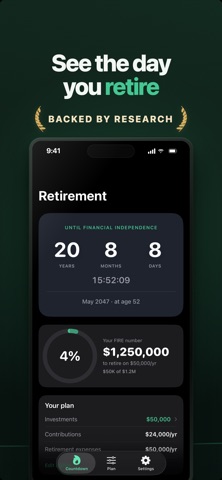
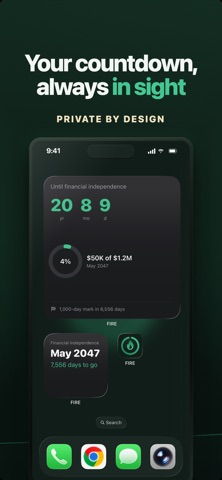
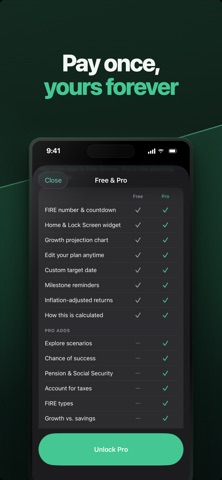
Know the date you could stop working, and see it move closer every time you invest. FIRE: Retirement Calculator is a FIRE calculator and retirement countdown for iPhone. Enter what you have invested, what you add each month and what you plan to spend. It works out your FIRE number, projects the month you reach it and your age then, and counts down to that date on your home screen. The widget follows your computed date, not one you type in, so when your investments grow, the countdown moves. No account, no ads, no tracking. We never see your numbers. WHAT IS A FIRE NUMBER? FIRE stands for Financial Independence, Retire Early. Your FIRE number is the amount you need invested to cover your spending without a paycheck: your annual expenses divided by a safe withdrawal rate. At the common 4% rule, spending $50,000 a year needs $1,250,000. The app shows the formula on your own numbers. THE FIRE TYPES • Traditional FIRE: your full annual expenses, covered at your withdrawal rate. • Lean FIRE: a frugal budget, 0.7× your expenses. • Chubby FIRE: a comfortable budget, 1.5× your expenses. • Fat FIRE: a no-compromise budget, 2× your expenses. • Coast FIRE: enough invested now to grow into your full number by your target age, with no more contributions. • Barista FIRE: part-time work covers part of your spending and your portfolio covers the rest. FREE, WITH NO TIME LIMIT • Your FIRE number and a live countdown to your financial-independence date • Home Screen widgets in three sizes, plus Lock Screen widgets • A Graphite or System widget background • Change any input and see the new date instantly: investments, contributions, spending, expected return, withdrawal rate, birth date • Amounts per month or per year, in your own currency • One-tap investment updates that move your date • A compound-interest growth chart to your FIRE date • Inflation-adjusted (real) returns, explained plainly • Reminders at each year to go, the final 200, 100, 30, 7 and 1 days, and when your plan projects 25%, 50% and 75% of your number • A monthly check-in on the 1st to keep your date current • An optional fixed target date • "How this is calculated", step by step on your numbers FIRE PRO: ONE-TIME PURCHASE • Explore scenarios: change one number and see how much sooner or later you get there • Chance of success: a Monte Carlo simulation of 2,000 market paths shows how often your money lasts • FIRE types: count down to Lean, Coast, Barista, Chubby or Fat FIRE, with a widget for each • Pension and Social Security: add income that starts at a set age and lowers your number • Account for taxes: add the tax on your withdrawals so your number reflects what you'll really need • Growth vs. savings: how much of your balance is contributions and how much is growth, year by year • History: your investments over time • Extra widget styles: progress ring and target date Every install starts with 14 days of full Pro. No card, no auto-charge. After that, your FIRE number, countdown, standard widget and growth chart stay free. QUESTIONS IT ANSWERS • When can I retire, and how old will I be? • What is my FIRE number? • How much do I need for Lean, Coast, Barista, Chubby or Fat FIRE? • How much sooner could I retire if I invest $500 more a month? • Will my money last to age 95? • How much more do I need once taxes on withdrawals are included? PRIVATE BY DESIGN Your plan stays on your device, and in your own private iCloud if you sync between devices. No account, no sign-in, no ads, no analytics. The app switcher shows a plain cover instead of your numbers, and an optional Face ID or Touch ID lock keeps the app closed until you confirm it's you. App Store privacy label: Data Not Collected. NO SUBSCRIPTION FIRE Pro is a single purchase. Restore it anytime on your other devices. FIRE: Retirement Calculator is an educational planning tool, not financial advice. Projections are estimates from the assumptions you enter, not guarantees. Available in English and Spanish.
What's new · 1.4.0
NEW • Graphite widget background: the same dark surface as the app's countdown, now the default. Prefer the standard look? Choose System in Edit Widget. Free on every widget. • Reminders, rebuilt: a note at each year to go, the final 200, 100, 30, 7 and 1 days, and when your plan projects 25%, 50% and 75% of your FIRE number. Plus an optional monthly check-in on the 1st. Turn them on in Settings > Reminders. IMPROVED • Explore scenarios shows contributions and spending per month or per year, matching your plan. • Chance of success now explains why its odds lean a little cautious: year-to-year market swings slow typical growth. • Revisiting your setup, "How this is calculated" and scenarios now follow the FIRE type you count down to. • History: edit or delete entries. Investment changes made on the Plan tab are recorded too. • The round Lock Screen widget shows months, then days, in your final year. • When the free trial ends, widgets switch to the free plan right away. • On a slow connection, first launch no longer waits on iCloud indefinitely: after 10 seconds you can try again or continue. FIXED • Scrolling past the growth chart no longer gets stuck. • The status bar no longer turns white after you return to the app. • The screen stays visible while an App Store purchase or restore is in progress.
Details