

Notes2Me Mobile
Tomoyuki Okawa · Lifestyle
Independent analytics for this App Store listing. AppTracker is not affiliated with Tomoyuki Okawa.
Chart standing · US
What changed · US
Listing changes AppTracker has observed for this app in this storefront — new versions, price moves, rating shifts, and store copy.
1. Fix: The orange download button under the Receiver side may not have appeared if the app was used with an iPad in the landscape mode. 2. When the user is notified of software update availability, the same sheet shows a button so that the user can give the app a rating.
Screenshots


About
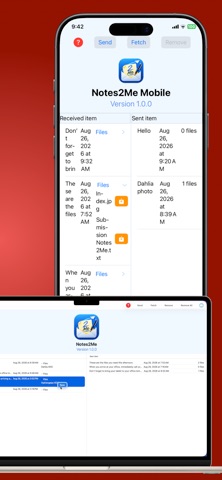
Notes2Me Mobile is a powerful iOS companion app for iPhone and iPad designed to seamlessly exchange messages and files across all your personal devices—including your Mac—using your iCloud account. Working in perfect harmony with its desktop counterpart, Notes2Me, the app requires zero configuration, no bluetooth and no secondary logins: if you are signed into iCloud, you are ready to go. Key Features: • Dual-Pane Dashboard: The startup screen is cleanly organized into two sides. The Receiver pane displays incoming items sent from your other devices while the Sender pane tracks records you have dispatched outward. • Flexible Fetching & Notifications: Fetch new records instantly with a single tap of the toolbar button. Notes2Me Mobile intelligently downloads only unique records that do not already exist locally. You can also subscribe to record-creation notifications so your device alerts you whenever a new item is pushed to the iCloud server. • Cloud Cleanup Control: Keep your iCloud storage pristine. With the tap of a button, you can remove individual records from the server after pulling them, or clear all server records entirely. • Cross-Platform Attachments: Records received from a Mac or another iOS device may include one or more attachments. Easily inspect and save these files using the system document workflow by expanding the Files section and tapping the orange save button with a downward-looking arrow.
What's new · 1.0.2
1. Fix: The orange download button under the Receiver side may not have appeared if the app was used with an iPad in the landscape mode. 2. When the user is notified of software update availability, the same sheet shows a button so that the user can give the app a rating.
Details