

BIM Design Lab Studio
Yuhsiu Lai · Education
Independent analytics for this App Store listing. AppTracker is not affiliated with Yuhsiu Lai.
Chart standing · US
In-app purchases · US
What this app sells inside itself, grouped by kind and priced for this storefront.
Screenshots




About
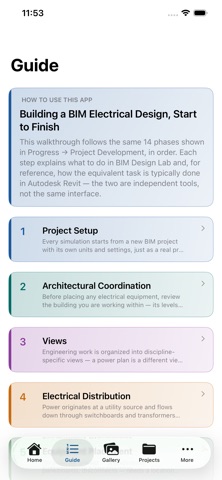
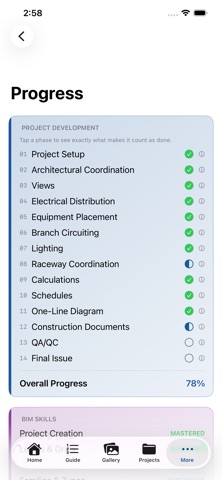
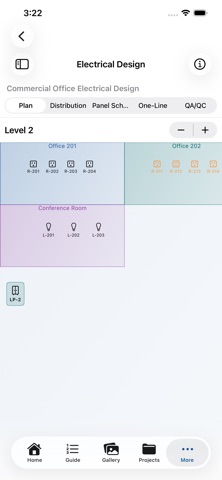
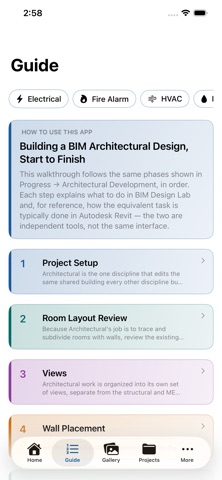
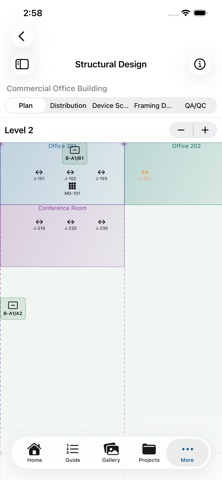
Learn how professional Building Information Modeling (BIM) actually works — by doing it, not just reading about it. BIM Design Lab puts you through the real workflow MEP and structural engineers use every day: start from one shared building model and build your discipline's systems on top of it, exactly like joining a live, linked Revit project. TEN DISCIPLINES, ONE SHARED BUILDING • Electrical — receptacles, lighting, panels, transformers, and switchboards wired into real branch and feeder circuits • Fire Alarm — initiating devices, notification appliances, control panels, and zone circuiting • HVAC — air handling units, VAV boxes, diffusers, and air distribution zones • Plumbing — water heaters, fixtures, and distribution branches sized by fixture units • Low Voltage / Security — access control panels, cameras, card readers, and door hardware • Data/Telecom — structured cabling, data outlets, wireless access points, and cable bundles • AV — racks, amplifiers, speakers, displays, and audio zones • Fire Sprinkler — fire pumps, standpipes, sprinkler heads, and hydraulic zone demand • Structural — footings, columns, beams, framing bays, and tributary load paths on real grid lines • Architectural — walls, doors, and windows placed directly onto the shared building Every discipline builds on the same levels, rooms, and grids — the way a real MEP or structural engineer links to an architect's central model rather than starting from scratch. A COMPLETE, DETERMINISTIC WORKFLOW • Floor plan canvas — place and wire equipment, room by room, level by level, with color-coded rooms and devices • Distribution trees & riser/framing diagrams — see your equipment hierarchy as a schematic • Schedules — panel, device, fixture, and framing schedules generated live from your actual model, never typed by hand • Load calculations — connected load, demand load, and percent-of-capacity, computed deterministically for every discipline (amps, CFM, GPM, PSF, wattage, or WSFU depending on the trade) • QA/QC engine — a rules-based checker, with its own rule-code namespace per discipline, that flags unassigned devices, overloaded circuits, and missing connections before you'd catch them on a real job • Undo/redo and full project history on every edit LEARN AS YOU GO • A dedicated step-by-step Guide for every discipline, each with a plain-language comparison to how the same step works in professional Revit-based tools • Progress tracking that's actually tied to your work — phases and skills complete automatically as your model reaches real milestones, not by checking a box • An illustration Gallery of BIM and construction-document reference concepts, zoomable and swipeable • Practice tasks that drop you straight into the workspace to try a specific skill WHO IT'S FOR Engineering and architecture students, CAD/BIM drafters leveling up, and anyone curious what a professional multi-discipline BIM workflow actually looks like — without needing an expensive license or a real project to practice on. PRIVATE BY DESIGN • Everything runs on your device • No account, no sign-up required to use what you've purchased • Your project data never leaves your iPhone or iPad BIM Design Lab is a free download. The Architectural guide is free to read. One in-app purchase, All Access, unlocks every discipline's Design workspace and every discipline's Guide — no subscription, no per-discipline pricing, no recurring charges. BIM Design Lab is an independent educational app and is not affiliated with, endorsed by, or sponsored by Autodesk, Inc. "Revit" and "Autodesk" are trademarks of Autodesk, Inc., referenced here only for educational comparison purposes.
Details