

How to Plan a Trip
Yitiao Gongcai (Guangzhou) Advertising Media Co., Ltd. · Travel
Independent analytics for this App Store listing. AppTracker is not affiliated with Yitiao Gongcai (Guangzhou) Advertising Media Co., Ltd.
Chart standing · US
What changed · US
Listing changes AppTracker has observed for this app in this storefront — new versions, price moves, rating shifts, and store copy.
• Added a Simplified Chinese interface. Follow your device language or switch between English and Chinese in Preferences. • Improved multilingual search and name display for cities and places. Place names now follow your interface language by default, with an option to prefer English. • Improved trip editing and save notifications, making pending changes easier to find and failed saves easier to retry. Fixed Chinese text input in transport location search. • Improved expense totals and exchange-rate loading for more consistent display in your preferred currency. • Refined guided practice, forms and hotel detail navigation. Updated the glass styling on Home and sign-in screens and fixed the border around the Apple sign-in icon.
Screenshots




About
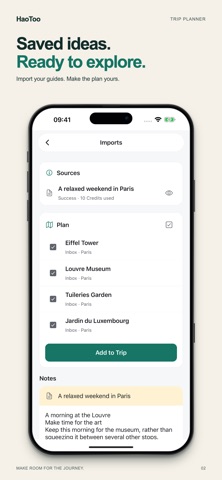
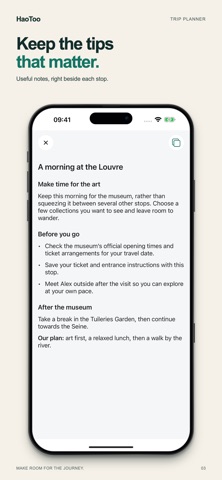
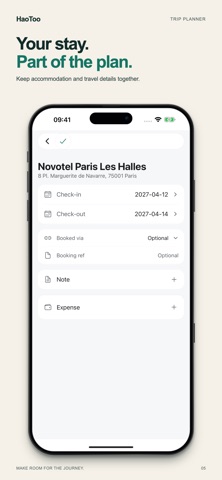
Turn your travel ideas into a trip you can follow. HaoToo is a trip planner and travel itinerary organizer that brings your places, daily routes, stays and transport together. Keep the details that make a trip yours: what to order, when to visit and what to remember at each stop. IMPORT IDEAS. KEEP THE USEFUL DETAILS. Bring in supported travel links, pasted text, photos, documents and forwarded booking emails. Review the places, add them to your trip and keep the source material in your private notes. Tips about a place stay with that stop, so your itinerary holds more than a list of names. BUILD YOUR ITINERARY ON THE MAP Plan one destination or several. Arrange places by day, change their order and check routes, distances and estimated travel times. Not ready to schedule a place? Keep it in Inbox until you are. You can start before your travel dates are decided. KEEP STAYS AND TRANSPORT TOGETHER Organize accommodation, flights and other transport alongside your daily plan. Add reservation details, notes and attachments so they are easy to find when you need them. Hotel booking continues with the booking provider. DISCOVER AND MAKE IT YOURS Explore public itineraries and nearby places. Copy a trip as a starting point, then adapt it to your own pace. Prepare packing lists and personal to-dos before you go. PLAN WITH YOUR COMPANIONS With Pro, collaborate on your itinerary, manage shared tasks, set a budget, track travel expenses and split costs. Export travel or visa itineraries as PDFs, or export your itinerary to a calendar. START FREE Browse public trips and places without signing in. Sign in to create and manage trips. Free accounts include two private trips and unlimited public trips. Private notes, costs and booking details are excluded from the public view of a trip. PRO AND CREDITS Choose Lifetime Pro with a one-time purchase, or Annual Pro with an auto-renewing yearly subscription. Both include the same Pro features, unlimited private trips and up to 500 gifted Credits each month, subject to a 1,500 gifted-Credit balance cap. Imports, route optimization and supported connected AI actions use Credits. Free users can use available Credits too. Extra Credit packs are optional; purchased Credits do not expire. Prices are shown before purchase. Annual Pro renews automatically unless cancelled at least 24 hours before renewal. Manage your subscription in your Apple account settings. Import results and place, route and hotel coverage depend on the source and destination. Review imported information before you travel. Privacy: https://howtoplanatrip.app/privacy Terms: https://howtoplanatrip.app/terms Support: https://howtoplanatrip.app/contact
What's new · 2.9.0
• Added a Simplified Chinese interface. Follow your device language or switch between English and Chinese in Preferences. • Improved multilingual search and name display for cities and places. Place names now follow your interface language by default, with an option to prefer English. • Improved trip editing and save notifications, making pending changes easier to find and failed saves easier to retry. Fixed Chinese text input in transport location search. • Improved expense totals and exchange-rate loading for more consistent display in your preferred currency. • Refined guided practice, forms and hotel detail navigation. Updated the glass styling on Home and sign-in screens and fixed the border around the Apple sign-in icon.
Details