

Photo Checkup
正平 孙 · Photo & Video
Independent analytics for this App Store listing. AppTracker is not affiliated with 正平 孙.
Chart standing · US
What changed · US
Listing changes AppTracker has observed for this app in this storefront — new versions, price moves, rating shifts, and store copy.
• Export controls stay at the bottom: choose a folder, pause, or resume without searching. Progress and results take priority, with improved larger-text layouts. • Clear counts for verified, reverified, failed, and unprocessed items. • Foreground exports keep the screen awake; pausing or finishing restores the previous auto-lock setting. • Share a summary of the current export containing only status, counts, and access scope—no photos, original filenames, or directory paths. • Switching Photos permission between full, limited, and denied clears outdated reports. Libraries with no items to check now show a neutral empty state instead of an all-healthy result. • Included in the existing one-time purchase, with no additional charge or subscription.
In-app purchases · US
What this app sells inside itself, grouped by kind and priced for this storefront.
Screenshots


About
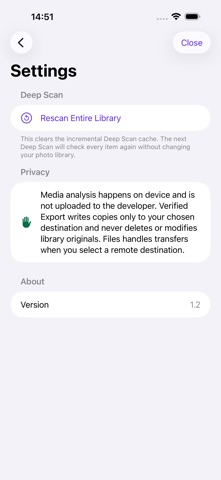
Is a photo damaged, still waiting for its iCloud original, or using a format your device cannot decode? Photo Checkup checks the photos and videos you allow it to access, helps you verify findings in Photos, and exports originals to a destination you choose. UNDERSTAND THE FINDINGS • Possibly corrupted: a local file has structural or decoding problems. Verify it again in Photos. • iCloud not ready: the original is not available locally. A cloud placeholder is not treated as corruption. • Unsupported format: the device cannot decode the format; that alone does not mean the file is damaged. • Could not verify: read failures and uncertain results are reported separately. Tap a finding to copy its filename and creation date, then open Photos to locate and check it yourself. QUICK SCAN IS FREE Quick Scan checks file structure and local availability within your granted library access. Total issue counts, every iCloud finding, and guidance are free. Preview the first three possibly corrupted items at no charge. Deep Scan checks every frame in multi-frame images and decodes samples from the beginning, middle, and end of videos. It can find some issues Quick Scan misses, but does not scan every video frame. Unchanged items have local availability rechecked before valid previous results are reused. VERIFIED EXPORT Export authorized photo and video originals to local folders, compatible external storage, or SMB/NAS shares available in the system Files picker. Available destinations depend on your device connections and file provider support. Photo Checkup calculates SHA-256 while reading the source, then rereads the written file and compares its hash. Only a match is marked successful. Organize exports by year and month, keep Live Photo image and video resources together, and get a per-item manifest and readable report. After an interruption, choose the same folder to continue. Completed copies are verified again. A matching hash confirms that the copy matches the source data read; it does not prove the original was healthy or replace periodic backup checks. Keep the app in the foreground during large exports. A CLEARER EXPORT FLOW A fixed bottom bar keeps Choose Folder, Pause, and Resume within reach. Progress takes priority while exporting, and results move to the top when it finishes. Separate counts show verified, reverified, failed, and unprocessed items, with layouts that adapt to larger system text. The screen stays awake during foreground exports and returns to its previous auto-lock setting when paused or finished. Share a text summary of the current export through the system share sheet. It contains only the status, counts, and authorization scope—not photos, original filenames, or directory paths. Per-file details remain in your chosen export folder. YOUR ACCESS, YOUR CHOICE Media analysis and hash verification run on your device. Photos, videos, and results are not uploaded to the developer. Scanning does not download iCloud originals. A separate export switch lets PhotoKit read missing originals from your iCloud only when enabled. If you choose a remote folder, the system file provider transfers copies as you direct. The app does not delete, compress, or modify library originals. With Limited Photos Access, scans and exports include only the items you have authorized. A one-time purchase unlocks the full possibly corrupted list, Deep Scan, and Verified Export. No subscription. Existing customers can restore their purchase. Photo Checkup is a detection and export tool. It does not repair damaged files.
What's new · 1.2
• Export controls stay at the bottom: choose a folder, pause, or resume without searching. Progress and results take priority, with improved larger-text layouts. • Clear counts for verified, reverified, failed, and unprocessed items. • Foreground exports keep the screen awake; pausing or finishing restores the previous auto-lock setting. • Share a summary of the current export containing only status, counts, and access scope—no photos, original filenames, or directory paths. • Switching Photos permission between full, limited, and denied clears outdated reports. Libraries with no items to check now show a neutral empty state instead of an all-healthy result. • Included in the existing one-time purchase, with no additional charge or subscription.
Details