

TypeHero: Typing Adventure
Changsha Eedon Technology Co., Ltd · Education
Independent analytics for this App Store listing. AppTracker is not affiliated with Changsha Eedon Technology Co., Ltd.
Chart standing · US
In-app purchases · US
No in-app purchases.
Screenshots

About
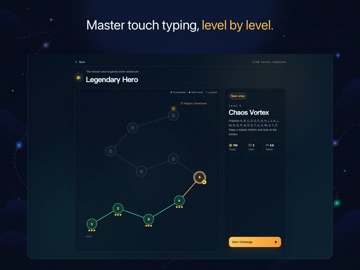
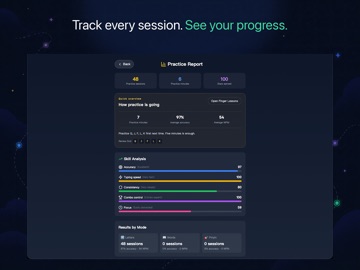
TypeHero is a game-based typing practice app for children and beginning typists. It combines guided finger-placement lessons, short adventure levels, and clear practice reports so learners can build correct movements before adding speed. Good typing starts with knowing where each finger belongs. TypeHero begins with the F and J home-key markers and the home row, then reinforces those movements through letter, English-word, and pinyin-initial challenges. === Core Features === Guided Finger Placement Learn the home row, top row, and bottom row step by step. Each lesson highlights the keys and finger zones to help learners develop steady habits. Typing Adventures Type the correct letters or words to clear targets in short, focused levels. New keys and faster rhythms are introduced gradually, giving every practice session a clear goal. Three Practice Topics • Letters: progress from basic key groups to the full alphabet • English words: practice familiar vocabulary and complete-word entry • Pinyin initials: view a Chinese word and type its pinyin initials Weak-Key Practice TypeHero uses per-key performance to identify keys that need more attention and creates focused practice without repeating what is already comfortable. Multiple Ways to Practice on iPad Connect an external keyboard for full touch-typing practice, use the iPad on-screen keyboard, or choose touch-focus practice when no keyboard is available. Reports Parents Can Understand Review practice sessions, time spent, average accuracy, WPM, recent trends, and suggested keys to practice next. Local Progress and Offline Practice Progress and reports are stored on the current device by default. Once installed, lessons, adventures, and reports remain available without an internet connection. Free in This Release Every lesson and main adventure is available with no in-app purchases or subscriptions. === iPad Input Notes === A physical keyboard is recommended for full touch-typing practice. The on-screen keyboard helps learners continue without an external keyboard. Touch-focus results are stored separately and never affect keyboard WPM, accuracy, or key mastery. === Privacy === TypeHero requires no account and contains no ads, leaderboards, or third-party behavioral analytics. Practice records stay on the current device by default and are not uploaded to our servers.
Details