

Inherent: DSLR RAW Editor SOOC
Christian Haemmerle · Photo & Video
Independent analytics for this App Store listing. AppTracker is not affiliated with Christian Haemmerle.
Chart standing · US
What changed · US
Listing changes AppTracker has observed for this app in this storefront — new versions, price moves, rating shifts, and store copy.
New editing tools: • Crop with free straighten — drag the corners, lock an aspect ratio, and straighten crooked horizons with a fine alignment grid. Rotating never leaves empty corners. • White balance — temperature and tint, plus presets. It is applied to the RAW data before the camera profile, so your camera's colors stay intact. • Rotate — still one tap to fix frames the camera tagged with the wrong orientation. • The Photos grid now shows each frame the way you edited it. • Smoother editing and a cleaner toolbar on iPhone. Now also available on Mac, including a side-by-side view to compare the camera's JPEG with your RAW.
Screenshots



About
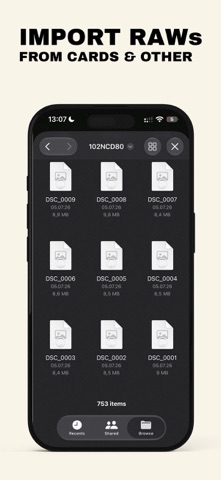
Shoot RAW. Keep the colors your camera was made for. Every DSLR has its own color signature — the rendering its manufacturer tuned into every JPEG it ever produced. It's why a CCD-era Nikon, a Canon 5D or a Fujifilm S5 Pro each have a look people still seek out today. Open the RAW files in a modern editor, though, and most of that signature is gone, replaced by a generic, one-size-fits-all profile. The photo you get no longer looks like it came from that camera. Inherent fixes that. It develops your RAW files in your camera's own straight-out-of-camera (SOOC) color, so you get the look you bought the camera for, plus everything RAW gives you. THE CAMERA'S OWN COLOR Each supported camera gets a dedicated color profile, built from real pairs of RAW files and the camera's own JPEGs. Inherent detects your camera automatically and applies its profile. Your colors, skin tones and greens look the way that camera renders them. A MODERN RAW ENGINE Under the hood, Inherent uses Apple's RAW engine, the same technology that's built into iPhone and Mac and is continually refined, including for older cameras. You get clean, detailed files by today's standards with the color character of the camera that took them. Old sensor, new pipeline: the best of both. SIMPLE BY DESIGN No sliders you'll never use. Inherent focuses on what matters most for older sensors: exposure, highlights and shadows, so you can make the most of your camera's dynamic range. Blown skies come back, shadows open up, and colors stay true. Every adjustment is reversible, with a one-tap reset for each. STRAIGHT FROM THE CARD TO PHOTOS Import RAW files directly from an SD or CF card reader connected to your iPhone. Edit, then save straight to your Photos library in full quality as a new photo. Your originals are never touched. No detours through other apps or folders. ON MAC, EVEN MORE The Mac version adds a side-by-side comparison, for example the camera's JPEG against your RAW, so you can see exactly what you've gained. CAMERAS WITH A DEDICATED PROFILE • Nikon D80 (also D40x and D60) • Nikon D200 • Canon EOS 5D • Canon EOS 5D Mark II • Canon EOS 6D • Fujifilm FinePix S5 Pro More cameras are on the way. Any other camera whose RAW files your iPhone or Mac can open works too. It gets a neutral standard profile, and Inherent works as a simple, high-quality RAW editor for it. One purchase. No subscription. No account. --- Nikon, Canon and Fujifilm are trademarks of their respective owners. Inherent is not affiliated with or endorsed by them.
What's new · 1.1
New editing tools: • Crop with free straighten — drag the corners, lock an aspect ratio, and straighten crooked horizons with a fine alignment grid. Rotating never leaves empty corners. • White balance — temperature and tint, plus presets. It is applied to the RAW data before the camera profile, so your camera's colors stay intact. • Rotate — still one tap to fix frames the camera tagged with the wrong orientation. • The Photos grid now shows each frame the way you edited it. • Smoother editing and a cleaner toolbar on iPhone. Now also available on Mac, including a side-by-side view to compare the camera's JPEG with your RAW.
Details