

Seattle Buses
Collin Bordeaux · Navigation
Independent analytics for this App Store listing. AppTracker is not affiliated with Collin Bordeaux.
Chart standing · US
What changed · US
Listing changes AppTracker has observed for this app in this storefront — new versions, price moves, rating shifts, and store copy.
A clearer map and a faster way to follow your everyday buses. • Tap bus stops to see estimated arrivals from live bus positions. • Pick a stop for each route on the map when creating or editing a custom route. • See the next two estimated arrivals for each selected stop in My Route. • Track Route 65, with updated route shapes and corrected travel directions. • Enjoy lighter route lines, a simpler My Route legend, and a cleaner Info menu. • Open your favorite route with Siri and Shortcuts. • Improved custom route saving and map zoom behavior.
Ratings breakdown · US
The star breakdown behind this app's rating in this storefront.
Screenshots





About
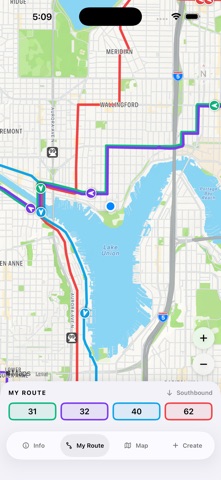
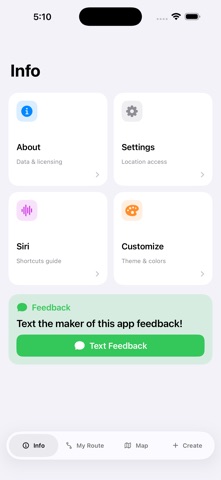
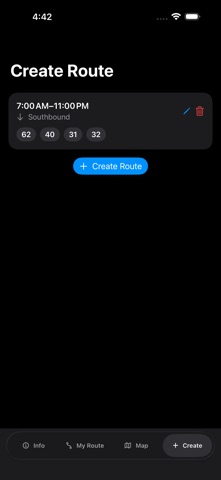
Seattle Buses puts the King County Metro routes you care about on one clear, live map. SEE YOUR BUS • Follow live bus positions on a clean map with lighter, color-coded route lines. • Compare up to four routes at once and switch travel direction. • Show bus stops on your selected routes. Tap a stop to see its name and estimated arrivals for the next three live buses. • Explore 24 supported routes, including Route 65 and RapidRide C, D, E, and H. MAKE IT YOUR ROUTINE • Save up to three custom route sets for different times of day. • Choose your stops directly on the map—no need to know a stop’s name. • Open My Route to see the saved routes for the current time window, with up to two upcoming arrival estimates for each selected stop. • Adjust your saved routes and stops as your routine changes. OPEN A ROUTE WITH SIRI Say “Siri, show me the 40 in Seattle Buses” to open that route on the Map tab. You can also create a personal shortcut for your favorite route. MAKE THE MAP YOURS Choose your appearance and route colors from a cleaner, Settings-style Info menu. Use your location to center the map near you, or browse routes manually. No account is required. Saved route sets stay on your device. Arrival times are estimates calculated from live bus positions and remaining route distance using an average speed of 22 mph. They are not official Metro arrival predictions or scheduled departure times. Actual arrivals vary with traffic, stops, and service changes. Live vehicle availability depends on Metro’s real-time feed. Supported routes: 1, 2, 5, 7, 8, 9, 10, 12, 13, 24, 28, 31, 32, 33, 40, 44, 45, 62, 65, 70, C, D, E, and H. Transit scheduling, geographic, and real-time data provided by permission of King County.
What's new · 1.1
A clearer map and a faster way to follow your everyday buses. • Tap bus stops to see estimated arrivals from live bus positions. • Pick a stop for each route on the map when creating or editing a custom route. • See the next two estimated arrivals for each selected stop in My Route. • Track Route 65, with updated route shapes and corrected travel directions. • Enjoy lighter route lines, a simpler My Route legend, and a cleaner Info menu. • Open your favorite route with Siri and Shortcuts. • Improved custom route saving and map zoom behavior.
Details