

Decibel Meter & Sound Spectrum
Robert Carpenter · Utilities
Independent analytics for this App Store listing. AppTracker is not affiliated with Robert Carpenter.
Chart standing · US
What changed · US
Listing changes AppTracker has observed for this app in this storefront — new versions, price moves, rating shifts, and store copy.
Mac Version now Ready Decibel Meter & Sound Spectrum is now available on the Mac App Store for Mac computers. Use the desktop Control Room to view SPL, RTA, FFT, level history, waterfall and estimated noise dose together. Expand an instrument for detailed inspection, then close it to return to the overview. This iPhone and iPad update adds the Mac availability announcement to What’s New. Your existing tools and purchases are unchanged.
Screenshots
About
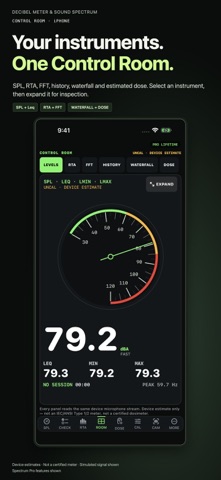
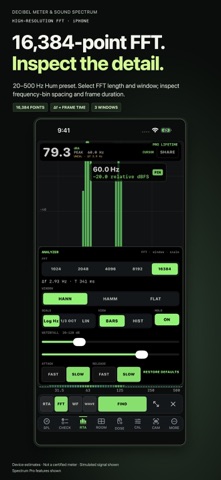
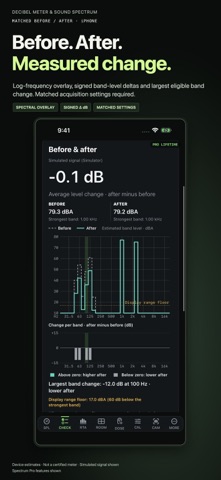
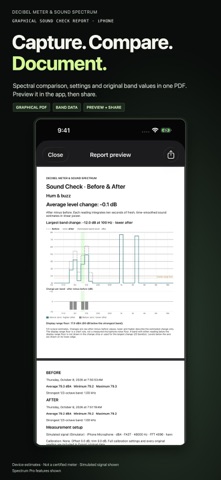
SPL. Spectrum. Exposure. One Control Room. Monitor sound pressure level, frequency content and changes over time in one workspace. Built for audio engineers, AV technicians, installers, musicians and anyone investigating environmental sound. SIX-INSTRUMENT CONTROL ROOM On iPad and Mac, view SPL/Leq, octave-band RTA, FFT, level history, waterfall and estimated noise dose simultaneously from one microphone stream. Expand an instrument for detailed inspection, then close it to restore the overview. Compact iPhone layouts show one instrument at a time. Live panel previews are available; Spectrum Pro unlocks professional interactions and saved work. HIGHER-RESOLUTION SPECTRAL ANALYSIS Choose FFT lengths from 1,024 to 16,384 points with Hann, Hamming or flat-top windows. Analyzer controls show frequency-bin spacing and frame duration. The Hum preset combines 20–500 Hz focus with a 16,384-point FFT. Longer frames improve bin spacing at the cost of temporal resolution; they do not improve microphone calibration. FREE LIVE SOUND LEVEL METER Grant microphone access for live estimated dBA, Leq, Lmin/Lmax and Hold. Spectrum Pro adds analysis, Sound Check, sessions, recording and exports. GUIDED SOUND CHECK Use Hum & Buzz, Feedback Tone or Venue Sound Check to capture ten seconds before and after an adjustment. Compare logarithmic-frequency spectral overlays, signed 1/3-octave band deltas and the largest band change. Export a graphical PDF with measurement settings and the original frequency table, or share the original JSON data. Comparisons require matching microphone, calibration and measurement settings. Relative tone strength helps you follow a frequency; it does not identify the noise source. MEASURE AND ANALYZE • Live estimated SPL, Leq, Lmin, Lmax, Hold and peak frequency • A, B, C, Z and ITU-R 468 weighting; Fast, Slow and Impulse response • 1/3-octave RTA, FFT, bars, line and scrolling waterfall views • System RTA, Feedback, Hum and Waterfall analyzer presets • Named calibration profiles and guided comparison with a trusted physical meter • Saved sessions, field reports and estimated noise dose MORE TOOLS Pro includes AAC/WAV and video recording, camera overlays, waveform inspection, loud-noise alerts, Live Activities, Siri/Shortcuts, optional iCloud session backup and Default Tool selection at launch. Twelve app languages; reports and Watch screens remain English. Sound Checks remain local unless exported. On Mac, use the input selected in macOS Sound settings. Calibrate each microphone and gain setting against a trusted reference. Apple Watch is a remote for an active iPhone session, not a standalone meter. No HealthKit integration. SPECTRUM PRO PRICING Choose Monthly, Annual or one-time Lifetime access. Apple shows current localized prices and any introductory-offer eligibility before purchase. Existing purchases remain honored. Subscriptions renew automatically unless canceled at least 24 hours before the current period ends. Payment is charged to your Apple Account at confirmation or after an eligible trial. Manage or cancel in Apple Account subscription settings. Lifetime is a one-time purchase. ACCURACY AND PRIVACY Device microphone readings are estimates. This is not an IEC/ANSI Type 1 or Type 2 meter, a certified dosimeter, or a replacement for required safety equipment. Use a trusted reference and consistent positioning for meaningful comparisons. Audio is processed on device. Optional audio/video recording starts only when you choose Record. Recordings stay local unless exported and are excluded from iCloud session sync. Optional iCloud backup is off by default. No tracking. Measurement is foreground-only; Live Activities may show paused or stale readings when measurement stops. Privacy Policy: https://gqbunny.com/decibel-meter-sound-spectrum-privacy.php Terms of Use (Apple Standard EULA): https://www.apple.com/legal/internet-services/itunes/dev/stdeula/
What's new · 3.1.1
Mac Version now Ready Decibel Meter & Sound Spectrum is now available on the Mac App Store for Mac computers. Use the desktop Control Room to view SPL, RTA, FFT, level history, waterfall and estimated noise dose together. Expand an instrument for detailed inspection, then close it to return to the overview. This iPhone and iPad update adds the Mac availability announcement to What’s New. Your existing tools and purchases are unchanged.
Details