

Kigen: Expiry Date Tracker
Kusama Yoshiki · Utilities
Independent analytics for this App Store listing. AppTracker is not affiliated with Kusama Yoshiki.
Chart standing · US
What changed · US
Listing changes AppTracker has observed for this app in this storefront — new versions, price moves, rating shifts, and store copy.
A fresh new look, plus new features. ・New design and icon. The next item to expire is shown big at the top ・Emergency supply check: see whether your water and food reach guideline amounts for your household ・Shopping list: used-up items are added automatically ・Record what you used up or threw away, month by month ・Home Screen and Lock Screen widgets
In-app purchases · US
What this app sells inside itself, grouped by kind and priced for this storefront.
Screenshots



About
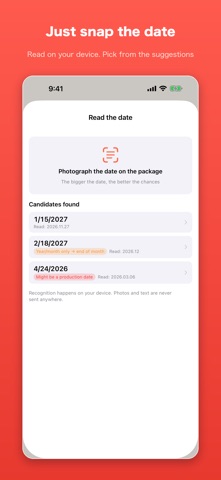
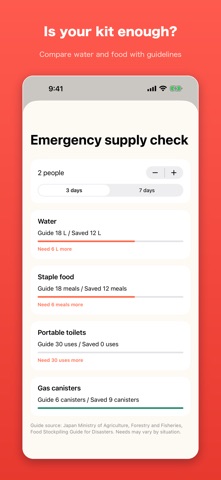
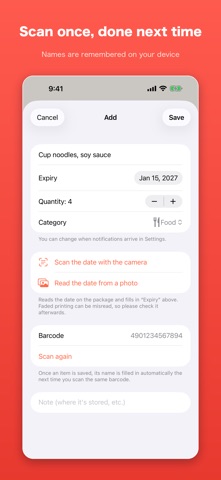
Kigen keeps the expiry dates of the food in your kitchen and the supplies in your emergency kit in one list, and tells you before they run out. ■ From the second time, just scan the barcode Type a product name in once and the app ties it to that barcode on your device. Buy the same thing again and scanning fills the name in for you. Food and emergency supplies are things you buy over and over, so from the second time there is almost nothing left to type. On a first scan the app can also look the barcode up online. Plenty of products are not in the database, so if nothing comes back, type the name yourself — it will be there next time. ■ Read the printed date with the camera Point the camera at the date printed on the pack, or pick a photo of it. Recognition runs entirely on your iPhone: no image and no text leaves the device. Dates on food packs are often dot-printed, low contrast, or on a curved film, so the app does not fill the date in on its own. It lists the dates it read and you tap the right one. If none of them look right, type it in. ■ Emergency supplies get an early warning ・Emergency supplies … 60 days before the date ・Medicine … 30 days before ・Food and household items … the number of days you choose (3 by default) Restocking an emergency kit takes longer than a trip to the shop, so those items are flagged earlier. Notifications arrive at 9 in the morning. ■ Emergency supply check Choose how many people and how many days (3 or 7), and the app shows whether the water, staple food, portable toilets and gas canisters you have saved reach the guideline amounts, and how much more you would need. The guidelines are based on public sources such as the Japanese Ministry of Agriculture's food stockpiling guide. What your household needs depends on your situation, so treat them as a rough guide. ■ Use one, replace one — with a shopping list Tap "Use one" when you eat or use something. When the count reaches zero, the item drops off the list and goes onto your shopping list automatically. Tick it off when you buy it and add the new date straight away. The Stock tab shows what you have by category, so the oldest goes first. ■ See what you used up When you remove an item, mark it as used up or thrown away. A monthly record shows how much you managed to use, which helps you notice when you are buying too much. ■ Clear at a glance, even from the Home Screen The next item to expire sits at the top, with counts for expired items and those due within 7 days. The list is split into expired, due today, coming up and plenty of time, and can be filtered by category. Home Screen and Lock Screen widgets show what is next without opening the app. ■ Everything stays on your device, except one thing Product names, dates, counts and notes are all stored on your iPhone and are never sent anywhere. The one exception is the online product lookup: it sends the digits of the barcode and nothing else — no device identifier, none of your saved items — and you can switch it off in Settings. With it off, the app makes no network requests for lookups at all. The camera is used only for reading; nothing is recorded or uploaded. ■ Premium, bought once Up to 20 items can be saved without Premium. Premium lifts the limit on the number of items and removes the ads. It is a one-time purchase, not a subscription. Please note: this app records dates and reminds you about them. Whether something is still fit to eat or use is your own call — the app does not judge food safety.
What's new · 2.0
A fresh new look, plus new features. ・New design and icon. The next item to expire is shown big at the top ・Emergency supply check: see whether your water and food reach guideline amounts for your household ・Shopping list: used-up items are added automatically ・Record what you used up or threw away, month by month ・Home Screen and Lock Screen widgets
Details