

MusicSubtitles
Lionel Teo · Music
Independent analytics for this App Store listing. AppTracker is not affiliated with Lionel Teo.
Chart standing · US
What changed · US
Listing changes AppTracker has observed for this app in this storefront — new versions, price moves, rating shifts, and store copy.
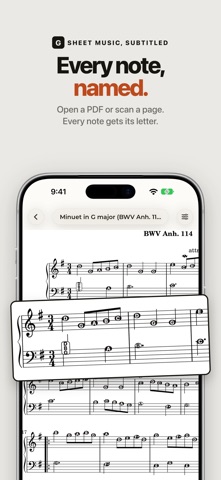
A fresh look A calmer, warmer design with floating controls that keep out of the way of your music. Letters right on the notes Every note's letter now sits on its notehead, so you read the name and the note in one look. Prefer the old style? Switch to Above & below in Letters. Scan or photograph your music Point your camera at a printed page, or pick photos, and Note Names reads them like a PDF. A live guide helps you line up a sharp shot. Start playing sooner Page 1 opens as soon as it's read, and the rest of the piece fills in while you play. Each piece also reopens right where you left off. Better reading Grace notes and small cue notes are now read accurately, and busy pages place letters so they don't cover other notes. Easier fixing Drag a letter wherever you want it. Tap one to change it, add a sharp or flat, or put it back. Undo any change with one tap. Simpler settings Choose your letter style, which hands to show, how many letters, and their size. The rest is tucked under one row. Swipe to turn pages Turn on Swipe to turn pages to flip through a piece one page at a time, like a book.
Price & rating history · US
Reconstructed from the listing changes AppTracker has observed in this storefront. A field is charted once it has changed more than once, and each line starts at the value it moved from.
Average rating · ★ 4.50 now · 2 changes on record
Ratings breakdown · US
The star breakdown behind this app's rating in this storefront.
In-app purchases · US
No in-app purchases.
Screenshots


About
Like subtitles for sheet music: every note's letter name, written right on the page. Play first. The notation sinks in as you go. For beginner and returning piano players who can play from letter names but stall on reading notation, and for parents helping kids practice. Import a sheet-music PDF and your iPhone or iPad reads it in seconds, fully offline. Or start from the Verified library: classical pieces by Bach, Mozart, and Chopin, their note names checked, note by note, against their source before shipping. HOW IT WORKS • Each note gets a small letter pill, above the staff for the right hand and below for the left. Accidentals like F# and C# are marked too. • Zoom into a dense passage and the letters hold their size, so crowded bars open up instead of shrinking. • Wrong read? Fix the letter with a tap and it sticks with the piece. WEAN OFF AT YOUR OWN PACE The reliance dial turns support down as a piece becomes familiar. Six steps take you from every letter, through landmarks and bar starts, down to ledger notes only, and finally none. Each piece remembers its own setting, and surprise accidentals stay marked until the very last step. MAKE THE SCORE YOURS Write fingering and reminders with your finger or Apple Pencil. The eraser lifts a whole stroke in one tap, undo brings it back, and markings save with the piece. PRIVATE BY DESIGN Everything happens on your device. No account, no ads, no tracking, no internet needed. Your sheet music never leaves your device. FREE TO START The whole Verified library is free, and so is your first import of your own sheet music. Unlock unlimited imports with a single purchase. No subscription, no ads. Bought the app before? Everything stays unlocked. For iPhone and iPad. On iPhone, turn it sideways and the page opens up to read like it does on an iPad. Also runs on Apple Silicon Macs.
What's new · 1.5.1
A fresh look A calmer, warmer design with floating controls that keep out of the way of your music. Letters right on the notes Every note's letter now sits on its notehead, so you read the name and the note in one look. Prefer the old style? Switch to Above & below in Letters. Scan or photograph your music Point your camera at a printed page, or pick photos, and Note Names reads them like a PDF. A live guide helps you line up a sharp shot. Start playing sooner Page 1 opens as soon as it's read, and the rest of the piece fills in while you play. Each piece also reopens right where you left off. Better reading Grace notes and small cue notes are now read accurately, and busy pages place letters so they don't cover other notes. Easier fixing Drag a letter wherever you want it. Tap one to change it, add a sharp or flat, or put it back. Undo any change with one tap. Simpler settings Choose your letter style, which hands to show, how many letters, and their size. The rest is tucked under one row. Swipe to turn pages Turn on Swipe to turn pages to flip through a piece one page at a time, like a book.
Details