

BlurSeal: Redact & Blur Photos
占辉 百 · Photo & Video
Independent analytics for this App Store listing. AppTracker is not affiliated with 占辉 百.
Chart standing · US
What changed · US
Listing changes AppTracker has observed for this app in this storefront — new versions, price moves, rating shifts, and store copy.
Improved privacy protection and a smoother editing experience.
In-app purchases · US
What this app sells inside itself, grouped by kind and priced for this storefront.
Screenshots



About
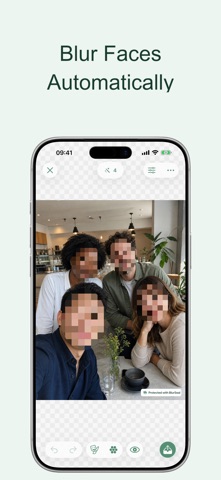
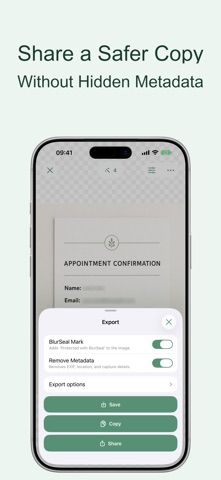
Share photos, screenshots, and document copies without exposing private details. BlurSeal finds faces, sensitive text, IDs, license plates, QR codes, and barcodes on your iPhone, then lets you review every suggested mask before sharing. No account. No uploads. No tracking. AUTOMATIC PRIVACY REDACTION • Find faces, profile pictures, license plates, sensitive text, QR codes, and barcodes • Protect names, phone numbers, email and postal addresses, account names, ID numbers, bank cards, verification codes, reference numbers, and more • Choose which categories, recognition languages, and custom keywords to protect REVIEW AND REFINE • Tap detected content or a mask to turn protection on or off • Paint over anything the automatic scan missed • Move and resize masks you add by hand • Choose pixelate, hex mosaic, blur, solid cover, Erase, or face emojis SHARE A SAFER COPY • Open images from Photos, Files, Camera, Paste, or the Share extension • Add a purpose watermark to document copies • Permanently flatten every mask into the exported pixels • Remove EXIF, location, device, and capture metadata before export PRIVATE BY DESIGN Photos, recognized text, detections, edits, and exports stay on your device. BlurSeal requires no account, uploads no images, uses no tracking, and collects no data. Free exports include a small “Protected with BlurSeal” mark. BlurSeal Pro is a one-time purchase that removes the mark and permanently unlocks custom protection rules, redaction defaults, Erase, custom watermarks, one-tap emoji changes for all faces, and export controls. Automatic detection can miss or misclassify content. Always review the protected image before sharing. Only edit images you own or are authorized to modify. By using this app, you agree to Apple's Standard End User License Agreement (EULA): https://www.apple.com/legal/internet-services/itunes/dev/stdeula/
What's new · 1.0.4
Improved privacy protection and a smoother editing experience.
Details