

Boxset: TV Tracker
Haatch Ventures LLP · Entertainment
Independent analytics for this App Store listing. AppTracker is not affiliated with Haatch Ventures LLP.
Chart standing · US
What changed · US
Listing changes AppTracker has observed for this app in this storefront — new versions, price moves, rating shifts, and store copy.
A new way in, and a change to accounts. New to Boxset? Swipe through a short introduction, pick the shows you follow from a grid of posters or by search, and set where you are in each before you create your account. Boxset now keeps every library in an account, so it is backed up as you go and follows you to iPad and Apple TV. Already using Boxset without one? You have two weeks to sign in, and every show and logged episode comes with you. Opening the app without a connection now keeps you signed in, and your library syncs when you're back.
Screenshots


About
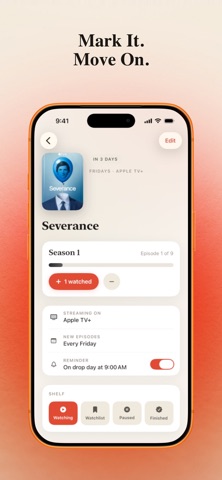
Juggling six shows on five streaming services, you lose track of what's actually on tonight. Boxset gives you one calm home screen with a single answer: the episode airing soonest, when it drops, and where to watch it. No more scrolling through apps trying to remember if the new season started. Plain-language countdowns like Tonight, Tomorrow, and In 3 days tell you exactly when to tune in, for every series you follow. Watching an episode is one tap. Hit +1, and your progress bar fills in, your count advances, and finishing a season earns a small celebration. It's a satisfying way to see how far you've come, series by series. Organise your library into Watching, Watchlist, Paused, and Finished shelves. Long-press to move a show between them as your habits change, and see counts at a glance so nothing gets lost in the shuffle. Each show carries its streaming service as a coloured chip, covering eleven major platforms plus a custom option for anything else. Weekly reminders nudge you on drop day at the reminder time you set for yourself. Adding shows is fast. Popular titles filter as you type, so common series go from search to shelf with a tap. Season and episode steppers make it easy to log where you are, and a show you have finished tells you when it comes back, so a new season is one tap away. Getting started takes a minute. Pick the shows you follow, set where you are in each, then create a free account with Apple, Google, or an email address. Your library backs itself up as you go, so a new iPhone, iPad, or Apple TV picks up on the exact episode you left off, and it still works offline. Only you can read your library, and you can delete your account from Settings whenever you like. Watching together? Share your library with one person by code: both phones see the same shelves, either of you can log an episode, and your reminders stay your own. If you watch more than one show at a time, give your library a home. Download Boxset and always know what's on next.
What's new · 1.0.7
A new way in, and a change to accounts. New to Boxset? Swipe through a short introduction, pick the shows you follow from a grid of posters or by search, and set where you are in each before you create your account. Boxset now keeps every library in an account, so it is backed up as you go and follows you to iPad and Apple TV. Already using Boxset without one? You have two weeks to sign in, and every show and logged episode comes with you. Opening the app without a connection now keeps you signed in, and your library syncs when you're back.
Details