

Pixelsynth: AUv3 Visual Synth
de Bastion, Inc · Music
Independent analytics for this App Store listing. AppTracker is not affiliated with de Bastion, Inc.
Chart standing · US
What changed · US
Listing changes AppTracker has observed for this app in this storefront — new versions, price moves, rating shifts, and store copy.
New in 1.1.1 • See your pitch glides. Hold a pad and slide: a marching line now runs from the note to your finger, so you can watch the bend and the vibrato. • The delay tank now sets how much delay you hear, with a gentle number of repeats, and leaves the delay time alone. Open the tank for the full time and repeat range. CC 94 on a MIDI controller moves it the same way.
Ratings breakdown · US
The star breakdown behind this app's rating in this storefront.
In-app purchases · US
No in-app purchases.
Screenshots



About
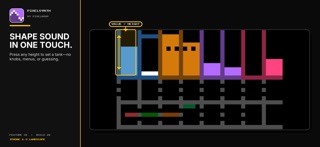
Make a sound in seconds—and shape it while it plays. Pixelsynth turns taps, drags, melodies, and chords into a colorful instrument you can understand by watching it. Everything you play lives on one screen. Touch a note and start exploring. FROM THE DEVELOPER OF PIXELBOOP Pixelsynth is a new visual instrument from the maker of Pixelboop. Both apps share a love of playful grids, immediate feedback, and musical ideas that begin with one touch. PLAY FIRST. LEARN BY WATCHING. Sixteen pads invite you to find a melody, hold a chord, or strum across the screen. Notes light up as you play, and every sound control moves in front of you. You can see what each gesture is doing while you hear the result. SHAPE THE SOUND LIVE • Switch waveforms to change the character of your sound. • Sweep the filter from bright and open to soft and focused. • Shape attack, decay, sustain, and release for crisp plucks, swelling notes, and long tails. • Add motion with LFO, repeating echoes with delay, and depth with reverb. Each control is a colorful tank. Touch higher or lower inside it to set the value directly. Values in the upper half stay where you leave them; notes in the lower half drain away after you lift. It feels immediate because the picture and the sound follow the same gesture. MADE TO BE SEEN Created by a Deaf musician, Pixelsynth treats visual feedback as part of the instrument. The entire musical surface is drawn on a 40 by 24 pixel grid—just 960 pixels—so every control stays visible and every change has a visual response. PLAY IT YOUR WAY Open Pixelsynth as a standalone instrument on iPhone or iPad, or load the included AUv3 instrument in a compatible iOS music host. Your host can send MIDI notes and save the instrument state with your project. A compatible host is available separately. FREE TO EXPLORE No account. No in-app purchases. No third-party ads. The instrument works offline. The standalone app may occasionally show developer news or an introduction to Pixelboop, which you can close immediately. Pixelsynth does not track you or collect the music you play. Open it. Touch a note. See where it takes you.
What's new · 1.1.1
New in 1.1.1 • See your pitch glides. Hold a pad and slide: a marching line now runs from the note to your finger, so you can watch the bend and the vibrato. • The delay tank now sets how much delay you hear, with a gentle number of repeats, and leaves the delay time alone. Open the tank for the full time and repeat range. CC 94 on a MIDI controller moves it the same way.
Details