

Holler: LED Banner & Big Text
Tejesh Mehta · Utilities
Independent analytics for this App Store listing. AppTracker is not affiliated with Tejesh Mehta.
Chart standing · US
What changed · US
Listing changes AppTracker has observed for this app in this storefront — new versions, price moves, rating shifts, and store copy.
• Words mode has its own pace, in words per minute. Auto is 250, and the dial runs from 100 to 1000. • Tap the display in Words mode for a Pace slider with an Auto button, the way Scroll has Speed. • Opening the app starts fresh: Scroll, Auto speed, plain style. Recents still bring back their own look.
In-app purchases · US
What this app sells inside itself, grouped by kind and priced for this storefront.
Screenshots




About
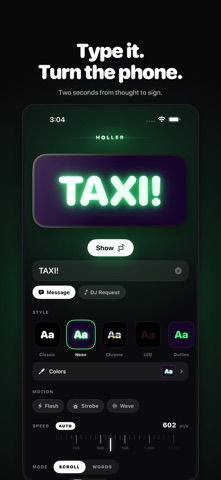
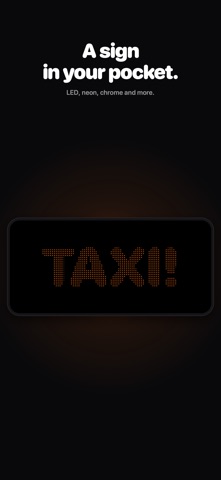
Hold your phone up and let the room read it. Type a message, turn the phone sideways, and it scrolls across the screen — big enough, bright enough, and moving enough to read from thirty feet away. Because sometimes shouting doesn't work. The music is too loud, the room is too full, or the person you need is too far away to hear you. Holler says it for you. ASK THE DJ WITHOUT PUSHING THROUGH THE CROWD Type the song and the artist. Holler formats it the way a DJ can read in one glance, mid-set, from the booth. No shouting over the bass, no waiting for a gap, no shoving to the front. It works anywhere a voice doesn't: airport arrivals, a packed bar, across a parking lot, the back of a concert, a noisy shop floor. TEN WAYS TO MAKE IT UNMISSABLE • Neon — a blown-out core inside a coloured halo, like real tube signage • Chrome — polished Y2K metal with a highlight that travels as the words move • LED — a dot-matrix sign, every letter lit pixel by pixel • RGB — the whole line cycling hue, gamer-peripheral style • Wave — letters rising and falling one after another • Flash — the classic blink, at a deliberately safe rate • Gradient — a band of hot colour sweeping along the text • Rainbow — a full spectrum carried across the letters • Outline — a hard stroke that stays readable against any background • Plain — because sometimes the biggest, cleanest letters win BUILT TO BE READ, NOT ADMIRED • Four high-contrast palettes tuned for distance, plus any colour you like • Speed you can dial by feel, or leave on automatic • Short messages hold still instead of scrolling — easier to read that way • The screen stays awake while your message is up • Taps do nothing. Bump it, grip it, hand it to a stranger — it keeps going • Runs on iPad too — the same message on a much bigger sign TURN IT, DON'T TAP IT Turning the phone sideways puts your message up. Turning it back brings you home. That's the whole interaction — it works with rotation lock on, and there's always a button if your hands are full. Your recent messages are one tap from the keyboard, styled exactly as you last showed them. NOTHING LEAVES YOUR PHONE Holler has no networking code at all. No account, no sign-in, no analytics, no ads, no servers. Your messages are typed, stored, and displayed on your device and nowhere else. It works in aeroplane mode, in a basement venue, on a dead network. App Store privacy label: Data Not Collected. Because there is nothing to collect.
What's new · 1.1.1
• Words mode has its own pace, in words per minute. Auto is 250, and the dial runs from 100 to 1000. • Tap the display in Words mode for a Pace slider with an Auto button, the way Scroll has Speed. • Opening the app starts fresh: Scroll, Auto speed, plain style. Recents still bring back their own look.
Details