

.html — HTML Viewer
LUCAS LONGUEIRA MARINO · Productivity
Independent analytics for this App Store listing. AppTracker is not affiliated with LUCAS LONGUEIRA MARINO.
Chart standing · US
What changed · US
Listing changes AppTracker has observed for this app in this storefront — new versions, price moves, rating shifts, and store copy.
• Search inside your documents: search now looks through the text of every HTML, not just the title, ignoring case and accents. • New magnifying glass in the viewer to find text in the open document, with every match highlighted. • Versions: import a file with the same name and it's saved as a new version of the same document, with earlier ones still available. • Merge two documents into one with "Merge with…". • Real thumbnails for every document. • Documents are no longer covered by the top bar or the camera area.
In-app purchases · US
No in-app purchases.
Screenshots




About
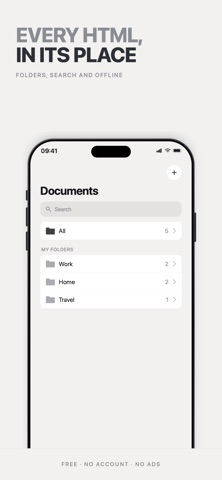
.html is an HTML document viewer. It is not an editor: no code writing, no console, no syntax highlighting. It stores the HTML files you already have, keeps them organized, and opens them when you need them. AI generates more HTML files than ever: reports, calculators, dashboards, interactive summaries. They come out of a chat, get opened once in a browser, and disappear among tabs and downloads. .html is the tool for handling them. WHAT IT DOES • Saves every HTML inside the app — its own copy, which opens offline. • Shows it full screen, with no address bar and no tabs. • Runs the document as it is: its scripts, styles and buttons all work. • Organizes files into folders, with pinned documents on top and sorting by date, name, or your own order by dragging. • Groups them by date automatically: today, yesterday, last 7 days, last 30 days. • Searches by title. MEMORY A document opened in Safari starts from scratch every time. Not here: whatever the document saves stays saved. Tick a checkbox in a list, fill in a form, switch a tab in a dashboard — close the app, come back days later, and it is exactly as you left it. Each document keeps its own state, and none can read another's. PRIVACY No account, no sign-up, no ads, no analytics. The app never connects to a server: your documents never leave your iPhone. ADDING DOCUMENTS Through the + button, which opens the Files app and shows only HTML files. Also via «Open with» from Files or Safari.
What's new · 1.2
• Search inside your documents: search now looks through the text of every HTML, not just the title, ignoring case and accents. • New magnifying glass in the viewer to find text in the open document, with every match highlighted. • Versions: import a file with the same name and it's saved as a new version of the same document, with earlier ones still available. • Merge two documents into one with "Merge with…". • Real thumbnails for every document. • Documents are no longer covered by the top bar or the camera area.
Details