

Wall Township NJ
Township of Wall · Reference
Independent analytics for this App Store listing. AppTracker is not affiliated with Township of Wall.
Chart standing · US
What changed · US
Listing changes AppTracker has observed for this app in this storefront — new versions, price moves, rating shifts, and store copy.
Stay connected on your terms! Turn on Township Notifications and choose your interests from Township Alert Center, Township Updates, and Government & Meetings. Open the Settings gear > Notification Preferences, enable notifications, select your topics, and tap Save Preferences. The new Inbox keeps Township notices together so you can read them, mark them read, and revisit them later.
Screenshots


About
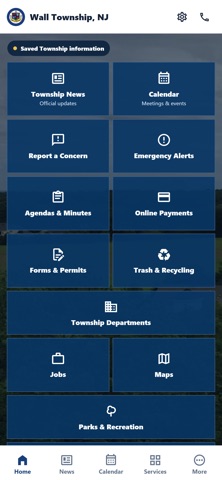
Wall Township NJ is the official mobile application of the Township of Wall, New Jersey. It gives residents and visitors convenient access to municipal information and online services from wallnj.gov. Stay connected to the updates that matter to you. Turn on Township Notifications, then select your interests from three groups: - Township Alert Center: weather, traffic, and service notices - Township Updates: community news, recreation, public works, and events - Government & Meetings: public meeting calendars, agendas, and minutes Open the Settings gear, choose Notification Preferences, turn on Township Notifications, select your topics, and tap Save Preferences. You choose the topics you want; no resident account is required. App features include: - A Township Inbox with read and delete controls - Township news and announcements - Meetings, events, and community calendars - Report a concern - Agendas and minutes - Online payments, forms, and permits - Trash and recycling information - Departments and staff directory - Employment opportunities - Maps, parks, and recreation resources - Township Committee information Information is retrieved from the official Township website. Certain services may open secure websites or third-party service providers. This app provides municipal information and is not a substitute for emergency warning systems or emergency services.
What's new · 1.2
Stay connected on your terms! Turn on Township Notifications and choose your interests from Township Alert Center, Township Updates, and Government & Meetings. Open the Settings gear > Notification Preferences, enable notifications, select your topics, and tap Save Preferences. The new Inbox keeps Township notices together so you can read them, mark them read, and revisit them later.
Details