

Fix My Route: Route Optimizer
Ramanpreet Singh · Navigation
Independent analytics for this App Store listing. AppTracker is not affiliated with Ramanpreet Singh.
Chart standing · US
What changed · US
Listing changes AppTracker has observed for this app in this storefront — new versions, price moves, rating shifts, and store copy.
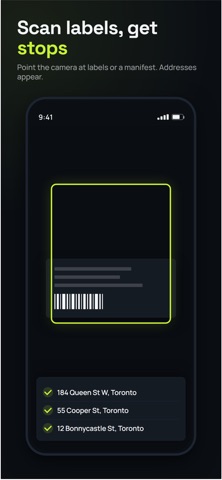
Scan packages Point your camera at FedEx labels and each box's address goes straight onto your route. Keep the camera open and scan box after box, with a live counter, flashlight, undo, and a quick review before adding. Two boxes for one address become two parcels at one stop. Know which shelf every box is on Set up your vehicle once with your own spots, like "Passenger Top" or "Shelf 7". Pick the spot while you scan, and every stop shows where its box is. Free saves one vehicle; Pro saves up to 10. Add a stop mid-route without losing progress Adding a delivery during your route no longer resets anything. Done stops stay done, and you choose: keep your order and fit the new stop in, or re-plan what's left. The rest of the route is planned from where you are, and you can undo right after. History in the order you delivered The route timeline now lists stops in the order you actually did them, including skips, and shows where the plan had them. Fixes - Unit numbers and notes now show on the stop card without tapping. - Cleaner spacing on the stop card.
Ratings breakdown · US
The star breakdown behind this app's rating in this storefront.
Screenshots



About
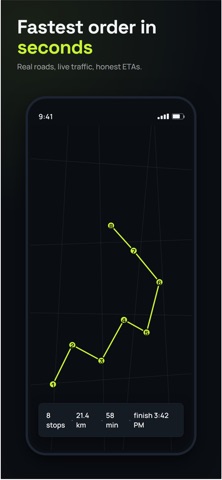
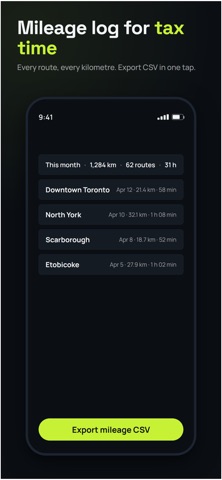
Fix My Route turns a list of addresses into the fastest route to drive them, built for delivery drivers, couriers, and anyone running multiple stops a day, not for planning a single trip. HOW IT WORKS Add your stops, type them one at a time, paste a whole list at once, upload a CSV, or just take a photo of a delivery manifest or app screenshot and let Fix My Route read the addresses for you. Tap Optimize, and get the fastest visiting order in seconds. Then work through your route stop by stop: mark each one Arrived, Done, or Skipped, and hand off to your own preferred maps app, Google Maps, Apple Maps, or Waze — for the actual turn-by-turn driving. BUILT FOR THE JOB, NOT THE DESK - Skip a stop and the rest of that cluster re-optimizes automatically - Works when you don't have signal, mark stops done in an elevator or a dead zone, and it syncs the moment you're back online, no lost work - Real history, not guesses: every finished route logs actual start time, actual finish time, and how long you spent at each stop, so you know exactly how your day went versus the plan - Large, thumb-friendly controls designed to be used one-handed, on the move GO PRO FOR - Unlimited stops per route - Unlimited photo/screenshot address imports - Avoid tolls, highways, and ferries when it matters Whether you're running your own delivery route, dispatching for a small courier business, or just tired of manually figuring out the best order to hit ten stops, Fix My Route gets you moving faster and keeps a real record of the work you did. Questions or feedback? We read every email, reach us right from the app's Settings screen. ... Questions or feedback? We read every email, reach us right from the app's Settings screen. Terms of Use (EULA): https://www.apple.com/legal/internet-services/itunes/dev/stdeula/ Terms of Service: https://app.fixmyroute.app/terms Privacy Policy: https://app.fixmyroute.app/privacy
What's new · Added Barcode Reader
Scan packages Point your camera at FedEx labels and each box's address goes straight onto your route. Keep the camera open and scan box after box, with a live counter, flashlight, undo, and a quick review before adding. Two boxes for one address become two parcels at one stop. Know which shelf every box is on Set up your vehicle once with your own spots, like "Passenger Top" or "Shelf 7". Pick the spot while you scan, and every stop shows where its box is. Free saves one vehicle; Pro saves up to 10. Add a stop mid-route without losing progress Adding a delivery during your route no longer resets anything. Done stops stay done, and you choose: keep your order and fit the new stop in, or re-plan what's left. The rest of the route is planned from where you are, and you can undo right after. History in the order you delivered The route timeline now lists stops in the order you actually did them, including skips, and shows where the plan had them. Fixes - Unit numbers and notes now show on the stop card without tapping. - Cleaner spacing on the stop card.
Details