

Days Until - Countdown Widgets
LEGAL PROMPT INC. · Utilities
Independent analytics for this App Store listing. AppTracker is not affiliated with LEGAL PROMPT INC.
Chart standing · US
What changed · US
Listing changes AppTracker has observed for this app in this storefront — new versions, price moves, rating shifts, and store copy.
Adjusted UI.
In-app purchases · US
No in-app purchases.
Screenshots
About
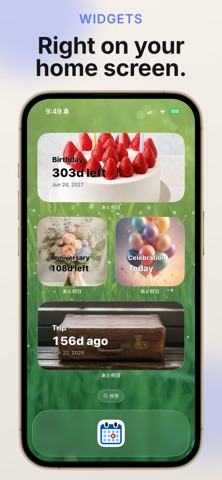
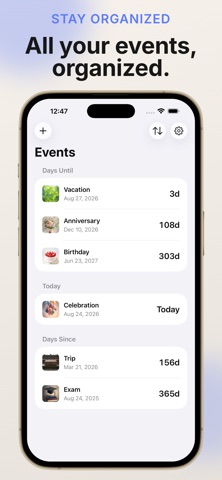
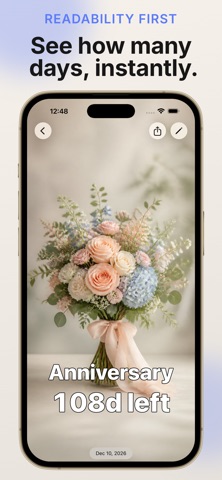
Days Until app lets you see at a glance how much time is left until an important event, or how much time has passed since one. Track birthdays, anniversaries, exam dates, due dates, and more. [Countdown / Count-up Display] · Remaining or elapsed time updates automatically in real time · Choose exactly which units to show: years, months, weeks, days, hours, minutes, seconds · Fractional amounts round up; all-day events show a clear "Today" label on the day itself [Customize Your Background] · Choose photos from your library, built-in illustrations, patterns, or solid colors · Generate images with Apple Intelligence on supported devices · Freely set text color, size, weight, and position — drag it anywhere on screen [Three Sections at a Glance] · Events are automatically sorted into "Upcoming," "Today," and "Since" · They move between sections automatically as time passes, and you can flip the sort order anytime [Repeating Events] · Supports daily, weekly, monthly, and yearly repeats · Automatically advances to the next date once an event has passed [Import from Calendar] · Pick events straight from the calendars on your device · Browse events from multiple calendars at once with "All Calendars" [Share & Widgets] · Create a shareable image combining your background, title, and remaining time · Check events without opening the app using Home Screen widgets (Small/Medium/Large/Extra Large) · Choose a different event for each widget [Apple Watch Support] · Check your event list and countdown screen right on your Apple Watch · See remaining time at a glance with watch face complications [iCloud Sync] · Keep your events in sync across devices (optional, off by default) Available in Japanese and English. Requires iOS 18 or later. Works on iPhone, iPad, and Apple Watch.
What's new · 1.0.5
Adjusted UI.
Details