

Weft: Tap Counter
Yi Yin · Productivity
Independent analytics for this App Store listing. AppTracker is not affiliated with Yi Yin.
Chart standing · US
What changed · US
Listing changes AppTracker has observed for this app in this storefront — new versions, price moves, rating shifts, and store copy.
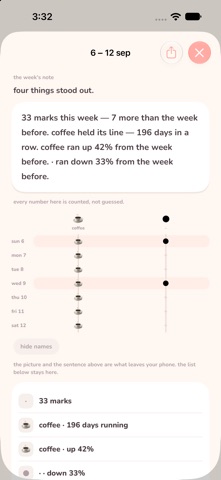
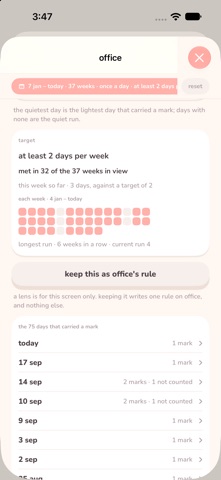
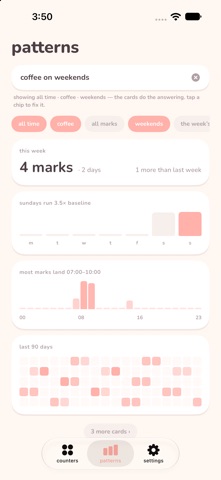
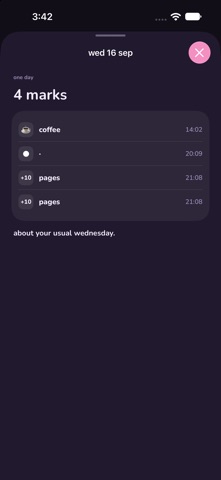
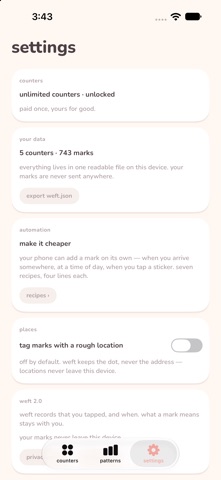
Weft 2.0 — days, context, and the note that arrives. This is a large update. If the version on your phone is 1.0, everything below is new to you. THE WEEK'S NOTE Every Monday the app writes a short summary of the week you just had, against the week before: what rose, what went quiet, your fullest day. It now arrives in its own Home Screen widget, composed on the spot, so it reaches you without an app launch. You can share it as a picture — with every thread name hidden, if you would rather show the shape than the subject. THE PATTERN LENS Open any pattern card and re-cut it where it stands. Choose your own start and end date. Count one day instead of three taps in the same day. Set a target, such as at least two days a week, and read it back against the window you chose: "met in 32 of the 37 weeks in view." Every kind of card now has a detail screen designed for it, and the taps a target does not count are still listed underneath rather than dropped. DAYS AS A UNIT A rule can count days instead of marks — three gym days a week, not three taps a week. The widget, the Shortcuts action and the app all read that number through the same rule, so they cannot disagree with each other. CONTEXT Narrow the whole board to only nights, only mornings, only weekends, or only one place. Nothing new is stored to make this work: the context is worked out from the timestamps you already have. DAY STORIES Tap any day in the grid to read that day back in order, with an honest comparison against your other Tuesdays. ASK, AND SAY IT Ask the loom a question in your own words and watch the filters change to match; on supported iPhones you can also describe a counter out loud instead of building it by hand. THE PHONE DOES THE TAPPING A Control Center control that also sits on the Action Button. Siri phrases. Shortcuts actions that hand back a count, your last mark, or the week's note. And seven ready-made automation recipes in Settings, each with a sentence you can copy and a live line showing when the last mark actually landed. PLACES, IF YOU WANT THEM An opt-in setting groups marks by where they happened. Coordinates are rounded on the device and never sent anywhere. Off by default. THREE FREE COUNTERS The free tier goes from one counter to three. One counter could never show a pattern between counters, and the patterns are the point. Unlimited counters is still a single $5.99 purchase, and if you already bought it nothing changes. Also: a card for your very first marks, so day two has something to show; two honest empty states instead of one blank board; and a fix for a rare case where a mark made from a widget could be overwritten.
Screenshots


About
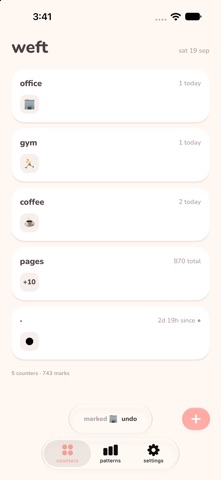
Tap a glyph when something happens. Weft turns those taps into days, weeks and patterns — and every Monday it writes you a short note about the week you just had. Three days in the office. Two gym days. Nine days without. Weft counts the days so you don't have to keep the tally in your head. WHAT THE APP GIVES BACK The week's note. Last week against the week before, in plain sentences: what rose, what went quiet, your fullest day. It arrives in a Home Screen widget, so you can read it without opening anything — and you can share the picture of a week with every thread name hidden, if you would rather not show what you count. The loom. Cards that assemble themselves out of what you have logged: your rhythm, your hours, your weekday shape, your longest run, how two counters move together. Ask a question in your own words and the filters change to match. Every card opens onto the marks it was built from, so you can check any number yourself. The lens. Open a pattern and re-cut it. Pick your own start and end date. Count one day instead of three taps. Set a target — two days a week — and read which weeks met it: "met in 32 of the 37 weeks in view." The taps that didn't count are still listed, never quietly dropped. Day stories. Tap a day in the grid and read it back: what you marked, in order, and how that day compared with your other Tuesdays. Context. Ask for only nights, only weekends, or only one place, and every card answers again under that condition. LOGGING TAKES A SECOND, OR NONE • Home Screen and Lock Screen widgets that count up in place • A Control Center control you can also put on the Action Button • Siri and Shortcuts — "add a mark", or ask for a count out loud • Automations you build in Shortcuts: arrive somewhere, plug in the charger, tap a sticker, and the phone does the tapping for you • Seven ready-made recipes in Settings, each one a sentence you can copy IT NEVER LEARNS WHAT YOUR MARKS MEAN Weft stores a glyph and a time. That is the whole record. It does not know whether ● is a coffee, a commute, or something you would rather not write down — only you do. There are no categories to choose, nothing to declare, nothing to be graded on. No streak to protect. No notifications. No goal you have to set before you are allowed to begin. PRIVACY IS THE ARCHITECTURE, NOT A POLICY No account, no sign-in, no server. Your marks never leave this device. They sit in one plain, readable file that you can export to yourself any day you like and open with your own eyes. PRICE Three counters are free, permanently, with full history, every widget, every pattern and export. Unlimited counters is one payment of $5.99. There is no subscription. The patterns are never behind the paywall — if the app can see something in your data, it shows you. Privacy policy: https://jadewisdom.com/privacy
What's new · 2.0
Weft 2.0 — days, context, and the note that arrives. This is a large update. If the version on your phone is 1.0, everything below is new to you. THE WEEK'S NOTE Every Monday the app writes a short summary of the week you just had, against the week before: what rose, what went quiet, your fullest day. It now arrives in its own Home Screen widget, composed on the spot, so it reaches you without an app launch. You can share it as a picture — with every thread name hidden, if you would rather show the shape than the subject. THE PATTERN LENS Open any pattern card and re-cut it where it stands. Choose your own start and end date. Count one day instead of three taps in the same day. Set a target, such as at least two days a week, and read it back against the window you chose: "met in 32 of the 37 weeks in view." Every kind of card now has a detail screen designed for it, and the taps a target does not count are still listed underneath rather than dropped. DAYS AS A UNIT A rule can count days instead of marks — three gym days a week, not three taps a week. The widget, the Shortcuts action and the app all read that number through the same rule, so they cannot disagree with each other. CONTEXT Narrow the whole board to only nights, only mornings, only weekends, or only one place. Nothing new is stored to make this work: the context is worked out from the timestamps you already have. DAY STORIES Tap any day in the grid to read that day back in order, with an honest comparison against your other Tuesdays. ASK, AND SAY IT Ask the loom a question in your own words and watch the filters change to match; on supported iPhones you can also describe a counter out loud instead of building it by hand. THE PHONE DOES THE TAPPING A Control Center control that also sits on the Action Button. Siri phrases. Shortcuts actions that hand back a count, your last mark, or the week's note. And seven ready-made automation recipes in Settings, each with a sentence you can copy and a live line showing when the last mark actually landed. PLACES, IF YOU WANT THEM An opt-in setting groups marks by where they happened. Coordinates are rounded on the device and never sent anywhere. Off by default. THREE FREE COUNTERS The free tier goes from one counter to three. One counter could never show a pattern between counters, and the patterns are the point. Unlimited counters is still a single $5.99 purchase, and if you already bought it nothing changes. Also: a card for your very first marks, so day two has something to show; two honest empty states instead of one blank board; and a fix for a rare case where a mark made from a widget could be overwritten.
Details