

Gridshot: Scan to Spreadsheet
Alan Agon · Productivity
Independent analytics for this App Store listing. AppTracker is not affiliated with Alan Agon.
Chart standing · US
In-app purchases · US
What this app sells inside itself, grouped by kind and priced for this storefront.
Screenshots


About
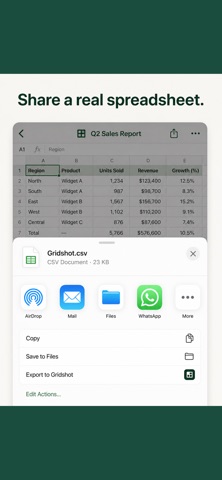
Photo a table. Get a spreadsheet. Stop retyping rows by hand. Point your camera at a printed table and Gridshot turns it into an editable sheet you can export in seconds. No account, no upload, no waiting. Rosters. Price lists. Stock counts. Score sheets. Timetables. Whiteboard grids before someone wipes them. Anything laid out in rows and columns. HOW IT WORKS 1. Photograph the table, choose a photo, or share an image straight to Gridshot 2. Gridshot reads the rows and columns and shows you the grid 3. Tap any cell to correct it, then export Cells Gridshot wasn't certain about are highlighted, so you know exactly where to look instead of checking all of them. EXPORT ANYWHERE Send a CSV or spreadsheet file to Files, Mail, Numbers, Excel, Google Sheets, AirDrop, or anything else on your share sheet. Open it on your Mac a second later. STAYS ON YOUR IPHONE There is no sign-up, no server, and no analytics. Your photo is read on the device using Apple's built-in text recognition, so nothing is ever uploaded. Gridshot works in airplane mode. WORKS BEST WITH Printed and typed tables, photographed roughly square in frame. Handwriting, steep angles, and dim light are hard for any scanner, so straighten up and get close for the cleanest read.
Details