

ClearTake - Noise Removal
正平 孙 · Photo & Video
Independent analytics for this App Store listing. AppTracker is not affiliated with 正平 孙.
Chart standing · US
What changed · US
Listing changes AppTracker has observed for this app in this storefront — new versions, price moves, rating shifts, and store copy.
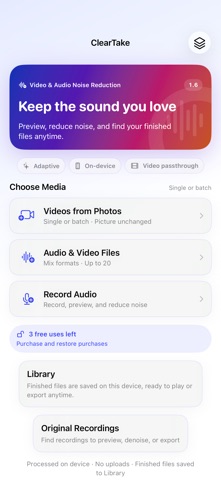
Find your recordings. Finish your export. • New Original Recordings library: preview, export, share, or denoise recordings you kept in ClearTake • Keep and Close: leave the recorder without discarding your finished recording • Export a finished video directly to Files from the result screen • Choose high-quality M4A, compact M4A, or 16-bit WAV when exporting or sharing audio from the Library • Retry a failed Library save for one result or a batch without running denoising again; a saved result is counted only once • Updated wording across 34 in-app language versions The Library retains finished outputs, not imported originals or A/B tracks. Original Recordings is separate. Recording remains foreground-only. WAV conversion cannot restore detail lost to compression.
In-app purchases · US
What this app sells inside itself, grouped by kind and priced for this storefront.
Screenshots


About
ClearTake reduces steady background noise in videos and recordings, then shows the measured change. After processing, the result is measured from sections of your media without speech. If there is not enough material to measure, ClearTake says so instead of inventing a number. Synchronized A/B playback lets you switch between the original and processed audio without losing your place. Works best on Steady noise such as fans, air conditioning, electrical hum, and hiss. The measured improvement depends on the source, the amount of speech, and the type of noise. Has limits on Sudden noise that fully overlaps speech, such as a wind gust. ClearTake does not promise to remove every kind of noise. Keep recordings and finished work • Record while ClearTake is in the foreground; locking the screen or switching apps stops recording • Choose Keep and Close or Use This Recording to retain a finished recording in Original Recordings • Find original recordings inside the app to preview, export, share, or denoise later • Keep finished audio and video in the Library to play, export, share, or delete later • Export a finished video directly to Files, or save it to Photos • Export or share audio as high-quality M4A, compact M4A, or 16-bit WAV from either the result screen or the Library • If a Library save fails, retry saving the finished output without repeating denoising; each successfully saved result is counted only once Also • Mix up to 20 videos or audio files and process them one at a time • Retry failed or cancelled processing items without repeating successful work • Copy the primary video track without re-encoding and process the audio • Choose a preview start point or use automatic segment selection • Preview and export without using a free denoising run • Process media on your device without uploading it to ClearTake's servers • Try 3 full runs free, then unlock once; no subscription and no ads • Work with video plus M4A, WAV, MP3, and other audio formats The free allowance counts full results successfully saved to the Library. Re-exporting or retrying the same saved result does not count again. Saved works and retained recordings use device storage. The Library stores final outputs, not imported originals or A/B listening tracks; Original Recordings separately exposes recordings kept by the in-app recorder. Older history entries contain metadata only and cannot restore a finished file. If saving to the Library fails, retry or export before closing the temporary result. WAV is decoded from processed audio and cannot restore detail lost to compression. System backups and the apps you choose for sharing follow your device settings and those services' policies.
What's new · 1.6
Find your recordings. Finish your export. • New Original Recordings library: preview, export, share, or denoise recordings you kept in ClearTake • Keep and Close: leave the recorder without discarding your finished recording • Export a finished video directly to Files from the result screen • Choose high-quality M4A, compact M4A, or 16-bit WAV when exporting or sharing audio from the Library • Retry a failed Library save for one result or a batch without running denoising again; a saved result is counted only once • Updated wording across 34 in-app language versions The Library retains finished outputs, not imported originals or A/B tracks. Original Recordings is separate. Recording remains foreground-only. WAV conversion cannot restore detail lost to compression.
Details