

Rewise: Flashcards & Memory
REVOT, K.K. · Education
Independent analytics for this App Store listing. AppTracker is not affiliated with REVOT, K.K.
Chart standing · US
What changed · US
Listing changes AppTracker has observed for this app in this storefront — new versions, price moves, rating shifts, and store copy.
• New: Red sheet mode (free). Answers are written in red under a red sheet; slide the sheet down to check yourself. Turn it on with the switch at the top right of the study screen, or in Settings. • Export all your cards as CSV, on any plan (in Settings). • Audio cards now play their recording during study. • Alternate app icons (Pro) now actually change the Home Screen icon, on iPad too. • When the Pro screen opens on top of a sheet, the sheet and your unsaved edits now stay in place. • The free daily cards-from-a-photo-or-PDF allowance now comes back when the day changes, even if the app stays open. • “Only if cards are due” reminders now arrive only on days when cards are actually due (they used to arrive every day), and “Warn me before a streak breaks” only on days you haven’t studied yet.
In-app purchases · US
What this app sells inside itself, grouped by kind and priced for this storefront.
Screenshots




About
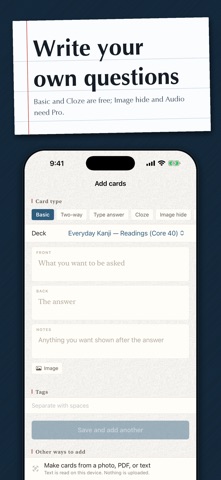
Remember it right before you forget it. Rewise turns the most current spaced-repetition science into the fastest way to study on iPhone. Medicine, exams, languages. It ends "there is too much to memorise" with actual science. Why do you forget it after all that work? Because the interval between reviews does not match your forgetting curve. The FSRS scheduler predicts the moment you are about to forget and asks you then. Set your target retention anywhere from 70% to 97%. Fewer reviews, deeper retention. How much longer is today going to take? Every answer button tells you when the card comes back — tomorrow, in 3 days, in 10 days — so you can see the end of it. When today runs out, "Study all now" adds more without disturbing the schedule. Isn't making the cards the part that kills the habit? Point it at a photo, a PDF or pasted text and it drafts the questions and answers for you, entirely on the device. Flashcard packages (.apkg / .colpkg, exported with legacy support enabled) and CSV files import directly. Everything is processed on the device and we run no servers of our own. Your cards leave the phone only if you turn on iCloud sync yourself. Is there only one way to memorise something? Basic cards, cloze deletion, image occlusion that lifts one mask at a time, and multiple choice. Red sheet mode (free) writes the answer in red under a see-through red sheet; slide it down to check yourself. Read-aloud uses the voices already on your device, so it speaks more than 30 languages. Do I need a computer? No. Building cards, masking images, importing files — all of it finishes on the device. Turn on iCloud sync (Pro) and your iPhone and iPad stay joined, with no sync button to press. But can you actually keep it up? Study reminders, and widgets for the Home and Lock Screen. Six months of heatmap, a forecast of the workload ahead, and your real measured retention: progress you can actually see. The haptics and sounds feel good, and they can be switched off. Won't it hurt my eyes at night? There is a paper-textured screen and a warm dark mode for late sessions. Pick your app icon too. What does it cost? Free, for up to 4 decks and 300 cards. The spaced repetition itself is never rationed. Rewise Pro (subscription) lifts the card limit and opens all-device sync, image occlusion, multiple-choice, typed-answer and audio cards, read-aloud, unlimited drafted cards, six-month statistics, alternate app icons, imports, and full JSON and printable PDF export. Exporting your cards as CSV is free on every plan. Yearly is the best value and comes with a 7-day free trial. A lifetime unlock is also available for anyone who prefers not to subscribe. What you learn today — for exam day, and long after. Terms of Use (EULA): https://www.apple.com/legal/internet-services/itunes/dev/stdeula/ Privacy Policy: https://revot.jp/apps/rewise/privacy.html
What's new · 1.0.1
• New: Red sheet mode (free). Answers are written in red under a red sheet; slide the sheet down to check yourself. Turn it on with the switch at the top right of the study screen, or in Settings. • Export all your cards as CSV, on any plan (in Settings). • Audio cards now play their recording during study. • Alternate app icons (Pro) now actually change the Home Screen icon, on iPad too. • When the Pro screen opens on top of a sheet, the sheet and your unsaved edits now stay in place. • The free daily cards-from-a-photo-or-PDF allowance now comes back when the day changes, even if the app stays open. • “Only if cards are due” reminders now arrive only on days when cards are actually due (they used to arrive every day), and “Warn me before a streak breaks” only on days you haven’t studied yet.
Details