

Kardhaus Business Card Scanner
CHEN GUAN-JHEN · Business
Independent analytics for this App Store listing. AppTracker is not affiliated with CHEN GUAN-JHEN.
Chart standing · US
What changed · US
Listing changes AppTracker has observed for this app in this storefront — new versions, price moves, rating shifts, and store copy.
• New: "Write a Follow-up". Tap it on a card's page, or long-press any card in the list, and Kardhaus drafts a message in their language, with a version in yours that's just for you. On iOS 27 with Apple Intelligence, Private Cloud Compute writes it; otherwise Apple Intelligence on your device or a template does. Before you generate, you see exactly what goes out: never phone numbers, emails, addresses or the card photo, and nothing is sent to Kardhaus. The draft stays on the card page, ready to copy, and every follow-up you send is kept with the card. Each AI-written draft uses one free AI credit; Pro is unlimited, and templates are always free. • Kardhaus now runs natively on iPad, in windows of any size, including Split View and Stage Manager. In a wide window, the list and the open card sit side by side. • The LINE button on a card now follows the card and opens the messenger printed on it: LINE, WhatsApp, Telegram or Zalo. If the card doesn't show one, Kardhaus picks what people use where the card is from, such as WhatsApp for an international mobile number or LinkedIn otherwise. • Fixed: a WhatsApp number printed on a card now opens the chat. Numbers with spaces used to be skipped. LINE official accounts (@id) open correctly too. • New in Settings › Privacy: "Send purchase records to RevenueCat". When it's on, purchases and restores also go through RevenueCat, which receives the purchase and a random anonymous ID. It never receives your cards or this device's identifier. Pro is still unlocked by your App Store purchase, even offline. It's on for new installs and off if you already used Kardhaus before this update. • Text that still appeared in English in other languages, such as the camera countdown, batch review and payment screens, is now translated.
In-app purchases · US
What this app sells inside itself, grouped by kind and priced for this storefront.
Screenshots




About
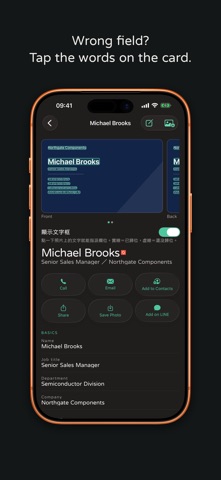
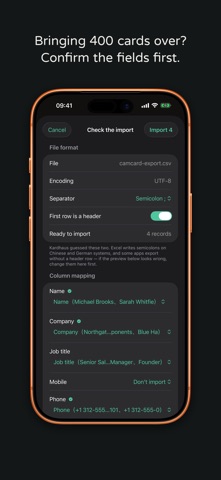
Three months later, all you have is "the machinery guy from Nangang". The card is still there; the person isn't. Kardhaus is for the version of you three months from now. Buy it once. No subscription. Scanning is free and unlimited forever. Photo, crop and text recognition happen on your iPhone and work offline. ■ You forget the name. You remember the room. The card map puts everyone back where you met them. Or just type "the machine-tool person I met in Taichung last month" — it works out the filters itself. ■ An impression only you can see "She handles purchasing, quote due September." That is never printed on a card, and three months later it is the only thing that saves you. Hold the mic and say one line — speech becomes text on the device and the audio is never stored. ■ The fields a card actually carries A LINE ID gets its own field with an Add Friend button beside it. So do a tax number, a phone extension, a licence number, and a Japanese card's name reading. None of it gets dumped into a notes field you can search but cannot tap. ■ One photo, every field Cropped, straightened, compressed — then the words on the card go into the right fields. Chinese and Latin names, job title, department, company, branch, phone, email, address, and the professional credentials a doctor's or a lawyer's card is mostly made of. ■ No need to unlock On iPhone 16 or later, set Camera Control to Kardhaus and one press shoots a card on a locked iPhone. Also from the Lock Screen, Control Center or the Action Button. ■ Both sides, one contact Scan the front and the back of a bilingual card in one go and they stay on a single card. Swipe to see the back; fields from both are read in together. Only shot the front? Tap Add Back on the card page; your edits stay put. ■ Your data leaves whenever you want Free vCard and CSV export — nothing to unlock. Imports accept vCard, CSV, and card photos, and you get to check the column mapping before anything is written. ■ Cards will not fill up your photo library Card photos live in Kardhaus's own database and are never written to your camera roll. It works the other way too: Kardhaus has no permission to read your library. ■ iCloud sync Cards live in your own private iCloud database and follow you to a new phone. We have no server and cannot see your cards. ■ What people ask before installing Is this a subscription? No. One payment, no auto-renewal, and it works with Family Sharing. What stays free? Scanning, with no limit on cards. Every field, tags, notes, search, import and export, plus 50 AI recognitions. The one-time purchase lifts the cap on AI recognition and adds natural-language search, the card map and relationship records. Does it work offline? Yes. The photo and text recognition happen on the device, so it works on a plane and in a basement exhibition hall. Offline, AI field recognition uses the on-device model. Where do my cards go? Onto this phone, and into your own private iCloud database if you switch iCloud on. There is no account, no login and no server of ours, so we cannot see your cards. On iOS 27 with Apple Intelligence on, AI field recognition sends that card's photo to Apple's Private Cloud Compute: used for that request only, never stored, and not accessible even to Apple. Can I get my data out? vCard and CSV export, free, always, with nothing to unlock. Anything that reads vCard or CSV will take them. Will cards fill up my photo library? No, and that is deliberate. Card photos live in Kardhaus's own database and are never written to your camera roll. Kardhaus also has no permission to read your library. Do I need to sign up? No. Open it and it works. Kardhaus is a one-time purchase. No subscription, no auto-renewal, yours for good, and it works with Family Sharing. — Terms of Use: https://kardhaus.com/terms Privacy Policy: https://kardhaus.com/privacy End User Licence Agreement: https://www.apple.com/legal/internet-services/itunes/dev/stdeula/
What's new · 1.2
• New: "Write a Follow-up". Tap it on a card's page, or long-press any card in the list, and Kardhaus drafts a message in their language, with a version in yours that's just for you. On iOS 27 with Apple Intelligence, Private Cloud Compute writes it; otherwise Apple Intelligence on your device or a template does. Before you generate, you see exactly what goes out: never phone numbers, emails, addresses or the card photo, and nothing is sent to Kardhaus. The draft stays on the card page, ready to copy, and every follow-up you send is kept with the card. Each AI-written draft uses one free AI credit; Pro is unlimited, and templates are always free. • Kardhaus now runs natively on iPad, in windows of any size, including Split View and Stage Manager. In a wide window, the list and the open card sit side by side. • The LINE button on a card now follows the card and opens the messenger printed on it: LINE, WhatsApp, Telegram or Zalo. If the card doesn't show one, Kardhaus picks what people use where the card is from, such as WhatsApp for an international mobile number or LinkedIn otherwise. • Fixed: a WhatsApp number printed on a card now opens the chat. Numbers with spaces used to be skipped. LINE official accounts (@id) open correctly too. • New in Settings › Privacy: "Send purchase records to RevenueCat". When it's on, purchases and restores also go through RevenueCat, which receives the purchase and a random anonymous ID. It never receives your cards or this device's identifier. Pro is still unlocked by your App Store purchase, even offline. It's on for new installs and off if you already used Kardhaus before this update. • Text that still appeared in English in other languages, such as the camera countdown, batch review and payment screens, is now translated.
Details