

DomoKey - Kody do domofonów
HONETI Filip Serewa · Utilities
Independent analytics for this App Store listing. AppTracker is not affiliated with HONETI Filip Serewa.
Chart standing · US
What changed · US
Listing changes AppTracker has observed for this app in this storefront — new versions, price moves, rating shifts, and store copy.
Fixed an issue with the map.
In-app purchases · US
What this app sells inside itself, grouped by kind and priced for this storefront.
Screenshots




About
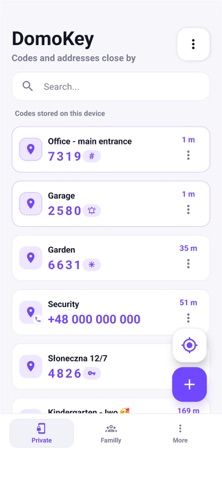
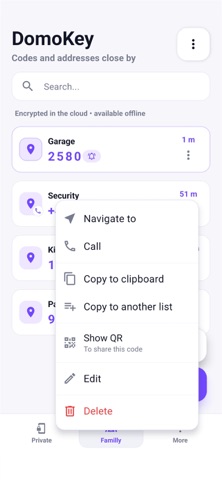
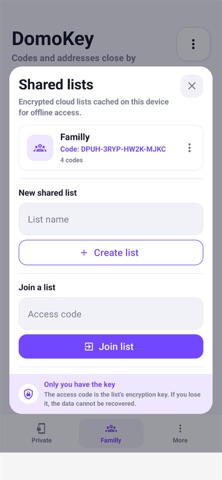
Intercom codes, addresses and GPS locations — privately or in encrypted cloud lists DomoKey is a simple and fast app for storing access codes, addresses, and important locations — either privately or in shared lists. The app is 100% free and contains no ads. In-app purchases are completely optional tips (a virtual coffee) for the developer if you'd like to support the project's development. You can store: • intercom, alarm, and access codes, • friends' and family members' addresses, • apartment and building entrance numbers, • your own notes with GPS locations. Choose how you want to store your data: • Private — your codes and locations are stored locally on your device. • Shared Lists — create a list or join one using an access code to conveniently share codes with family or friends. Shared lists are protected with end-to-end encryption. The access code is used to encrypt your data, and only the encrypted version is stored in the cloud. Keep your access code in a safe place — without it, the data in a shared list cannot be recovered. Shared lists are also stored locally on your device, so they remain available offline. Once your internet connection is restored, the app will automatically try to synchronize any changes. Key features: • Save access codes, addresses, and notes. • Private local lists and encrypted shared lists. • Share lists using an access code. • Offline support with automatic synchronization when back online. • Assign GPS locations to places. • Pick a location on the map or save your current position. • Sort locations by distance. • Quickly copy access codes. • Export and import private data as JSON files. • Generate QR codes. • Clean, fast, and easy-to-use interface. DomoKey is perfect for organizing your own access codes while also providing a secure way to share codes and addresses with family members, roommates, or anyone you trust.
What's new · 1.6.1
Fixed an issue with the map.
Details