

Ohms Explain
Omar Quddusi · Productivity
Independent analytics for this App Store listing. AppTracker is not affiliated with Omar Quddusi.
Chart standing · US
What changed · US
Listing changes AppTracker has observed for this app in this storefront — new versions, price moves, rating shifts, and store copy.
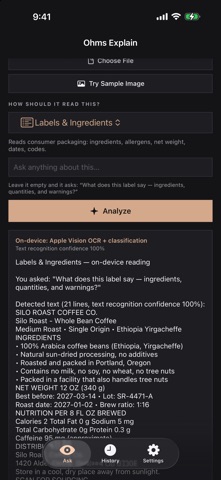
Try Sample Image now uses the Labels & Ingredients preset. Written answers no longer show stray asterisks or pound signs. Japanese text on labels now reads instead of coming back empty, and your device's own languages are recognized where supported. When no written answer is possible, the report says why. Answers reach the clipboard only when you tap Copy. Settings no longer lists a local model server, which could not run on iPhone or iPad.
In-app purchases · US
No in-app purchases.
Screenshots


About
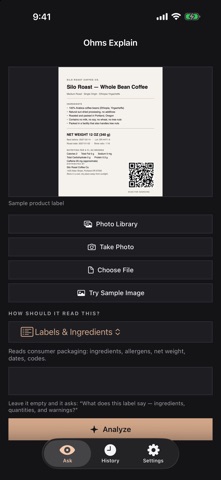
Point your iPhone or iPad at a food label, a circuit board or a QR code, ask your question, and read the answer. The image is read on your device and stays there unless you choose to connect a provider of your own. What you get depends on your device. With Apple Intelligence (iOS 26 or later) you get a written answer. Without it, Ohms Explain reports exactly what it read: the text and the likely subject, each with its measured confidence, plus any decoded code. It never makes up a summary, and it tells you why no written answer was possible. WHAT PEOPLE ASK IT • Which allergens are on this packet, and what are the lot code and best-before date? • What link does this QR code hold, before I open it? • What do the markings on this chip or connector say? • What are the date, total and line items on this invoice? • What is this object? You get the likely subject and how sure it is. FOUR WAYS IN • Take a photo with the camera. • Pick an image from your photo library. • Open a PNG, JPEG, HEIC or TIFF from Files. • A bundled sample label that needs no permissions, so you can try it in seconds. LABELS IN MORE THAN ONE LANGUAGE Printed text is read in English, German, French, Spanish, Portuguese and Japanese, plus the languages set on your iPhone or iPad wherever Apple's text recognition supports them. The app itself is in English. KEEP AND REUSE ANSWERS Ask a follow-up about the same image without taking it again. Search every past question and answer in History, copy or share an answer, or save it as a text file. History is plain text on your device, and you can delete one entry or all of them. WHAT STAYS ON YOUR IPHONE OR IPAD No account, no analytics, no telemetry, no third-party SDKs. Images are analyzed in memory and never written to disk. Nothing goes to the clipboard until you tap Copy. Label answers are informational and never medical advice. OPTIONAL: A PROVIDER OF YOUR OWN Off by default. If you want a larger vision model to look at an image, add an API key from a provider you already use. Only then does an image leave your device, and only to that provider. Keys stay in the Keychain.
What's new · 1.1.0
Try Sample Image now uses the Labels & Ingredients preset. Written answers no longer show stray asterisks or pound signs. Japanese text on labels now reads instead of coming back empty, and your device's own languages are recognized where supported. When no written answer is possible, the report says why. Answers reach the clipboard only when you tap Copy. Settings no longer lists a local model server, which could not run on iPhone or iPad.
Details