

Sales Dialer – CSV Call List
seiya kawano · Business
Independent analytics for this App Store listing. AppTracker is not affiliated with seiya kawano.
Chart standing · US
What changed · US
Listing changes AppTracker has observed for this app in this storefront — new versions, price moves, rating shifts, and store copy.
Minor improvements and stability fixes.
In-app purchases · US
What this app sells inside itself, grouped by kind and priced for this storefront.
Screenshots



About
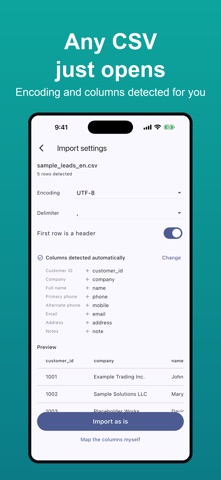
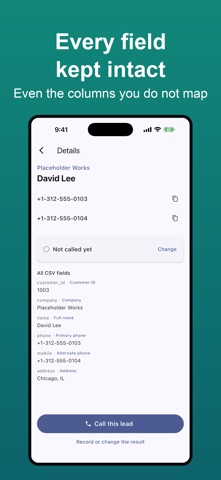
Import a CSV. Call through the list. Export every result. If your prospects live in a spreadsheet, this app lets you call them without copying numbers or typing them in. After each call you pick the outcome, and it is recorded — then export everything back in the CSV format your company expects. ■ What it removes from your day ・Hunting for the next number in a spreadsheet ・Copying or retyping phone numbers ・Going back to the sheet to write down what happened ・Working out which rows you already called ■ It reads the CSV you already have Formats differ from company to company, and that is fine. The app detects the encoding (UTF-8 / Shift_JIS) and the delimiter (comma / tab / semicolon), and you can change either. It also guesses which column is which from names like "phone", "mobile" or "company", so most files import with nothing to adjust. Leading zeros survive. So do commas and line breaks inside quoted fields. ■ Your original file comes back intact Every column, in the original order, with the original values. Call results are appended as new columns at the end. Your source file is never modified. Before exporting you can check the file name, row count, encoding and the first five rows. You can also map statuses to the values your company uses — set "Appointment → 01" once and the export is ready to hand over. ■ Layer a newer CSV on top Import a new CSV into an existing list and apply only the differences. Rows are matched by customer ID or phone number, and you see the add/update counts before anything is written. Call results, notes and callback times are never overwritten. ■ Never call the same number twice Before importing you see numbers repeated within the file, already present in another list, or on your do-not-call list. Each list has a duplicate check that keeps one lead per number. Excluded rows still appear in the exported CSV. ■ Set it up once, reuse it Save a column mapping as a template. The next file with the same columns is recognized automatically, and added or removed columns are shown first. Templates export as files you can share or move to another device. ■ How calling works Tap the large call button and the Phone app opens. When the call ends and you return, the result screen appears — choose an outcome and it saves and moves to the next person. Tapped the wrong one? Undo it. Schedule callbacks by time of day ("tomorrow morning") rather than fiddling with a clock, and get a notification when the time comes. ■ Everything stays on your device Your lists are stored only on your iPhone. Nothing is sent to our servers. No account, no ads, no analytics. Lock the app with Face ID or your passcode, and the screen is hidden when you switch apps. You can also keep customer names out of notifications. ■ Protecting the people you should not call Numbers you mark as do-not-call are skipped in every list, including CSVs you import later. Excluded contacts are clearly marked. ■ Who it is for ・Salespeople who keep prospects in Excel or CSV ・Anyone calling from an iPhone between meetings ・Freelancers and small sales teams ・Teams that do not need an expensive CTI or CRM ■ Pricing Free: CSV import, calling, result logging, CSV export and DNC (1 list, 10 calls per day). Pro, an auto-renewing monthly or yearly subscription, removes the list and daily call limits. Free data stays viewable and exportable after reaching them. ■ Please note ・Calls use your own mobile line and are billed by your carrier. ・iOS asks you to confirm every call. The app cannot dial continuously on its own. ・Call duration and call contents are not recorded. ・The app does not generate or sell phone number lists. Use only lists you are lawfully entitled to use, and check the telemarketing and privacy laws that apply where you call. The app does not check numbers against national do-not-call registries. Terms of Use: https://www.apple.com/legal/internet-services/itunes/dev/stdeula/ Privacy Policy: https://fillapps.com/privacy/
What's new · 1.2.3
Minor improvements and stability fixes.
Details