

Nerd Fonts Installer
Graham Colehour · Developer Tools
Independent analytics for this App Store listing. AppTracker is not affiliated with Graham Colehour.
Chart standing · US
What changed · US
Listing changes AppTracker has observed for this app in this storefront — new versions, price moves, rating shifts, and store copy.
Ratings breakdown · US
The star breakdown behind this app's rating in this storefront.
In-app purchases · US
No in-app purchases.
Screenshots

Keywords this app targets
Search terms AppTracker associates with this app — estimates, not search volume. ❝ = in the app's title; a highlighted number is its current position for that term.
Similar apps
Competitors and close alternatives, as estimated by AppTracker.
 Nerd Font Installer
Rim Rock Systems LLC
Nerd Font Installer
Rim Rock Systems LLC
 Fontastic - Install Fonts
Harf Labs
Fontastic - Install Fonts
Harf Labs
 Fonts - Find, install any font
Dhruv Dudhagara
Fonts - Find, install any font
Dhruv Dudhagara
 FondFont: Install System Fonts
贤安 陈
FondFont: Install System Fonts
贤安 陈
 Fonts: Install New Fonts
立毅 成
Fonts: Install New Fonts
立毅 成
 AnyFont
Evo Tec Labs @ Pepperbit Online
AnyFont
Evo Tec Labs @ Pepperbit Online
 72pt: Fonts for Designers
Sachin Sivankutty
72pt: Fonts for Designers
Sachin Sivankutty
 RightFont: Install Any Font
立毅 成
RightFont: Install Any Font
立毅 成
About
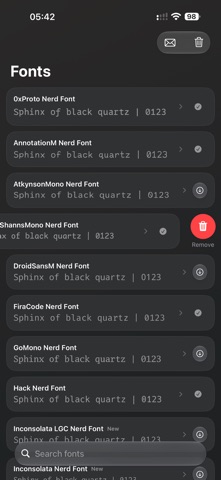
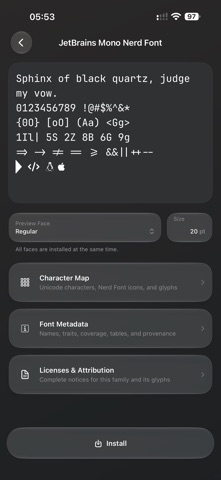
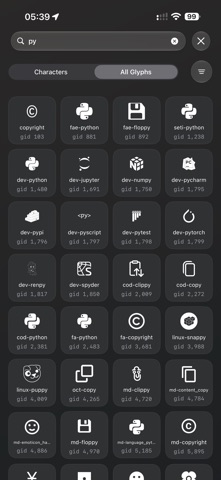
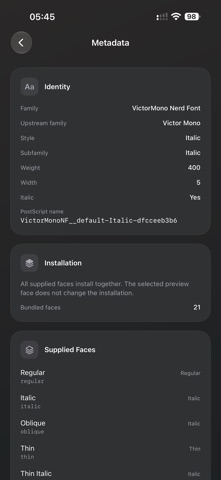
READ BEFORE PURCHASE: Installed fonts are available in apps that support Apple’s user-installed font system. Apps that provide only their own built-in font list may not display them. Ligatures depend on each app’s text-rendering settings and cannot be forced if the app does not support or enable them. Nerd Fonts Installer includes 18 Nerd Font families and 118 bundled faces. All font files, catalog data, metadata, and licenses are included with the app; no font downloads or account are required. AVAILABLE FONTS • 0xProto Nerd Font • AnnotationM Nerd Font • AtkynsonMono Nerd Font (based on Atkinson Hyperlegible Mono) • ComicShannsMono Nerd Font • DroidSansM Nerd Font • FiraCode Nerd Font • GoMono Nerd Font • Hack Nerd Font • Inconsolata LGC Nerd Font • Inconsolata Nerd Font • InconsolataGo Nerd Font • JetBrains Mono Nerd Font • MesloLGM Nerd Font • OpenDyslexic Nerd Font • Terminess Nerd Font • Ubuntu Nerd Font • UbuntuSansMono Nerd Font • VictorMono Nerd Font AtkynsonMono and OpenDyslexic provide accessibility- and readability-oriented options alongside coding and monospace designs. FEATURES • Search the complete bundled font catalog • Preview each actual bundled font with editable specimen text • Switch among every supplied face and preview sizes from 5–42 pt • Install every supplied face in a family together through the iOS Fonts system • See installation status and remove one family or all fonts installed by the app • Browse Unicode characters, Private Use Area icons, encoded and unencoded glyphs, alternates, and ligatures • Search character and glyph maps by character, code point, Unicode name, glyph ID, name, or kind • Inspect Unicode details, glyph mappings, icon sources, categories, and metrics • Copy characters and mapped glyph text • Inspect embedded names, traits, language coverage, OpenType features, variation axes, font tables, file details, counts, and checksums • Read copyright, attribution, incorporated-work notices, and complete bundled license text • Open a prefilled support email containing the app version, device model, and OS version • Native iPhone and iPad interface designed for iOS 26. Core browsing, previews, metadata, licenses, installation, and removal work from bundled resources without a network connection. Here is a non-exhaustive list of apps that user-installed fonts should work with: Code App, a-Shell, Pyto, Blink Shell, Prompt 3, Drafts, Adobe Apps, Tot, Goodnotes, Notability, Pages, Keynote, Numbers, Procreate, Adobe Photoshop, Adobe Premiere, Final Cut Pro, OmniGraffle, Noteful, IceCubes, Aidoku, Moblin, Provenance, Typography Insight, Accordance, iDesign, Clip Studio Paint, Ulysses, Noto, HashPhotos. If an app works with your Adobe Creative Cloud user-installed fonts on iOS, it should work with these (same underlying mechanism) I can verify Textastic and Obsidian do not support user-installed fonts. Textastic documentation clarifies that it's only fonts installed through a profile. Obsidian change log says it does, but no user-installed fonts were in the list of available fonts.
Details