

Cuprio: Calculator with Skins
misty-egg,Y.K. · Utilities
Independent analytics for this App Store listing. AppTracker is not affiliated with misty-egg,Y.K.
Chart standing · US
What changed · US
Listing changes AppTracker has observed for this app in this storefront — new versions, price moves, rating shifts, and store copy.
Version 1.5 adds a free 7-day trial of all features, including photo backgrounds, time calculations, history, and memory. After the trial, the standard calculator remains free. A one-time Cuprio Pro purchase keeps all features unlocked. Customers who bought the previous paid version retain Pro access.
In-app purchases · US
What this app sells inside itself, grouped by kind and priced for this storefront.
Screenshots




Similar apps
Competitors and close alternatives, as estimated by AppTracker.


About
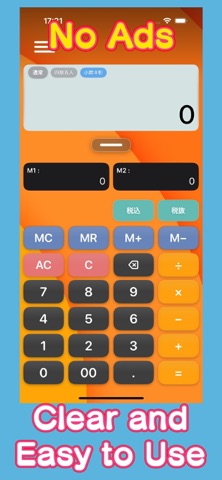
FREE TRIAL & CUPRIO PRO Try all features free for 7 days from your first use. After the trial, the standard calculator remains free. To keep using photo backgrounds, time calculations, history, memory, and more, unlock Cuprio Pro with a one-time purchase. No subscription. Make your everyday calculator easier to see, easier to use, and uniquely yours. Cuprio is a versatile calculator that lets you customize its background and perform time calculations with ease. Choose from the included preset skins, or use a favorite picture from your photo library as the background. You can adjust the image position, zoom, rotation, and the visibility of buttons and displays to create a calculator that is both personal and easy to read. 【Main Features】 ■ Customize Your Calculator • Six preset skins • Use a photo from your library as the background • Adjust the background position, zoom, and rotation • Adjust the visibility of buttons and displays • Supports iOS Light and Dark appearances ■ Four Calculation Modes • Sequential mode calculates in the order entered • Precedence mode performs multiplication and division first • Time mode calculates hours, minutes, and seconds directly • Decimal time mode is useful for hourly pay and similar calculations ■ Calculate Time Directly Calculate working hours, travel time, task duration, and more using hours, minutes, and seconds. For example, you can calculate “7 hours 30 minutes × 20 days” without first converting the time into a decimal value. The Current Time key also lets you add travel or preparation time to the current time and calculate an estimated arrival time. ■ Calculation History Review previous calculations and results in the history tray. Values from past calculations can be recalled and reused in new calculations. Important history entries can be locked, while unwanted entries can be removed from the list. ■ Return to an Earlier Calculation State Tap a calculation chip to return to that point in the expression. This is useful when you make an input mistake or want to recalculate from an earlier step. ■ Convenient Memory Functions In addition to the standard MC, MR, M+, and M− keys, Cuprio includes M1 and M2 keys for storing frequently used values. Save unit prices, constants, hourly rates, travel times, and other values, then recall them whenever needed. ■ Tax Calculations Use the TAX+ and TAX− keys to calculate tax-inclusive and tax-exclusive amounts. Choose from preset tax rates of 1%, 5%, 8%, 10%, 15%, and 20%, or enter any custom tax rate. You can also configure the number of decimal places and select rounding, rounding up, or rounding down. From quick everyday calculations to time, cost, and work-related totals, Cuprio adapts to the way you calculate.
What's new · 1.5
Version 1.5 adds a free 7-day trial of all features, including photo backgrounds, time calculations, history, and memory. After the trial, the standard calculator remains free. A one-time Cuprio Pro purchase keeps all features unlocked. Customers who bought the previous paid version retain Pro access.
Details