

Portal — Between Your Devices
Sil van Diepen · Utilities
Independent analytics for this App Store listing. AppTracker is not affiliated with Sil van Diepen.
Chart standing · US
What changed · US
Listing changes AppTracker has observed for this app in this storefront — new versions, price moves, rating shifts, and store copy.
Portal is in the share sheet. • Share a screenshot, photo, file, link or note straight to Portal from any app, without opening Portal first • The app icon is flat again, instead of picking up a glassy sheen on iOS 26 • A transfer interrupted by a device going away is cleaned up properly • Portal reconnects to a device that has gone quiet without spinning
Screenshots
About
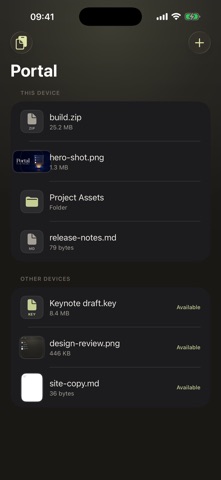
Portal is a temporary space between your own devices. Drop a file, a folder or some text into Portal on your Mac, and it appears on your iPhone and iPad straight away. Open it there, edit it, or drag it out — and when you are done, it expires on its own. WHAT MAKES IT DIFFERENT Adding something to Portal does not copy or upload it. Portal publishes a reference, and the file stays exactly where it already lives. Bytes move only at the moment another one of your devices actually opens or copies the item — directly, over your own network, encrypted end to end. That means no cloud folder filling up, no second copy to keep track of, and no account to create. • Refer, don't copy — your original file never moves • One shared tray across Mac, iPhone and iPad • In the share sheet — send a screenshot or a file to Portal from any app • Nearby devices connect automatically on your local network • Previews of what is on your other device, before anything downloads • Open and edit a file on another device and save back to the original • Drag out of Portal for a normal, independent copy • Everything expires by itself • A command-line tool for scripts and automation PRIVATE BY DESIGN There is no Portal server and no Portal account. Your files are exchanged directly between your own devices, authenticated and encrypted. Portal collects nothing: no analytics, no advertising identifiers, no file contents, no clipboard history. Portal works on one trusted local network — your home or your office — and it is deliberately small. One window, your files, nothing to manage. One purchase covers Mac, iPhone and iPad.
What's new · 1.2.0
Portal is in the share sheet. • Share a screenshot, photo, file, link or note straight to Portal from any app, without opening Portal first • The app icon is flat again, instead of picking up a glassy sheen on iOS 26 • A transfer interrupted by a device going away is cleaned up properly • Portal reconnects to a device that has gone quiet without spinning
Details