

Linear Cut List Optimizer
Gorasiya Vishal Nanjibhai · Utilities
Independent analytics for this App Store listing. AppTracker is not affiliated with Gorasiya Vishal Nanjibhai.
Chart standing · US
What changed · US
Listing changes AppTracker has observed for this app in this storefront — new versions, price moves, rating shifts, and store copy.
In-app purchases · US
What this app sells inside itself, grouped by kind and priced for this storefront.
Screenshots



About
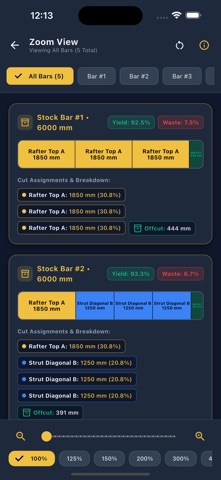
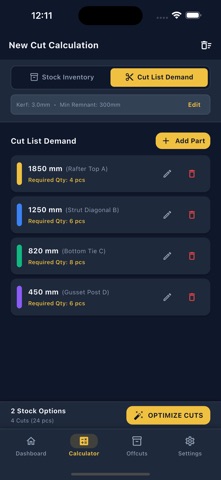
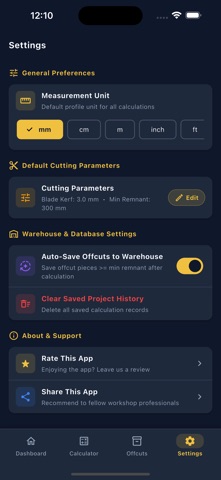
Optimize your cutting plan, reduce material waste, and get more usable pieces from every bar, pipe, tube, profile, or other linear stock. Cut List Optimizer: Linear is a powerful 1D cutting optimization tool for planning cuts before you start cutting. Enter your available stock lengths, add the pieces you need, set your blade kerf, and generate an optimized cutting plan. Stop guessing how to arrange your cuts. Plan them first. OPTIMIZE YOUR CUT LIST Enter the dimensions and quantities of the pieces you need and let the optimizer arrange them across your available stock. The app helps you: • Optimize linear cutting patterns • Reduce leftover material • Minimize the number of stock pieces required • Plan cuts before production • Use existing leftover pieces efficiently • Account for blade kerf • Set a minimum remnant length • View clear cutting patterns • Calculate material usage and waste WORK WITH MULTIPLE STOCK LENGTHS Not all stock materials are the same length. Add different available stock lengths and quantities to create a practical cutting plan. You can combine standard stock with leftover pieces from previous jobs. For example: • 6000 mm steel bars • 6500 mm aluminum profiles • 5000 mm copper pipes • 3000 mm PVC pipes • Custom-length remnants The optimizer determines how to distribute your required pieces across the available stock. ACCOUNT FOR BLADE KERF Every cut removes a small amount of material. Enter your saw blade kerf so the calculation accounts for the material lost with each cut. This helps ensure your cutting plan is realistic and prevents the final piece from unexpectedly failing to fit. SAVE USEFUL REMNANTS Not every leftover piece needs to become scrap. Set a minimum remnant length to tell the optimizer which leftovers are worth keeping. Shorter pieces can be treated as waste while useful remnants remain available for future projects. CLEAR CUTTING PLANS See exactly how each stock piece should be cut. The cutting plan shows the required pieces assigned to each stock length, allowing you or your workshop team to follow the optimized pattern during production. Review: • Stock material used • Required pieces • Remaining material • Waste • Cutting patterns • Material utilization USE IT FOR MANY MATERIALS The app is useful for virtually any material sold by length. Metal & Fabrication • Steel bars • Steel tubes • Square tubing • Angle sections • Aluminum profiles • Metal sections • Rebar Plumbing & HVAC • Copper pipes • PVC pipes • PEX pipes • Conduit • HVAC tubing Woodworking • Timber • Wooden battens • Rails • Dowels • Trim • Molding Construction & Manufacturing • Profiles • Rods • Tubes • Rails • Frames • Linear stock GREAT FOR PROFESSIONALS Designed for people who regularly work with material cut to length: • Metal fabricators • Steel workshops • Aluminum fabricators • Plumbers • HVAC installers • Construction workers • Woodworkers • Furniture makers • Window and door manufacturers • Workshop professionals • DIY builders CUT SMARTER. WASTE LESS. Material waste costs money. Instead of cutting pieces in whatever order they appear on a list, optimize the complete cut list first. A better cutting pattern can help you use fewer stock pieces and reduce unnecessary offcuts. Whether you're preparing a small workshop job or a larger production cut list, plan your cuts before you start. Enter your stock. Add your cut list. Set the kerf. Optimize your cuts. Cut smarter and get more from every piece of material.
Details