

Safe Crosswalk
Hyun Sik Kim · Health & Fitness
Independent analytics for this App Store listing. AppTracker is not affiliated with Hyun Sik Kim.
Chart standing · US
What changed · US
Listing changes AppTracker has observed for this app in this storefront — new versions, price moves, rating shifts, and store copy.
Screenshots


About
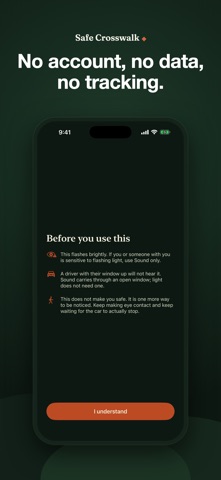
A driver turning across your path is usually looking the other way. They turn their head left to find a gap in traffic, then move right while still processing it. On-road eye-tracking has found that in a large share of turns, the driver never looks at the crosswalk at all. You are not too hard to see — their eyes are pointed somewhere else. Safe Crosswalk is one tap that pulls their attention back. WHAT IT DOES Your whole screen and your torch flash together, and a voice says "Crossing." Tap once to start, tap anywhere to stop. It stops on its own after 45 seconds. ONE PRESS, WITHOUT UNLOCKING Add it to Control Center or the Lock Screen, or bind it to the Action Button. The moment this app exists for lasts about two seconds; waking the phone, finding the icon and tapping does not fit in two seconds while you are holding a dog lead. HOLD FOR URGENT Press and hold, or use the Urgent control, when a car is already moving. Full brightness, voice forced on, and it says "Stop. Person crossing." It does NOT flash faster. 10 to 20 flashes per second is the range most likely to trigger a photosensitive seizure, so the rate is capped no matter how urgent things get. TUNED TO THE CONDITIONS YOU ARE IN Daylight, dusk or rain, night, and fog each need a different amount of light, and brighter is not always better - at night a strong light hides what is around it and costs you your own night vision, and in fog it scatters into a glare ball. You pick, because iOS will not tell an app how dark it is and asking for your location just to guess would cost more than it is worth. THREE MODES, BECAUSE ONLY YOU CAN SEE THE WINDOW • Light only — silent, and works through a closed window • Light and sound — when you cannot tell • Sound only — best when the window is down and the street is quiet Whether sound reaches a driver is decided almost entirely by one thing: a closed modern car cuts about 35 dB, so a phone would need to be nearly touching the glass. With the window down, the same phone carries several metres. No app can see the window from your pocket. You can. BUILT TO PUBLISHED RESEARCH, NOT GUESSWORK The obvious instincts — as fast and as bright as possible — are both wrong. • Flashing is capped at 4 per second. 10 to 20 is the range most likely to trigger a photosensitive seizure, and above 5 causes eyestrain. • The dim phase never goes fully dark, because a light that disappears is harder for a driver to place. • It does not use maximum brightness. Past a point, a bright beacon starts masking the very things a driver needs to see. HONEST ABOUT WHAT IT IS NOT This does not make you safe. It is one more way to be noticed. Keep making eye contact and keep waiting for the car to actually stop. What would genuinely fix this is street design — daylighting, leading pedestrian intervals, turn calming. This is what one person can carry into the gap those leave. FREE, AND PRIVATE BY CONSTRUCTION No subscription, no in-app purchase, no ads. It contains no networking code at all, so there is nowhere for your data to go. It stores three settings on your device and nothing else. No account, no location, no tracking.
Details