

SmartBreakdown
Stefan Hollekamp · Productivity
Independent analytics for this App Store listing. AppTracker is not affiliated with Stefan Hollekamp.
Chart standing · US
What changed · US
Listing changes AppTracker has observed for this app in this storefront — new versions, price moves, rating shifts, and store copy.
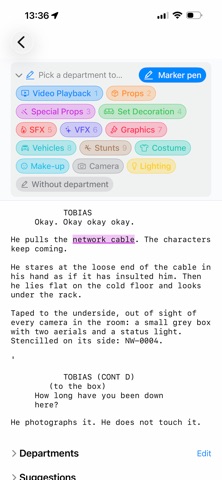
This release brings the marker pen to Apple Pencil — a breakdown the way it was done for decades, with coloured pencils on paper, except that what is left at the end is data. MARK WITH APPLE PENCIL Pick up the marker pen and a department, then draw across the screenplay with Apple Pencil. The marking is set the moment the pencil lifts. Your finger keeps scrolling while the pencil marks, with no switching back and forth. Put the marker down and the pencil scrolls like a finger again. WHOLE WORDS, EVERY TIME A stroke snaps to whole words. Nobody hits the edge of a letter with a pencil tip, and half a word would be impossible to find again in lists and exports. DOUBLE-TAP AND SQUEEZE Double-tap the pencil to move to the next department; squeeze to put the marker down or pick it up again. Both follow the pencil settings of your iPad — if you have switched double-tap off, it stays off here too. Double-tap needs Apple Pencil (2nd generation) or Apple Pencil Pro; squeeze needs Apple Pencil Pro. HANDWRITTEN NOTES Every note field takes Scribble: write by hand and it becomes text, with the same formatting as anything typed. LAYOUT FIXES • The welcome screen and the screenplay recovery screen now scroll. On iPhone in landscape, the buttons further down — the demo production among them — used to sit out of reach. • Text on the welcome screen is no longer cut off mid-sentence. • This version also corrects the subscription check. Still no account, no cloud, and no networking code of any kind.
In-app purchases · US
What this app sells inside itself, grouped by kind and priced for this storefront.
Screenshots

About
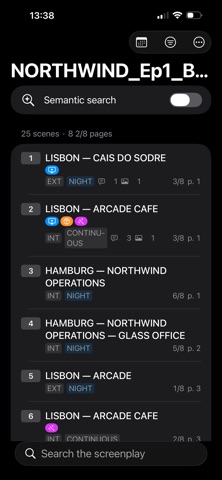
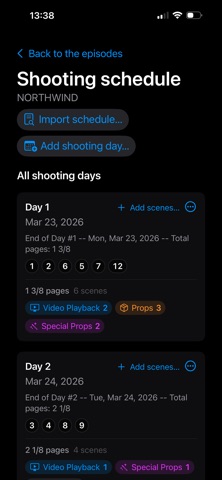
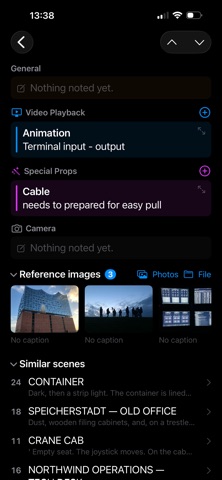
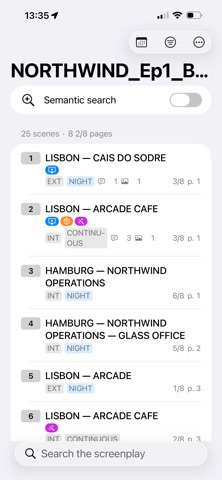
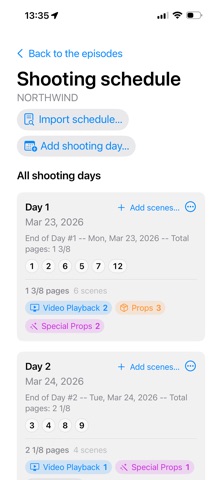
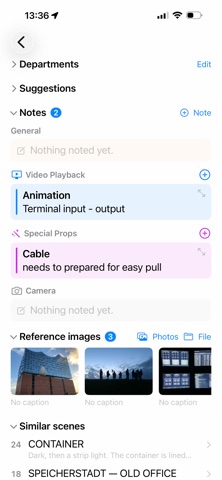
SmartBreakdown turns a screenplay into a breakdown your department can work from — prepared on Mac, carried onto set on iPad, checked on iPhone between set-ups. Nothing leaves your device. No account, no cloud, no uploads — even the semantic search runs locally. For unreleased material under NDA, that is not an extra. It is the condition. READ THE SCREENPLAY Import a PDF and SmartBreakdown finds the scenes: headings, scene numbers, length in eighths, DAY/NIGHT and INT/EXT. Dialogue stays dialogue and action stays action, so the screenplay reads the way it was written. Scans work too, and any heading the app is unsure of is shown for you to check, not quietly guessed. BREAK IT DOWN YOUR WAY Name your own departments, give them your production's colours and a symbol, and assign them to any scene. Write notes per department — with formatting — attach reference images and videos, and highlight passages in the screenplay itself. Props, Sound, Video Playback, VFX, Costume: each department sees what concerns it, and nothing else. MARK UP WITH APPLE PENCIL On iPad, pick up the marker pen and draw across the screenplay with Apple Pencil — a highlighter on paper, except that what it leaves behind can be filtered and exported. Your finger keeps scrolling while the pencil marks. Double-tap the pencil to switch department, and write notes by hand with Scribble. COST IT Put an estimate on any note — two phones, a rain bar, three doubles. Totals add up per scene, per department and across any scenes you choose, go into the PDF and Excel exports, and the app always shows what still has no amount. SCRIPT, STORY DAY AND CONTINUITY Every scene carries a running time, a story day and the clock time it plays at. Running times start as estimates from the scene's length and give way to the times you measure. See every scene of story day 2 at a tap, and know what the phone in shot or the watch in costume has to show. A NEW DRAFT KEEPS YOUR WORK Read in a revision without starting over. Departments, notes and markings hang on scene numbers, not on page positions. Coloured stripes in the margin show what each draft changed — blue pages, pink pages, as on paper — and you mark them as reviewed as you go. THE SHOOTING SCHEDULE Import a Movie Magic one-line schedule and the shooting days are linked to their scenes. Open a day to see its scenes in shooting order, with page count, running time, story days and your department's workload. FIND SCENES BY MEANING Search for "phone screen", "someone gets a message" or "computer in the background" and find the scenes, even where the screenplay puts it in other words. EXPORT WHAT IS NEEDED, NOTHING MORE PDF and Excel reports filtered by department, scenes, episode or shooting day: the full breakdown, one department, a handful of scenes or a day sheet. Send a production — or one department's work alone — to a colleague as a single file, by AirDrop or any other way, and merge their changes back when it returns. YOUR WORK STAYS YOURS A production is a single file: save it, move it between devices, carry on where you left off. Open, read, print and export it — always, with or without a subscription. TRY IT FREE No screenplay to hand? Open the demo production: a fictional episode with a finished breakdown — departments, notes with estimates, marked passages, a shooting schedule and two draft revisions. 14 days with every feature unlocked. No account required. SMARTBREAKDOWN PRO Auto-renewing subscription: EUR 12.99 per month or EUR 99.99 per year; prices vary by region. A one-off purchase is also available. Payment is charged to your Apple Account at confirmation of purchase. The subscription renews automatically unless cancelled at least 24 hours before the end of the current period. Manage or cancel it in your Apple Account settings. Terms of Use (EULA): https://www.apple.com/legal/internet-services/itunes/dev/stdeula/ Privacy Policy: https://smart-app.dev/SmartBreakdown/support/privacy.html
What's new · 1.2.1
This release brings the marker pen to Apple Pencil — a breakdown the way it was done for decades, with coloured pencils on paper, except that what is left at the end is data. MARK WITH APPLE PENCIL Pick up the marker pen and a department, then draw across the screenplay with Apple Pencil. The marking is set the moment the pencil lifts. Your finger keeps scrolling while the pencil marks, with no switching back and forth. Put the marker down and the pencil scrolls like a finger again. WHOLE WORDS, EVERY TIME A stroke snaps to whole words. Nobody hits the edge of a letter with a pencil tip, and half a word would be impossible to find again in lists and exports. DOUBLE-TAP AND SQUEEZE Double-tap the pencil to move to the next department; squeeze to put the marker down or pick it up again. Both follow the pencil settings of your iPad — if you have switched double-tap off, it stays off here too. Double-tap needs Apple Pencil (2nd generation) or Apple Pencil Pro; squeeze needs Apple Pencil Pro. HANDWRITTEN NOTES Every note field takes Scribble: write by hand and it becomes text, with the same formatting as anything typed. LAYOUT FIXES • The welcome screen and the screenplay recovery screen now scroll. On iPhone in landscape, the buttons further down — the demo production among them — used to sit out of reach. • Text on the welcome screen is no longer cut off mid-sentence. • This version also corrects the subscription check. Still no account, no cloud, and no networking code of any kind.
Details