

DriveScape
Naoki Takahashi · Lifestyle
Independent analytics for this App Store listing. AppTracker is not affiliated with Naoki Takahashi.
Chart standing · US
What changed · US
Listing changes AppTracker has observed for this app in this storefront — new versions, price moves, rating shifts, and store copy.
1.0.2 • Drive Log sharing: Share an image or short silent video with an Apple map, protected public route, distance, and more—even on days without photos. Choose portrait or landscape, vehicle art, and the details to show. • Map-led video: Choose Classic or Dynamic motion. Add up to eight reviewed photos as route-linked photo stops, matched by capture time and location and kept in their original aspect ratio. • Add photos later: Bring photos into a completed Drive Log from Photos. Unmatched photos stay out of route placement instead of moving to another point. • Resume the same record: Continue a saved Drive Log while keeping its route and photos. The unrecorded gap is excluded from distance. • Bicycle and Review: Choose bicycle and use its standard icon. Show or hide GPS-estimated maximum and moving-average speeds independently; they remain record details, not competition.
Screenshots



About
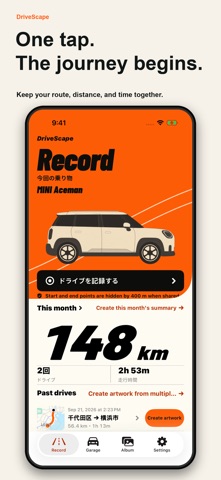
Your route and vehicle photos become one piece on the map. DriveScape turns the distance, time, photos, and videos from a drive into a Drive Log—a drive journal you can share without making the numbers the whole story. Record a drive Start a drive to save its GPS route, distance, duration, and date. Pause for a break, keep recording with the screen closed, and review when parked. Make a map-led journey Match saved photos to the public route by capture time and location. Matched photos appear at their route points in their original aspect ratio, then can become photo stops in a short silent video. On days without photos, create an image or video with an Apple map, distance, time, and place details. Choose separate portrait 9:16 or landscape 16:9 compositions, vehicle art, and Classic or Dynamic motion. Add later, resume the same log Add photos from Photos after the drive. Unmatched photos are never moved to another point. Resume a saved Drive Log into the same record; the unrecorded gap is excluded from distance. Keep each memory with its photos, videos, and finished piece. Record cars, motorcycles, or bicycles Choose the vehicle before recording and carry it into Review and sharing. Cycling records use a standard bicycle icon. Revisit monthly distance and vehicle statistics, or keep a travel memory from a road trip. Share with privacy and context Show or hide GPS-estimated maximum and moving-average speeds independently. There are no rankings or speed competition. Exact start and end points are hidden by default; choose the place detail to show, remove license-plate candidates one by one, and inspect the final preview. For safety, capture, editing, and sharing are intended for when you are parked or a passenger can operate the app safely.
What's new · 1.0.2
1.0.2 • Drive Log sharing: Share an image or short silent video with an Apple map, protected public route, distance, and more—even on days without photos. Choose portrait or landscape, vehicle art, and the details to show. • Map-led video: Choose Classic or Dynamic motion. Add up to eight reviewed photos as route-linked photo stops, matched by capture time and location and kept in their original aspect ratio. • Add photos later: Bring photos into a completed Drive Log from Photos. Unmatched photos stay out of route placement instead of moving to another point. • Resume the same record: Continue a saved Drive Log while keeping its route and photos. The unrecorded gap is excluded from distance. • Bicycle and Review: Choose bicycle and use its standard icon. Show or hide GPS-estimated maximum and moving-average speeds independently; they remain record details, not competition.
Details