

CropPress: Print Layout
Gobling Company · Graphics & Design
Independent analytics for this App Store listing. AppTracker is not affiliated with Gobling Company.
Chart standing · US
What changed · US
Listing changes AppTracker has observed for this app in this storefront — new versions, price moves, rating shifts, and store copy.
Fit, Fill and Custom now calculate their own scale, crop and uncovered area. The proof follows your actual dimensions. Edit and duplicate saved jobs, retain image previews, and share PDF and CSV specifications. Includes input validation, safer saving and a clearer interface.
In-app purchases · US
No in-app purchases.
Screenshots




Keywords this app targets
Search terms AppTracker associates with this app — estimates, not search volume. ❝ = in the app's title; a highlighted number is its current position for that term.
Similar apps
Competitors and close alternatives, as estimated by AppTracker.



About
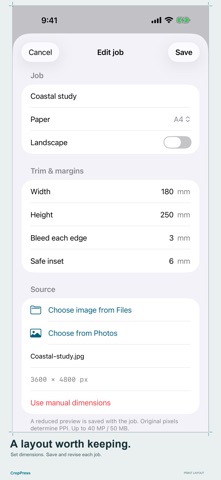
CropPress checks the geometry of a single-image print layout before you hand specifications to a print provider. Choose A3, A4, US Letter, Tabloid or square paper, set orientation, then enter trim, bleed and safe inset dimensions. Add an image from Files or Photos, or enter pixel dimensions manually. Fill covers the bleed area; Fit keeps the entire image; Custom uses your chosen PPI. All placements are centered. The measured preview, effective PPI, cropped-image percentage and uncovered-bleed percentage use the same geometry. Save, edit, duplicate and delete local jobs. A reduced image preview stays with each saved image job. Share a named PDF layout specification and a CSV of the measurements and notes. The report is not print-ready artwork. Checks compare your layout with reference values of 300 PPI, 3 mm bleed and 5 mm safe inset. These are not printer certification or a guarantee of print quality. Confirm paper, margins, resolution and bleed with your print provider. CropPress does not perform color management, CMYK conversion, PDF/X validation, multiple-image imposition or direct printing. Image imports support up to 40 megapixels and 50 MB. Preview copies are reduced to at most 2,400 pixels on their longest edge; resolution calculations use the original oriented pixel dimensions. Up to 300 saved jobs. No account, subscription, in-app purchases, ads, analytics, tracking, cloud sync or developer-server upload. Jobs and preview copies stay on your device unless you choose to share the PDF or CSV.
What's new · 1.0.1
Fit, Fill and Custom now calculate their own scale, crop and uncovered area. The proof follows your actual dimensions. Edit and duplicate saved jobs, retain image previews, and share PDF and CSV specifications. Includes input validation, safer saving and a clearer interface.
Details