

PunchPlot
响育 陈 · Business
Independent analytics for this App Store listing. AppTracker is not affiliated with 响育 陈.
Chart standing · US
What changed · US
Listing changes AppTracker has observed for this app in this storefront — new versions, price moves, rating shifts, and store copy.
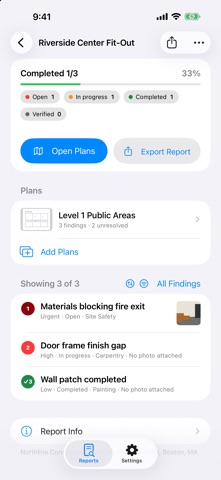
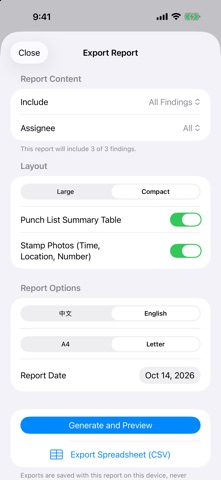
• New report home: progress, plans, and every finding in one place, with sort, filters, and swipe to complete or verify. • Close out the punch list: due dates with overdue alerts, location and trade fields, after-fix photos, and a Verified status. • Add, rename, reorder, or remove plans at any time, or open a PDF or image plan straight from Mail, Files, or another app. • Filtered reports by status, assignee, or trade, a punch-list summary table, compact before/after photo layout, photo stamps, "Page X of N", and a preview before sharing. • Export the punch list to Excel-compatible CSV. • Logo and signature are now optional; reports keep a line for a handwritten signature. • Circle and pen markup, a sample report to explore, and many polish and accessibility improvements.
Screenshots




About
PunchPlot is a focused, offline-first field inspection tool for small construction teams. Import PDF or image plans, touch and hold to place a numbered finding, capture up to eight evidence photos, and add rectangles, arrows, or text without changing the original image. Findings stay tied to their plan location, severity, status, assignee label, timestamps, and available GPS evidence. Generate a branded inspection report in Chinese or English before leaving the site. A4 and Letter PDFs include a cover, status summary, plan overviews, local plan crops, annotated photos, inspector signature, and clear notices for findings without photos. No account or PunchPlot backend is required. The core workflow works offline, and your reports, plans, findings, photos, markup, logo, and signature stay in the app's local storage unless you choose to share an exported PDF.
What's new · 1.1.0
• New report home: progress, plans, and every finding in one place, with sort, filters, and swipe to complete or verify. • Close out the punch list: due dates with overdue alerts, location and trade fields, after-fix photos, and a Verified status. • Add, rename, reorder, or remove plans at any time, or open a PDF or image plan straight from Mail, Files, or another app. • Filtered reports by status, assignee, or trade, a punch-list summary table, compact before/after photo layout, photo stamps, "Page X of N", and a preview before sharing. • Export the punch list to Excel-compatible CSV. • Logo and signature are now optional; reports keep a line for a handwritten signature. • Circle and pen markup, a sample report to explore, and many polish and accessibility improvements.
Details