

ART-emis
JAMSoft Inc · Graphics & Design
Independent analytics for this App Store listing. AppTracker is not affiliated with JAMSoft Inc.
Chart standing · US
What changed · US
Listing changes AppTracker has observed for this app in this storefront — new versions, price moves, rating shifts, and store copy.
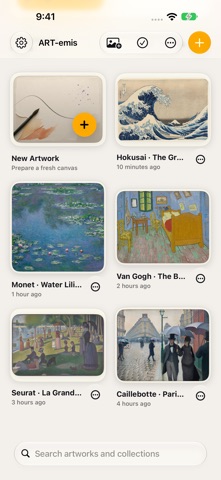
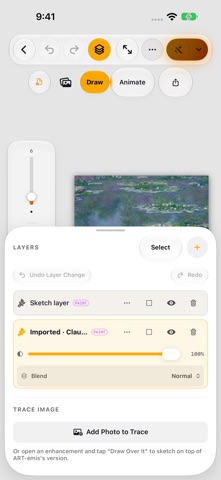
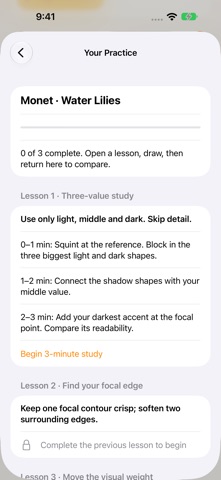
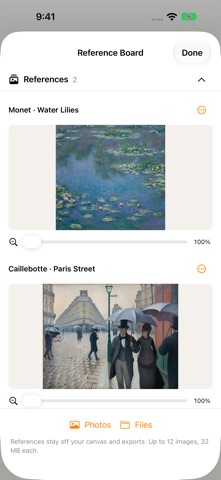
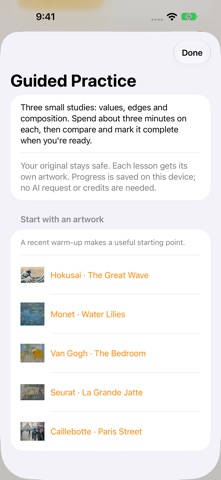
More ways to create, practice, and make your workspace your own. **Templates & References** • Start faster with built-in project templates or save your own reusable setups. • Keep inspiration close with a dedicated Reference Board for images from Photos and Files. • Use Focus Mode for a clean, distraction-free canvas. • Pin your favorite brushes for quick access. **A More Powerful Studio** • New fill, transform, crop, and copy/paste tools. • Radial and kaleidoscope symmetry across every layer. • Smoother strokes, pressure curves, tapering, and Apple Pencil Pro barrel roll support. • Wide-gamut P3 color, color harmonies, and palette import/export. • An improved iPad workspace with docked access to layers, brushes, and references. **Guided Practice** • Build your skills with focused studies for values, edges, and composition. • Save your progress and compare your work without changing the original. **Better Animation** • Export to HEVC with transparency, ProRes 4444, APNG, Live Photo, and more. • Record voice-overs and fine-tune animations with draggable keyframes and easing controls. **More Across iOS** • Home Screen widgets, Spotlight, Handoff, Shortcuts, and Share extension support. • A redesigned gallery with adjustable thumbnail sizes. • A refreshed Settings experience and cleaner iPhone toolbar. Plus, this update includes improved layouts, better support for larger text, more reliable text editing, memory optimizations, and numerous performance, stability, animation, reference-import, and artwork-comparison fixes.
Screenshots




About
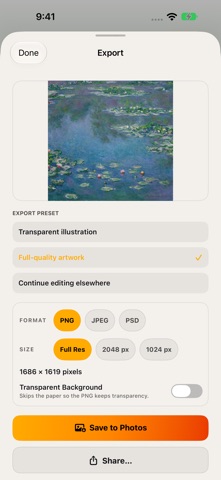
Meet ART-emis — your muse. Turn the idea in your head into something you can see, shape, and share. Art-emis brings drawing, painting, animation, and creative exploration together on iPhone and iPad. Start with a quick sketch, develop a layered illustration, or bring your artwork to life with motion—all in one studio. Make every mark your own with customizable brushes, layers, masks, text, color adjustments, and canvas guides. Reshape details with Liquify, organize your favorite brushes, and arrange your workspace to suit the way you create. Explore new directions with optional AI enhancement styles, including watercolor, anime, concept art, and storybook illustration. Compare results and use Keep My Marks to protect selected layers while exploring generated surroundings. Build your skills through focused practice. Turn critique into a guided study, work in a separate practice copy, and compare your progress while preserving your original artwork. When your ideas need movement, switch to animation. Draw frame by frame with onion skinning, or combine drawing, image, text, and audio tracks with keyframes and motion paths. Export animations as GIF or MP4, and share your creative process through Studio Replay and Process Reels. Keep your projects organized with collections, explore alternate versions, and save checkpoints you can return to. Export finished artwork as PNG, JPEG, or layered PSD, with transparent backgrounds when you need them. Start with a free 7-day trial, then unlock the drawing and animation tools with a one-time purchase. No subscription required. Optional cloud AI features require an internet connection and use Muse Credits; additional credits are available through in-app purchases. You can continue viewing and exporting your existing artwork after the trial ends. https://www.apple.com/legal/internet-services/itunes/dev/stdeula/ https://jamsoftinc.com/privacy-policy-art-emis
What's new · 1.1
More ways to create, practice, and make your workspace your own. **Templates & References** • Start faster with built-in project templates or save your own reusable setups. • Keep inspiration close with a dedicated Reference Board for images from Photos and Files. • Use Focus Mode for a clean, distraction-free canvas. • Pin your favorite brushes for quick access. **A More Powerful Studio** • New fill, transform, crop, and copy/paste tools. • Radial and kaleidoscope symmetry across every layer. • Smoother strokes, pressure curves, tapering, and Apple Pencil Pro barrel roll support. • Wide-gamut P3 color, color harmonies, and palette import/export. • An improved iPad workspace with docked access to layers, brushes, and references. **Guided Practice** • Build your skills with focused studies for values, edges, and composition. • Save your progress and compare your work without changing the original. **Better Animation** • Export to HEVC with transparency, ProRes 4444, APNG, Live Photo, and more. • Record voice-overs and fine-tune animations with draggable keyframes and easing controls. **More Across iOS** • Home Screen widgets, Spotlight, Handoff, Shortcuts, and Share extension support. • A redesigned gallery with adjustable thumbnail sizes. • A refreshed Settings experience and cleaner iPhone toolbar. Plus, this update includes improved layouts, better support for larger text, more reliable text editing, memory optimizations, and numerous performance, stability, animation, reference-import, and artwork-comparison fixes.
Details