

Jobsheet: Photo Invoices
David Long · Business
Independent analytics for this App Store listing. AppTracker is not affiliated with David Long.
Chart standing · US
What changed · US
Listing changes AppTracker has observed for this app in this storefront — new versions, price moves, rating shifts, and store copy.
Jobsheet 1.8.1 fixes sending your mileage log. THE MILEAGE LOG GOES OUT AGAIN On iOS 27, tapping Send the log to your accountant on the Mileage tab froze the app for a few seconds and the share sheet came up empty, so Save to Files, Mail and Messages did nothing. Now the spreadsheet is made first and the sheet opens on the finished file, ready to save or send. IF YOU SKIPPED 1.8 A new look and a new icon: cream paper, black ink and one deep green for everything you tap. A new job asks one thing at a time: who it's for, then what you did, with the photos. Each job shows its first photos on the Jobs list, so you can find it by looking at it. Your first job is free, start to finish. After that, Jobsheet Pro, by the month or the year. If you already subscribe, nothing changes. Estimates and invoices in English or Spanish: Settings › Estimates and invoices in.
Screenshots


About
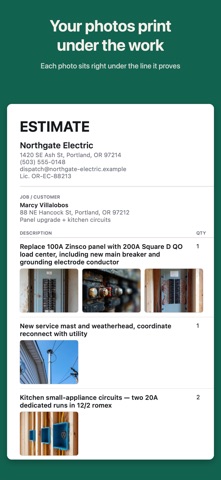
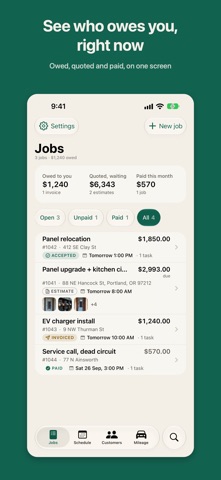
Shoot the job. Put each photo under the work it shows. Send an estimate or invoice with each photo printed right under the work it proves. Nobody argues with a bill they can see. No account, no signal needed. For electricians, plumbers, HVAC techs, roofers, handymen, painters and landscapers. Your work stays on your phone. The app, estimates and invoices in English or Spanish. ESTIMATES AND INVOICES A new job goes step by step: customer, work, price, then Send. Each line: work, how many, price. Saved work in one tap. Tax per job. "Customer said yes", then EST-0012 becomes INV-0012, with a due date. YOUR JOBS Up top: what you're owed, quoted and paid this month. Each job shows its stage, when it went out, if it's overdue, and its photos. Late bills and unanswered estimates come first. Filters. Swipe or hold to send, invoice, mark paid, book or duplicate. Search. PHOTOS The camera stays open, or add photos from your library. Shoot straight into a line of work. Arrows, circles and notes. Rotate or move. A date, time, place and business stamp. THE PDF Your logo, details and license. Sharp photos under each line. Tax, deposit, payments, balance. How to pay, with a code to scan. Note, signature, terms, page numbers. Paid, it's the receipt. SENDING AND SIGNING Preview it, add a missing email, and send it pre-written from Mail, by text, AirDrop or print. The customer signs on your phone (marked Accepted); the PDF shows their name, what they accepted, the amount, time and, when known, place. Change the price and you're warned. GETTING PAID Log payments by amount, day and method: deposits, progress payments, Paid at zero, a credit if overpaid. Your pay details on every unpaid invoice; the money goes straight to you. BOOKING Open times that fit your hours and drive time, or any time for an emergency. Clash warnings. Your week and jobs waiting for a date. Optional: Apple Calendar in the Schedule, blocking times; booked jobs sync both ways. Reminders. CUSTOMERS Phone, email, address and private notes that never print. Call, text, email, directions, past jobs, start the next one. Fixing an address never changes a sent invoice. THE CLOCK Start it on the job; it shows on every screen and warns if another is running. Fix time by hand. Hours become labor on the invoice, billed once. MILEAGE FOR THE IRS GPS with the phone locked, on a live map. Optional: keep measuring if the app closes; detect drives automatically (Motion & Fitness). Each trip: date, destination, purpose, miles, parking, tolls, that day's IRS rate; missing details flagged. The year's deduction, miles by month and your Schedule C totals. Send the log to your accountant as a spreadsheet. Route maps with Look Around. Bill travel. APPLE INTELLIGENCE AND VOICE On iPhones with Apple Intelligence (iOS 26): say what you did and check the lines; a wand tidies wording. Any iPhone: scan a supply receipt as materials; speak a line of work, trade words and all. WIDGETS, APPLE WATCH, SIRI Widgets: next job, today, money, quick actions and miles, some on the Lock Screen. A drive as a Live Activity. Apple Watch (with your iPhone): today, clock, drive, money and complications. Siri and Shortcuts: start or open a job, add work, start the clock or a drive. ALSO Optional backup to your own iCloud. A payment turns an estimate into an invoice. Drives cut short keep their miles. Trips by hand. Quick actions on the app icon. PRICING Your first job is free, start to finish. Then Jobsheet Pro is $19.99 USD a month or $149.99 USD a year in the US (elsewhere: see In-App Purchases), charged to your Apple Account when you confirm. It renews automatically unless turned off at least 24 hours before the period ends; the renewal is charged in those last 24 hours. Manage or cancel in your Apple Account settings. Without it, your records stay readable. Terms of Use: https://www.apple.com/legal/internet-services/itunes/dev/stdeula/ Privacy Policy: https://jobsheet-privacy.dlong8484.workers.dev
What's new · 1.8.1
Jobsheet 1.8.1 fixes sending your mileage log. THE MILEAGE LOG GOES OUT AGAIN On iOS 27, tapping Send the log to your accountant on the Mileage tab froze the app for a few seconds and the share sheet came up empty, so Save to Files, Mail and Messages did nothing. Now the spreadsheet is made first and the sheet opens on the finished file, ready to save or send. IF YOU SKIPPED 1.8 A new look and a new icon: cream paper, black ink and one deep green for everything you tap. A new job asks one thing at a time: who it's for, then what you did, with the photos. Each job shows its first photos on the Jobs list, so you can find it by looking at it. Your first job is free, start to finish. After that, Jobsheet Pro, by the month or the year. If you already subscribe, nothing changes. Estimates and invoices in English or Spanish: Settings › Estimates and invoices in.
Details