

Bumpy Keys: Kids Typing Game
Click Clack Labs LLC · Education
Independent analytics for this App Store listing. AppTracker is not affiliated with Click Clack Labs LLC.
Chart standing · US
What changed · US
Listing changes AppTracker has observed for this app in this storefront — new versions, price moves, rating shifts, and store copy.
Two fixes for keyboards. Pressing Esc on the unlock card now closes the card. Before, it could close the app. The first lesson can now be finished on German, Spanish, Italian and Nordic keyboards. When it asks for the ; key, press the key to the right of L.
Screenshots



About
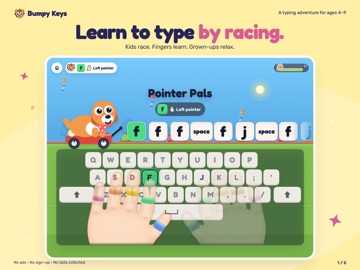
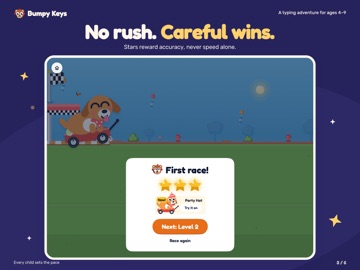
Little keys. Big adventures. Find F. Find J. Get your racer moving! Bumpy Keys helps children ages 4–9 practice typing with colorful worlds, animated finger guidance and an encouraging bear coach. START WITH A LITTLE WIN Begin with the bumpy F and J keys and build from there. New players start at the beginning; an optional placement lap is for children who have played Bumpy Keys before. Short lessons, fresh practice prompts and gentle retries help children keep going. SEE WHICH FINGER TO TRY Animated hands reach toward the next key. Color cues and optional finger shapes make the guidance easier to follow. Help fades as children grow comfortable, and accuracy comes before speed. THE FULL LEARNING PATH IS FREE Play all 100 curriculum levels in Puppy Park and Dino Dash. An optional one-time purchase unlocks all twenty worlds and racers. Dress-up rewards are earned through play. Purchases and grown-up settings sit behind a parent gate. THREE WAYS TO PLAY Little Racers (4–5) get spoken keys, bigger targets and no speed pressure. Racers (6–7) follow the regular path. Speed Racers (8–9) get faster challenges and rounds with less guidance. A daily practice plan revisits earlier keys alongside the next lesson. Arcade and same-device races add variety. SOUND THAT FITS YOUR FAMILY Bumpy cheers children on and explains the next key. Choose calm or racing music, adjust voice and key sounds, or play quietly. Grown-ups can review practice and save progress as a file. PLAY ON IPAD Use a physical keyboard to practice touch typing. Big on-screen keys are also available for exploring letters when a keyboard is not connected. NO ADS. NO PLAYER ACCOUNT TO CREATE. Learning and local profiles work offline after installation. Purchases, restoring access and online features need a connection. Progress is stored on each device; it does not automatically sync. The optional Apple purchase supports Family Sharing on iPad and Mac. Questions? hello@bumpykeys.com Privacy: https://bumpykeys.com/privacy
What's new · 1.0.7
Two fixes for keyboards. Pressing Esc on the unlock card now closes the card. Before, it could close the app. The first lesson can now be finished on German, Spanish, Italian and Nordic keyboards. When it asks for the ; key, press the key to the right of L.
Details