
Chart standing · US
What changed · US
Listing changes AppTracker has observed for this app in this storefront — new versions, price moves, rating shifts, and store copy.
Price & rating history · US
Reconstructed from the listing changes AppTracker has observed in this storefront, so each line starts at the first change on record.
Price · USD
Average rating
Screenshots


About
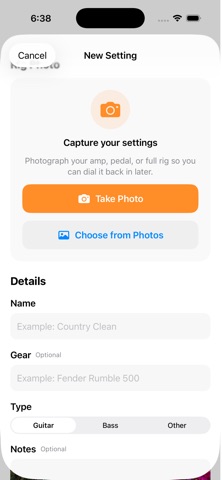
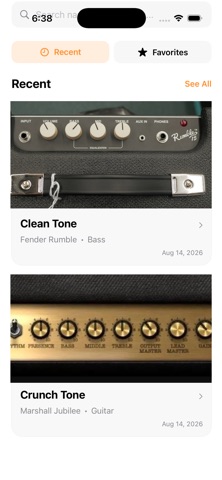
Never lose a great tone again. RigMemo is a simple visual rig notebook built for guitarists, bassists, and musicians who want an easy way to remember their favorite gear settings. Found the perfect amp tone? Dialed in your pedals just right? Instead of trying to remember every knob position, take a photo and save it in RigMemo. SAVE YOUR SETTINGS Create a setting for your guitar, bass, amp, pedalboard, effects pedals, or complete rig. Add a name, gear information, notes, and photos so you can quickly recreate your setup later. ADD MULTIPLE PHOTOS Save multiple photos with each setting. Capture your amp controls, individual pedals, pedalboard, instrument settings, or anything else you need to remember. SEE YOUR SETTINGS AT A GLANCE Browse your saved setups using photos instead of digging through notes. Tap photos to view them full screen and swipe through additional images. FIND SETTINGS FAST Search your saved settings by name, gear, or notes. Mark important setups as Favorites so your go-to tones are always easy to find. BUILT FOR REAL MUSICIANS RigMemo is useful for: • Live performances • Band rehearsals • Recording sessions • Home practice • Guitar amp settings • Bass amp settings • Effects pedal settings • Pedalboard setups • Studio gear • Favorite tones YOUR RIG. YOUR SETTINGS. Whether you finally found the perfect guitar tone, need to remember your bass setup from last week's gig, or want to recreate a pedal combination months later, RigMemo keeps the information you need right on your iPhone. No complicated setup. No account required. Just photograph your gear, save your settings, and get back to making music. You found the tone. Never lose it.
Details