

STL Viewer – 3D Model Viewer
Alper Vural · Developer Tools
Independent analytics for this App Store listing. AppTracker is not affiliated with Alper Vural.
Chart standing · US
What changed · US
Listing changes AppTracker has observed for this app in this storefront — new versions, price moves, rating shifts, and store copy.
• Opens PLY, OFF, 3DS, GLB and glTF too. • Export any model as STL, at full detail. • See your model in AR at real size — it never leaves your iPhone. • Share a 9:16 video for stories. • Tools fit small screens like iPhone SE, with a fold-away panel. • Fixed 360° GIF sharing and model framing on narrow screens. Your emails keep making this app better and better — thank you!
In-app purchases · US
No in-app purchases.
Screenshots


Similar apps
Competitors and close alternatives, as estimated by AppTracker.
 STL File Viewer Pro
Andeesh Mehdi Syed
STL File Viewer Pro
Andeesh Mehdi Syed
 STL & 3D Model Viewer - Mes3D
ONNEX YAZILIM ANONIM SIRKETI
STL & 3D Model Viewer - Mes3D
ONNEX YAZILIM ANONIM SIRKETI
 Preview3D
Michal Fanta
Preview3D
Michal Fanta
 STL to STEP Assistant
维 艾
STL to STEP Assistant
维 艾
 STEP File Viewer
维 艾
STEP File Viewer
维 艾
 Viewer3D
Beijing Chengxin Technology Co., Ltd
Viewer3D
Beijing Chengxin Technology Co., Ltd
 STEP Reviewer Pro
Shanghai Fuwei Information Technology Co., Ltd.
STEP Reviewer Pro
Shanghai Fuwei Information Technology Co., Ltd.
 ObjView: 3D Model Viewer
婷婷 陈
ObjView: 3D Model Viewer
婷婷 陈
About
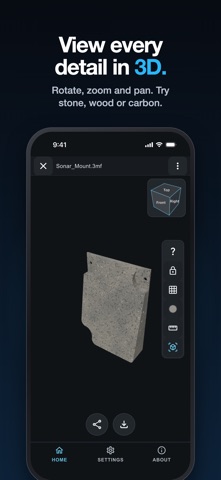
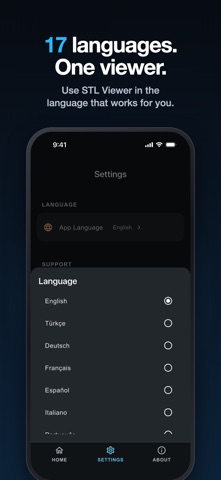
STL Viewer is a free, offline 3D model viewer for iPhone and iPad. It opens STL, 3MF, OBJ, PLY, OFF, 3DS, GLB and glTF files, measures them, estimates the print, shows them in AR at real size and converts them to STL. Your models never leave your device and no account is needed. AT A GLANCE • 8 file formats: STL, 3MF, OBJ, PLY, OFF, 3DS, GLB, glTF • Works fully offline, with no upload and no sign-up • Free: no subscription and no in-app purchase • No pop-up, timed or full-screen ads; at most one small banner • 17 languages, on iPhone and iPad VIEW IN AR AT REAL SIZE Place your model on a real desk or floor with AR Quick Look and see its true size before you print it. The camera is used only while AR is open. MEASURE AND ESTIMATE THE PRINT • Measure the distance between any two points, in millimetres • See dimensions, volume, surface area and triangle count • Print estimate: weight, filament length, print time and cost, by printer class, material (PLA, PETG, ABS, ASA, TPU, Nylon), layer height, infill and walls • Cut through the model with a section view CONVERT AND EXPORT TO STL Turn an OBJ, 3MF, PLY, OFF, 3DS, GLB or glTF model into a binary STL in millimetres, ready for any slicer. Every triangle of the source is kept, even when the on-screen preview is simplified. INSPECT EVERY DETAIL • Orbit, pan, zoom and fit to screen • Shaded or wireframe, perspective or orthographic • Front, back, left, right, top and bottom views from the view cube • Change the colour and the surface look: plastic, glossy, wood, stone or carbon SHARE • A rotating 360° GIF • A 9:16 video for stories • An STL copy, only when you choose WORKING WITH 3MF 3MF is the format most modern slicers save. STL Viewer reads the geometry inside a 3MF so you can check a part before printing, with real-world units from the file. Modifier meshes and negative volumes are left out, so you see the part itself. A 3MF that holds only print data, such as G-code, says so instead of opening empty. LOCAL AND PRIVATE Models are processed on your device. STL Viewer does not send model files, filenames, paths, geometry or dimensions to any cloud service, advertising provider or analytics platform. WHAT IT DOES NOT DO STL Viewer is for viewing, measuring, sharing and STL export. It does not edit, repair, slice or print models. Textures, materials and animations are not loaded. Native CAD formats (STEP, IGES, SOLIDWORKS, Fusion) need to be exported to STL, OBJ or 3MF first. QUESTIONS AND ANSWERS How do I open an STL file on iPhone or iPad? Tap Open file in STL Viewer, or choose STL Viewer from Open With or Share in the Files app. Is STL Viewer free? Yes. There is no subscription and no in-app purchase. At most one small banner appears after a model is ready. Does it work offline? Yes. Opening, measuring, AR and export all run on the device without an internet connection. Can I open a 3MF from Bambu Studio, PrusaSlicer or Cura? Yes. The part's geometry opens with its real units; print settings and plates are not read. Can I see an STL in AR at real size? Yes. Tap the AR button to place the model in your room at its real size. How do I measure an STL on iPhone? Open the model, tap the ruler, then Measure distance, and tap two points on the model. Can it estimate filament and print time? Yes. Print estimate shows weight, filament length, time and cost from the part's volume and your printer class, material and settings. It is an estimate, not a slicer result. How do I convert OBJ, 3MF or GLB to STL on iPhone? Open the model, tap Export, then Share as STL. How do I open a GLB or glTF file on iPhone? Open it like any other model. glTF files must keep their buffers embedded; use GLB if yours has a separate .bin file. Are my files uploaded anywhere? No. Models stay on your device.
What's new · 1.7.0
• Opens PLY, OFF, 3DS, GLB and glTF too. • Export any model as STL, at full detail. • See your model in AR at real size — it never leaves your iPhone. • Share a 9:16 video for stories. • Tools fit small screens like iPhone SE, with a fold-away panel. • Fixed 360° GIF sharing and model framing on narrow screens. Your emails keep making this app better and better — thank you!
Details