

Rok Power Remote
James Kinsman · Utilities
Independent analytics for this App Store listing. AppTracker is not affiliated with James Kinsman.
Chart standing · US
What changed · US
Listing changes AppTracker has observed for this app in this storefront — new versions, price moves, rating shifts, and store copy.
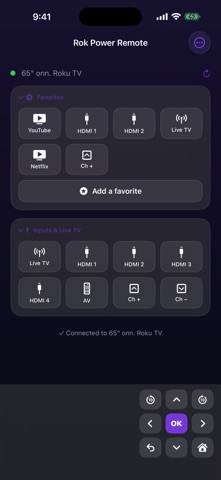
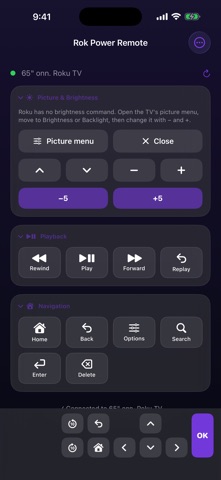
Simpler to start with, and far more adjustable once you want it. • Starts in a simple mode — a remote, nothing to configure. Advanced mode is one tap away in the menu. • The docked bar of keys is yours now: a D-pad cross, two rows, one row, or your own buttons. Drag its divider to size it, and park it left, centre or right so it lands under your thumb. • Volume sits on the bar from the start. Add inputs, channels or macros beside it and drag them into order. • Hide screen — one press jumps to an unused HDMI port to clear the TV, and the next press brings it back. • All Off turns off every Roku on your network at once. • Favorites — YouTube, HDMI 2, Live TV, one tap away. • Picture & Brightness drives the TV's own picture menu. • On a Mac: arrows or WASD drive the TV, every key is remappable, and the screen shows which key fired.
In-app purchases · US
What this app sells inside itself, grouped by kind and priced for this storefront.
Screenshots



About
Rok Power Remote is a Roku remote you build yourself. It starts about as simple as a remote gets: On, Off, and a D-pad. Everything else — playback, volume, HDMI inputs, your channels, a keyboard, macros — is a panel you add when you want it and drag exactly where you want it. What you don't use never clutters the screen. FINDS YOUR TV ON ITS OWN There's no "tap scan to begin". The app connects when you open it and reconnects when you come back to it. If your router hands the TV a new address, it matches your TV by its hardware ID and reconnects anyway. The On button wakes a TV that has dropped off Wi-Fi in standby, using Wake-on-LAN and a retry ladder rather than giving up. SIMPLE UNTIL YOU WANT MORE The app opens in a simple mode: a remote, and nothing to configure. Everything you can add lives in one menu. Turn on Advanced mode when you want to rearrange panels, resize the docked bar, and build your own buttons. BUILD THE REMOTE YOU WANT • 18 panels: Power, D-Pad, Navigation, Playback, Volume, Inputs & Live TV, Favorites, Channels, Keyboard, Macros, My Buttons, Message on TV, History, Picture & Brightness, Controllers, Away from Home, Browser Remote, and Type on the TV keyboard • Add or remove any panel, and drag them into the order you like • My Buttons is your own grid — any key, any macro, any channel • A docked bar of keys that never scrolls away: a full D-pad cross, two rows, one row, or your own buttons — drag its divider to size it from barely-there to half the screen, and park it left, centre or right so it falls under your thumb • Put volume, inputs, channels or a macro on that bar and drag them into the order you want • 15 themes, including an animated Matrix background WHAT IT DOES • Power on, off, or toggle — with a real wake sequence behind the On button • All Off turns off every Roku on your network at once, on the way out the door • Volume by single steps, by 5/10/15/20 presses, or set to an exact level • Favorites — the few places you actually go, one tap away: YouTube, HDMI 2, Live TV • Launch any channel installed on the TV • Type onto the TV using your phone's keyboard, and re-send anything you typed before • Put a message on the TV screen — typed out letter by letter, word by word, scrolling, or looping • Record a macro (Home, Right, Right, OK) and replay the whole thing with one tap • HDMI 1–4, AV, the tuner, and channel up/down on Roku TVs • Hide screen — one press jumps to an unused HDMI port to clear the TV, the next press brings it back • Drive the TV's own picture menu to change brightness, backlight and contrast • Use a connected game controller as the remote FREE, AND ONE OPTIONAL PURCHASE Power, D-Pad, Navigation, Playback, Volume, Inputs & Live TV, History, Picture & Brightness, Controllers, Browser Remote and four themes are free. No ads, no account, no tracking. One optional $4.99 purchase unlocks Favorites, Channels, Keyboard, Message on TV, Macros, My Buttons, the custom docked bar, Away from Home, Type on the TV keyboard, and all 15 themes — permanently. It's a one-time purchase, not a subscription, and it restores on your other devices. ON A MAC The arrow keys or WASD drive the TV, with Return for OK and Escape for Back. Every key can be remapped, and the remote shows you which key fired and what it did, so you can tell a dead key from a sleeping TV. Macros and your own buttons can take keys too. WHAT YOU NEED Your iPhone or iPad and your Roku have to be on the same Wi-Fi network — the app talks straight to the TV over your local network and sends nothing to any server. iOS will ask for Local Network permission the first time; without it the app cannot reach your TV.
What's new · 1.1
Simpler to start with, and far more adjustable once you want it. • Starts in a simple mode — a remote, nothing to configure. Advanced mode is one tap away in the menu. • The docked bar of keys is yours now: a D-pad cross, two rows, one row, or your own buttons. Drag its divider to size it, and park it left, centre or right so it lands under your thumb. • Volume sits on the bar from the start. Add inputs, channels or macros beside it and drag them into order. • Hide screen — one press jumps to an unused HDMI port to clear the TV, and the next press brings it back. • All Off turns off every Roku on your network at once. • Favorites — YouTube, HDMI 2, Live TV, one tap away. • Picture & Brightness drives the TV's own picture menu. • On a Mac: arrows or WASD drive the TV, every key is remappable, and the screen shows which key fired.
Details