

iCar for Tesla
MXCOD · Travel
Independent analytics for this App Store listing. AppTracker is not affiliated with MXCOD.
Chart standing · US
What changed · US
Listing changes AppTracker has observed for this app in this storefront — new versions, price moves, rating shifts, and store copy.
"News": articles from your favorite sites, read page by page, with three sources suggested in your language and your own to add. Map: a "Fast chargers (>150 kW)" layer across Europe and North America, with each network's logo. "My charges": schedule the days, times and charging current for each place, see the car's schedules, and get notified when a charge ends. "My trips": distance driven month by month, and the route drawn as a trip opens. "My charges": each charger's network logo, and a battery curve you swipe through. Minor bug fixes and improvements.
In-app purchases · US
What this app sells inside itself, grouped by kind and priced for this storefront.
Screenshots




Similar apps
Competitors and close alternatives, as estimated by AppTracker.


About
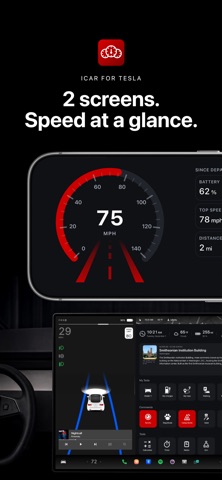
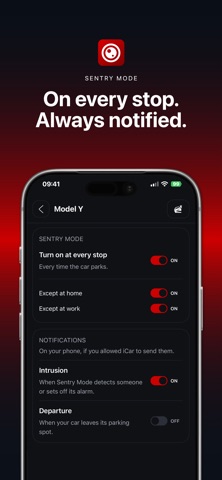
iCar turns the blank start page of your Tesla's built in browser into a home screen you actually want to open, and gives you controls your car does not offer on its own. You set everything on your phone. The car follows. SET UP IN ONE MINUTE 1. Install iCar on your phone and sign in: a link by email, or Google, Apple or Tesla. No password. 2. In your car, open the browser and go to geticar.com/app 3. Scan the QR code on the car screen with your phone. The car is paired. Anything you change on your phone shows up there within seconds. THE DASHBOARD FOR YOUR TESLA Time, weather and range at the top. Your shortcuts in large tiles. Your car's data and the commands you really use, from Sentry to Camp Mode, one tap away. And something to do while you charge. SET ON YOUR PHONE. SHOWN IN THE CAR. Add a favorite where there is a real keyboard: news, radio, maps, charging networks, video, parking. Sort them into sections, rename them, hide what you never open. The grid in the car updates by itself. The grid and the shortcuts are free, with no time limit. YOUR PHONE, A SECOND SCREEN Lay it sideways on the dash and the Cockpit opens by itself. GPS speed in large type, battery, distance, average and the time of the drive you are on. It works even without a Tesla account, and in a car that is not one. THE ROAD, SHARED. FOR FREE. Traffic, roadworks, accidents and speed cameras are announced ahead, in your direction of travel. One tap reports a police check or an accident to the drivers behind you. Included for everyone, no subscription needed. Everything below comes with the subscription. EVERY CHARGE. THE REAL COST. Every session logged: energy delivered, which charger, and what it cost. Enter your rates once and the cost appears by itself. When Tesla bills a Supercharger session, the real amount replaces the estimate. No rate entered, no invented figure. Plus your battery level day after day, usable capacity measured from your own charges, and the Superchargers you can actually reach. THE RIGHT LIMIT. AT THE RIGHT PLACE. 80% at home, 100% at work, 100% on a trip. Your Tesla can schedule when it charges, not how far. iCar sets the limit the moment you plug in. It never reads or stores an address: the car simply says whether it is home or at work. EVERY TRIP. DRAWN ON THE MAP. Recorded by the car itself, with no button to press and no gap. Each drive with its distance, moving time, battery used, and the route on a map with the speed curve underneath. Trips group into journeys, so a week away reads as one and not as eleven. Cities, regions and countries reached become badges. THE WORLD, LIVE. RIGHT ON THE ROAD. Several hundred live TV channels, radio stations and podcasts, sorted by category, with nothing to install and no account to create. YOUR MOVIES. NOW IN THE CAR. Your own Plex server on the Tesla's screen: your films, your series and your music, with their posters. Files go from your server to your car, never through us: no streaming subscription, no quota. Video when parked; music anywhere. ON EVERY STOP. HOME EXCLUDED. Let iCar arm Sentry Mode every time you park, and leave it off at home and at work. Get a notification when Sentry detects someone, or when your car leaves its parking spot. Doors, trunks, lock, climate, Dog Mode and Camp Mode are one tap away as well. THE SUBSCRIPTION 4.99 EUR or 4.99 USD per month, 49 EUR or 49 USD per year, with a 14 day free trial. Up to two cars per account. Cancel any time in your iOS settings. Terms of Use (EULA): https://www.apple.com/legal/internet-services/itunes/dev/stdeula/ REQUIREMENTS Works with the browser built into Tesla vehicles (Model 3, Y, S, X). Connecting your Tesla account is optional for the grid and the shortcuts, and needed for everything that reads or commands the car. iCar is an independent product and is not affiliated with, endorsed by or sponsored by Tesla, Inc. Tesla and Model 3, Model Y, Model S and Model X are trademarks of Tesla, Inc.
What's new · 1.0.32
"News": articles from your favorite sites, read page by page, with three sources suggested in your language and your own to add. Map: a "Fast chargers (>150 kW)" layer across Europe and North America, with each network's logo. "My charges": schedule the days, times and charging current for each place, see the car's schedules, and get notified when a charge ends. "My trips": distance driven month by month, and the route drawn as a trip opens. "My charges": each charger's network logo, and a battery curve you swipe through. Minor bug fixes and improvements.
Details